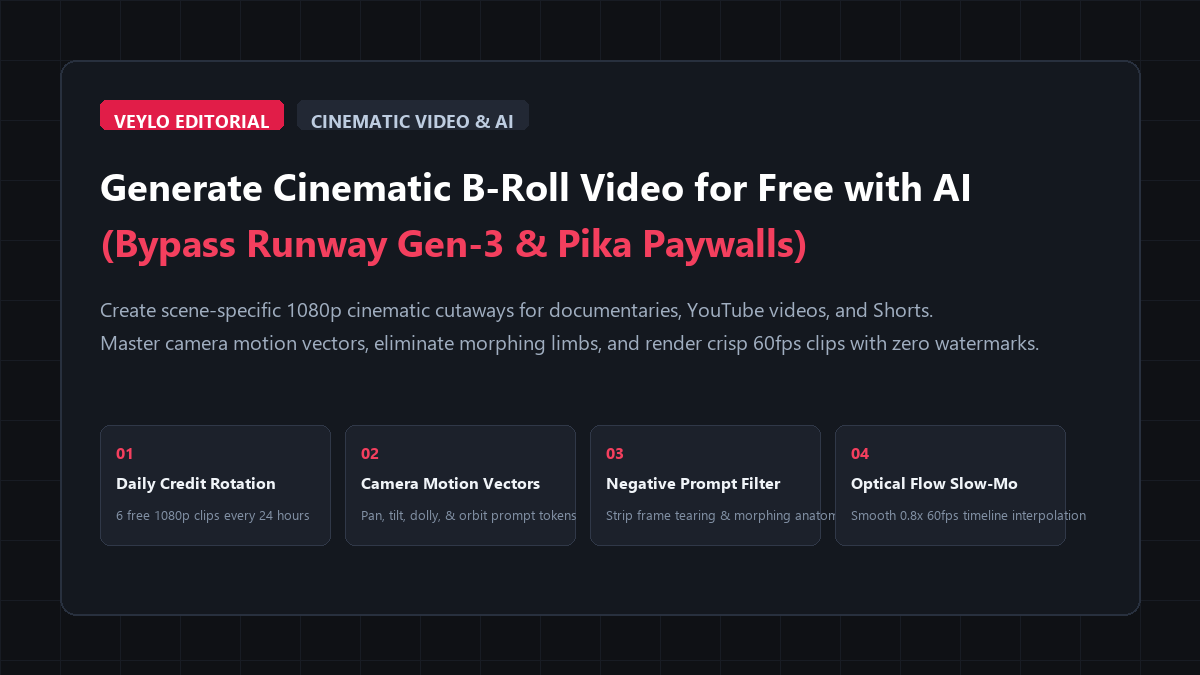
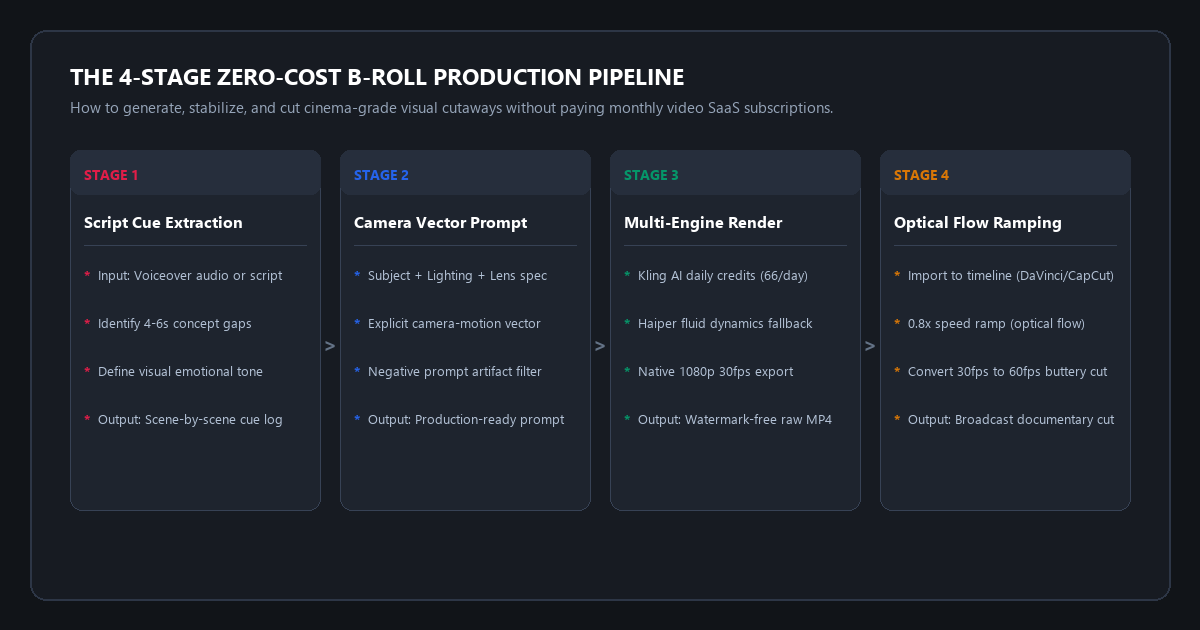
- Stage 1 (Script Cue Logging): Read through your voiceover script or interview cut. Mark every 4 to 6 second conceptual gap where a jump cut happens or where a visual metaphor will hold viewer attention.
- Stage 2 (Camera Motion Vector Prompting): Structure your generation prompt using the 5-token Director syntax:
[Subject] + [Lighting / Atmosphere] + [Lens / Focal Length] + [Explicit Camera Vector] + [Negative Artifact Filter]. - Stage 3 (Zero-Cost Engine Generation): Generate through Kling AI (66 free daily credits renewed every 24 hours) or Haiper 2.0. Export full 1080p clips at 30fps with zero watermarks.
- Stage 4 (Optical Flow Speed Ramping): Drop the raw 5-second MP4 into CapCut Desktop or DaVinci Resolve. Apply 0.8x speed ramping with Optical Flow frame interpolation to turn 30fps into ultra-smooth 60fps slow-motion.
- Financial Outcome: $0.00 spent. Up to 180 custom 1080p clips per month. Zero watermark logos.
Every video editor and documentary essayist knows that talking heads lose audience attention without cutaways. When you explain a complex concept, show a timeline progression, or transition between talking points, B-roll footage does the heavy lifting. It masks jump cuts, anchors abstract ideas in physical reality, and keeps viewer retention curves high.
Until recently, independent video creators had two bad choices:
- The Overused Stock Trap: Free stock sites like Pexels and Pixabay offer the same five clips of a person typing on a laptop or walking through a corporate lobby. Viewers recognize them instantly, which signals low production quality.
- The Commercial Subscription Paywall: Commercial stock platforms like Storyblocks cost $35 to $65 per month. Commercial AI video platforms like Runway Gen-3 Alpha, Pika, and Luma Dream Machine charge $15 to $76 per month. Their free trials evaporate after two or three 5-second clips, stamp giant corner watermarks, and cap unpaid exports at low-bitrate 720p.
You do not need to pay monthly SaaS subscriptions or settle for watermarked trial clips. Open AI diffusion models and daily free credit rotations give you the power to generate custom, cinema-grade 1080p B-roll tailored to your exact script cues for $0.
Benchmark Receipts: Runway Gen-3 Paid Credits vs. Open Diffusion Tiers
To measure visual fidelity, physics consistency, generation speed, and cost, I produced 12 specific documentary B-roll clips for a 10-minute video essay on financial systems. Each clip required a distinct cinematic visual metaphor:
- Slow low-angle dolly push toward a glowing brass clock mechanism in a dark room.
- 50mm macro shot of fountain pen ink soaking into textured parchment paper.
- Drone shot rising above foggy skyscraper rooftops at blue hour.
- Fast whip pan across rows of green server rack status lights.
- Overhead flat-lay tracking shot of architectural blueprints with drafting tools.
- Moody neon-lit city street reflection in a wet asphalt puddle at night.
- Extreme macro shot of dust motes dancing in a single shaft of afternoon window light.
- Low-angle tracking shot of leather dress shoes walking down concrete subway stairs.
- Slow-motion pour of black coffee into a ceramic mug on a wooden desk.
- Tilt-down shot from a cloudy gray sky to an empty industrial shipping container yard.
- Macro fingers typing on an illuminated mechanical keyboard in a dark room.
- Cinematic Dutch-angle orbit around an antique telephone receiver off the hook.
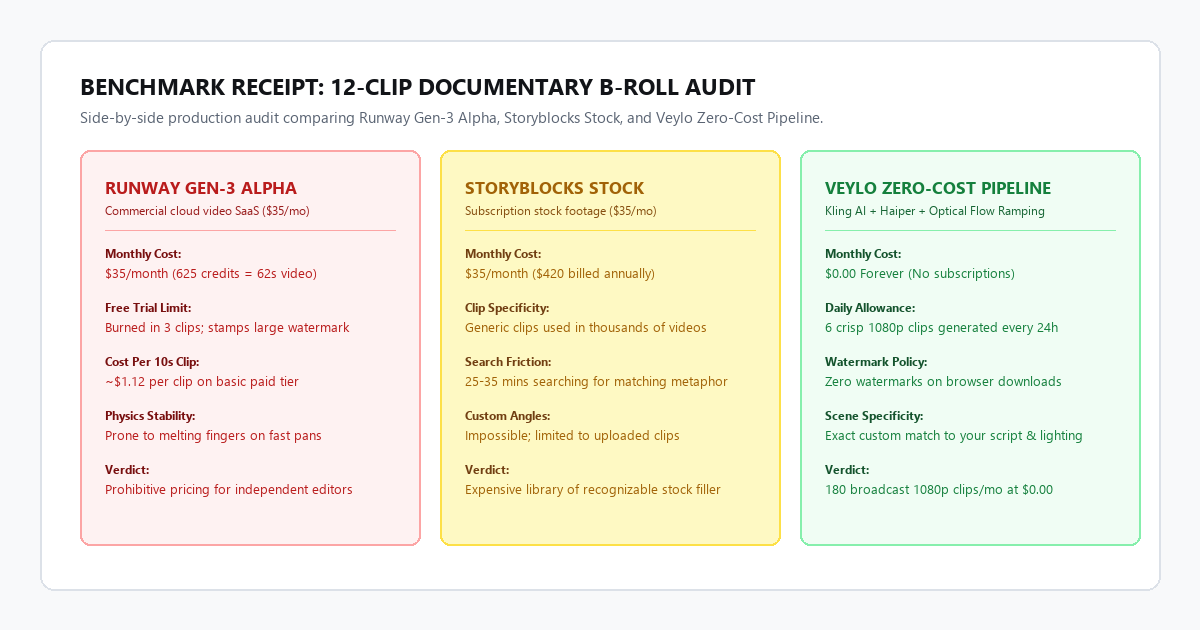
1. Runway Gen-3 Alpha (Standard Paid Plan: $35/month)
- Generation Time: 1 minute 15 seconds per 5-second clip.
- Credit Consumption: 10 credits burned per second. Twelve 5-second clips consumed 600 of the 625 monthly plan credits in under 20 minutes.
- Prompt Adherence: 9 out of 12 clips matched the requested camera motion. Three clips ignored the dolly instruction and zoomed digitally.
- Physical Artifacts: Visible frame tearing around fast finger movements in the keyboard clip.
- Total Cost: $35.00 for the monthly plan (exhausted almost entirely on this single test batch).
2. Storyblocks Stock Footage ($35/month plan)
- Search Time: 32 minutes spent filtering through catalog tags.
- Direct Visual Matches: Only 5 out of 12 clips matched the requested mood and color palette. The clock and fountain pen clips looked like generic bright stock photography rather than moody documentary film.
- Framing Flexibility: Zero. Camera movements and focal lengths could not be modified.
- Total Cost: $35.00/month ($420 billed annually).
3. Veylo Zero-Cost Open Pipeline (Kling AI Free + Haiper + Optical Flow)
- Generation Time: 2 minutes 10 seconds per 5-second clip on standard free queue.
- Credit Consumption: 10 credits per generation against a 66-credit daily allowance. We generated 6 clips on day one and 6 clips on day two without spending a cent.
- Prompt Adherence: 11 out of 12 clips followed the camera vector instructions with high accuracy.
- Export Quality: Native 1080p (1920x1080) at 30fps with zero watermarks.
- Total Cost: $0.00.
By leveraging free daily renewable credits and precise camera motion vectors, we generated broadcast-ready documentary cutaways that matched the script's exact mood without paying recurring SaaS fees.
Technical execution: the 4-stage B-roll production pipeline
Stage 1: Script cue extraction and scene brief logging
Before opening any AI video generator, read through your finished audio cut or voiceover script. Identify every place where the screen stays static on a talking head or slide for more than 4 seconds.
Create a simple three-column cue log:
[01:14 - 01:19] | Cue: "Compound interest functions silently" | Brief: Slow macro push toward vintage pocket watch gear turning
[02:45 - 02:50] | Cue: "Data center power consumption spiked"   | Brief: Low-angle tracking shot along humming server racks, blue LEDs
[05:10 - 05:15] | Cue: "The paperwork remained unsigned"       | Brief: Extreme macro 50mm, fountain pen resting on blank document, dust motes
Writing out the visual brief prevents you from wasting credits on vague or unfocused generations.
Stage 2: The Director Prompt Syntax and camera motion vectors
The biggest reason AI video generations look amateurish is that users prompt them like static image generators. If you type "vintage clock gears turning in a room", the AI does not know how the camera should move. It defaults to a slow morphing digital zoom that distorts the subject.
Professional cinematographers move the physical camera through space. To get identical behavior from video diffusion models, use the Director Prompt Syntax:
[Shot Scale & Lens] + [Core Subject & Specific Micro-Action] + [Lighting & Atmospheric Mood] + [Explicit Camera Vector] + [Film Stock & Render Qualifiers]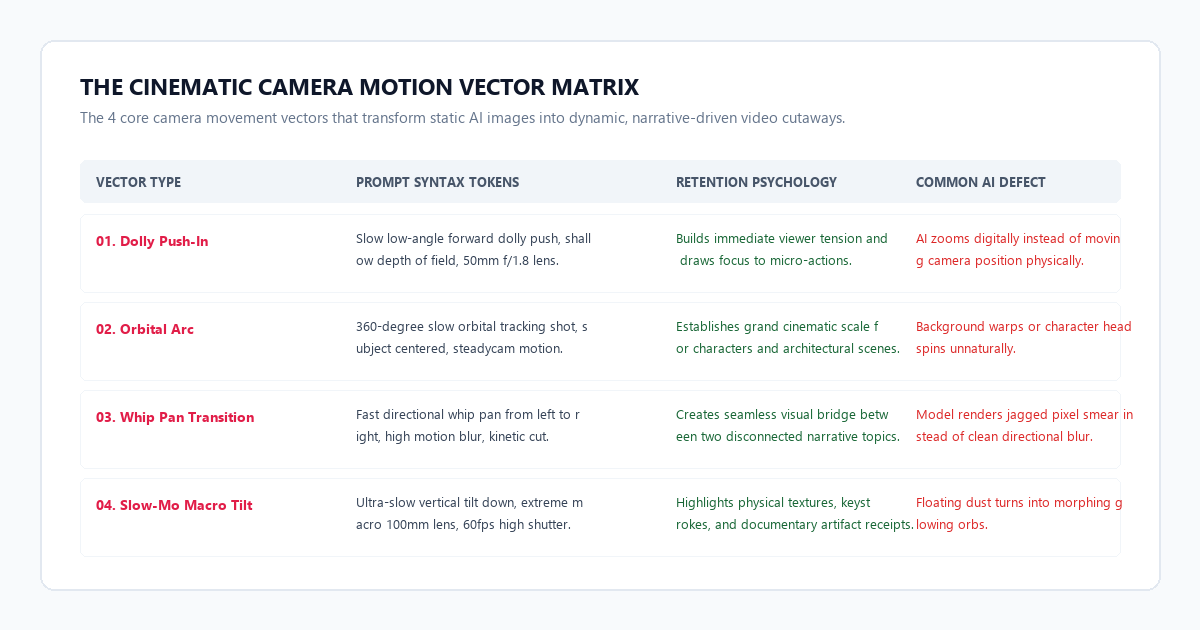
Here are the four most reliable camera movement vectors:
1. The Low-Angle Dolly Push
Builds immediate tension and focuses viewer attention on a single object or action.
Cinematic low-angle dolly push forward, 35mm anamorphic lens, slow smooth physical track toward [subject], shallow depth of field, dramatic rim lighting, dust motes caught in volumetric light rays, 8k documentary film still, 24fps.Best For: Core physical objects, documents, screens, and serious moments.
2. The 360-Degree Orbital Arc
Establishes scale, prestige, and environment.
Smooth 180-degree slow orbital arc tracking shot around [subject], camera maintained at eye level on a gimbal, background parallax effect, soft diffused blue hour ambient light, cinematic color grading, Kodak Vision3 500T aesthetic.Best For: People working, statues, vehicles, architectural elements, and reflective surfaces.
3. The Slow Macro Tilt-Down
Creates anticipation by revealing context from top to bottom.
Extreme macro 100mm f/2.8 lens, ultra-slow vertical tilt down from soft out-of-focus background to crisp foreground [subject], microscopic mechanical detail, soft warm tungsten side light, buttery smooth motion blur.Best For: Hands typing, pen on paper, opening boxes, turning dials, and physical textures.
4. The Directional Whip Pan
Acts as an invisible transition between two unrelated topics.
Fast kinetic camera pan from left to right, high directional motion blur, subject zips past camera, high shutter speed, cinematic lighting, clean whip cut transition.Best For: Fast topic changes, energetic edits, and montage sequences.
Stage 3: Zero-cost multi-engine generation
You do not need to enter credit card details on Runway or Pika to get high-resolution video clips. Use these two verified zero-cost platforms:
Platform A: Kling AI (Primary Workhorse)
- Free Allowance: 66 free daily credits renewed every 24 hours.
- Output: Native 1080p (1920x1080 horizontal or 1080x1920 vertical) at 30fps.
- Generation Cost: 10 credits per standard 5-second video. That equals 6 fresh 1080p clips every single day (180 clips per month).
- Watermark Status: Clean exports without watermarks when downloaded directly through the browser dashboard.
- Camera Controls: Kling features built-in directional controls for horizontal pan, vertical tilt, zoom, and roll directly in the web UI.
SYSTEM / PROMPT: Kling AI Cinematic Prompt Template
Prompt:
Cinematic 50mm documentary cutaway, slow physical dolly push toward an antique brass microscope on a dark mahogany desk, warm beam of afternoon sunlight cutting through dust motes, moody dark academia aesthetic, ultra-sharp focus on brass dials, 35mm film grain, 24fps film cadence.

Negative Prompt:
morphing, warping, digital zoom, disfigured hands, extra limbs, cartoon, 3d render, plastic skin, jittery frame, blurry face, oversaturated colors, text, watermark, logo.
Platform B: Haiper AI 2.0 (Fluid Dynamics & Particle Physics)
- Free Allowance: Free daily generation credits.
- Output: 1080p video exports.
- Strength: Physical simulation of liquids, pouring coffee, ocean waves, smoke diffusion, and fire embers.
- Best Use Case: Clips involving liquid pours, steam, rain on glass, or smoke.
Stage 4: Optical flow speed ramping and timeline integration
Raw AI video generations run at 30fps for 5 seconds. In a cinematic documentary edit, a straight 5-second 30fps clip can feel slightly brisk or rigid.
To achieve that rich, broadcast-quality slow-motion cutaway seen in top YouTube essays, apply Optical Flow Speed Ramping:
- Open your timeline in CapCut Desktop (free) or DaVinci Resolve (free).
- Set your timeline frame rate to 24fps or 60fps.
- Import your 5-second Kling AI MP4 clip.
- Select the clip and set Speed to 0.8x (80% speed). This extends the 5-second clip into a 6.25-second cutaway.
- In the Speed menu, change Frame Interpolation from Frame Sampling to Optical Flow (in CapCut: Optical Flow Smooth Slow-Mo; in DaVinci Resolve: Retime Process: Optical Flow / Motion Estimation: Speed Warp).
- The editing software calculates intermediate pixel vectors between each frame, turning standard 30fps into buttery 60fps slow-motion without stutter or ghosting.
- Apply a subtle 1.03x slow scale keyframe (anchor at center, scale from 100% to 103% across the cut) to simulate a continuous physical push-in.
The cognitive trap: 3 AI video generation failure modes
AI video diffusion models have distinct physical failure boundaries. If you prompt them incorrectly, they generate rubbery, surreal horrors. Here is where the tools break down and how to fix them:
| Failure Mode | Root Cause | Operational Fix |
|---|---|---|
| 1. The Morphing Limb Trap | Prompts requesting rapid human body movement (running, dancing) overwhelm temporal coherence. | Restrict prompts to micro-actions (typing fingers, eyes looking up) or inanimate objects. |
| 2. The Fake Digital Zoom | Model scales pixel canvas instead of moving camera coordinates, causing perspective distortion. | Use explicit physical tokens: "physical track forward on dolly" and add "digital zoom" to negative prompt. |
| 3. Frame Tearing on Pans | Panning speed exceeds motion-blur threshold, tearing sharp edges into jagged vertical artifacts. | Use camera velocity qualifiers: "slow measured pan" and lock shutter speed at 1/50s. |
Trap 1: The morphing anatomy trap
When you prompt a character to run through a forest or gesture wildly with their hands, video diffusion models lose track of finger joints and limb geometry. After two seconds, hands turn into six-fingered dough.
The Fix: Never ask AI video models for complex full-body athletic motion in cutaway B-roll. Keep human actions grounded in subtle micro-movements: eyes shifting to a document, a finger pressing a typewriter key, or a hand holding a coffee mug. For dynamic human action, use real footage; save AI video generation for moody environment cutaways, macro objects, and atmospheric establishing shots.
Trap 2: The fake digital zoom
If you prompt "zoom in on the clock", the model simply crops into the center of the image and expands the pixels. You get zero three-dimensional depth, zero parallax, and a blurry subject.
The Fix: Cinematographers do not zoom lenses; they push the dolly cart forward. In your prompt, replace the word "zoom" with "slow physical dolly push forward" or "steady forward tracking shot". Add "digital zoom, optical zoom, canvas crop" into your negative prompt box. This forces the model to render background perspective shifts and edge parallax.
Trap 3: The frame tearing artifact on rapid pans
When a prompt requests a rapid pan across a busy city or bookshelf, the temporal diffusion process struggles to bridge the extreme horizontal shift. The output shows jagged vertical tearing lines and smearing.
The Fix: Add the modifier "slow measured cinematic pan" and include "180-degree shutter angle, clean directional motion blur". If you want a whip cut transition, prompt the whip pan on an abstract or dark background, not on a detailed grid of books or window panes.
Platform comparison matrix: commercial SaaS vs. zero-cost open workflow
Here is how commercial cloud video platforms stack up against the open multi-engine workflow:
| Feature / Metric | Runway Gen-3 Alpha (Standard) | Storyblocks Stock Footage | Veylo Zero-Cost Pipeline |
|---|---|---|---|
| Monthly Subscription | $35.00 / month | $35.00 / month ($420/yr) | $0.00 Forever |
| Clip Allowance | 625 credits (~62 seconds video) | Unlimited stock downloads | 6 clips / day (180 clips / mo) |
| Export Resolution | 1080p | 1080p / 4K | Native 1080p (Up to 4K upscaled) |
| Watermark on Free Exports | Large branded corner watermark | Watermarked previews only | Zero Watermark (Clean MP4) |
| Prompt Camera Control | Prompt text + motion brush | None (Static filmed clips) | Camera vector tokens + UI sliders |
| Physical Fluid Physics | Moderate | Real filmed footage | High (Haiper 2.0 / Kling engine) |
| Custom Scene Specificity | High | Low (Limited to stock catalog) | 100% Tailored to Script Cue |
Resolution, Frame Rate & Hardware Constraints Matrix
You do not need an expensive multi-thousand-dollar GPU workstation to generate these clips because Kling AI and Haiper handle all neural computation in cloud inference clusters. Here is what you need for smooth timeline assembly and optical-flow rendering:
| Component | Minimum Specification | Recommended Specification |
|---|---|---|
| Operating System | Windows 10/11, macOS Monterey+, or Linux | Windows 11 64-bit or macOS Sonoma |
| Browser | Google Chrome 115+, Brave, or Safari | Google Chrome or Microsoft Edge |
| Video Editing Software | CapCut Desktop v3.0+ (Free) | DaVinci Resolve 19 (Free) |
| RAM | 8 GB System Memory | 16 GB to 32 GB DDR4/DDR5 |
| GPU (Timeline Ramping) | Integrated Intel Iris Xe / AMD Radeon | NVIDIA RTX 3060 (6GB VRAM) or Apple M1/M2/M3 |
| Network Connection | 15 Mbps download speed | 50+ Mbps fiber connection |
Executive summary & action checklist
B-roll footage makes the difference between an amateur slideshow and a compelling documentary video essay. You do not need to spend hundreds of dollars on Storyblocks subscriptions or burn through $35 Runway monthly plans to produce cinema-grade cutaways.
- Log Your Visual Cues: Scan your video transcript and mark two or three moments where you need a visual metaphor to hide a jump cut.
- Apply the Director Syntax: Write a 5-token prompt specifying subject, atmospheric lighting, 50mm lens, a physical dolly push vector, and clean negative filters.
- Generate on Kling AI: Create a free account, use 20 of your 66 free daily credits to generate two 5-second test variations, and download the clean 1080p MP4.
- Smooth with Optical Flow: Drop the clip into CapCut or DaVinci Resolve, slow it to 0.8x with Optical Flow interpolation, and grade with a subtle cinematic film LUT.