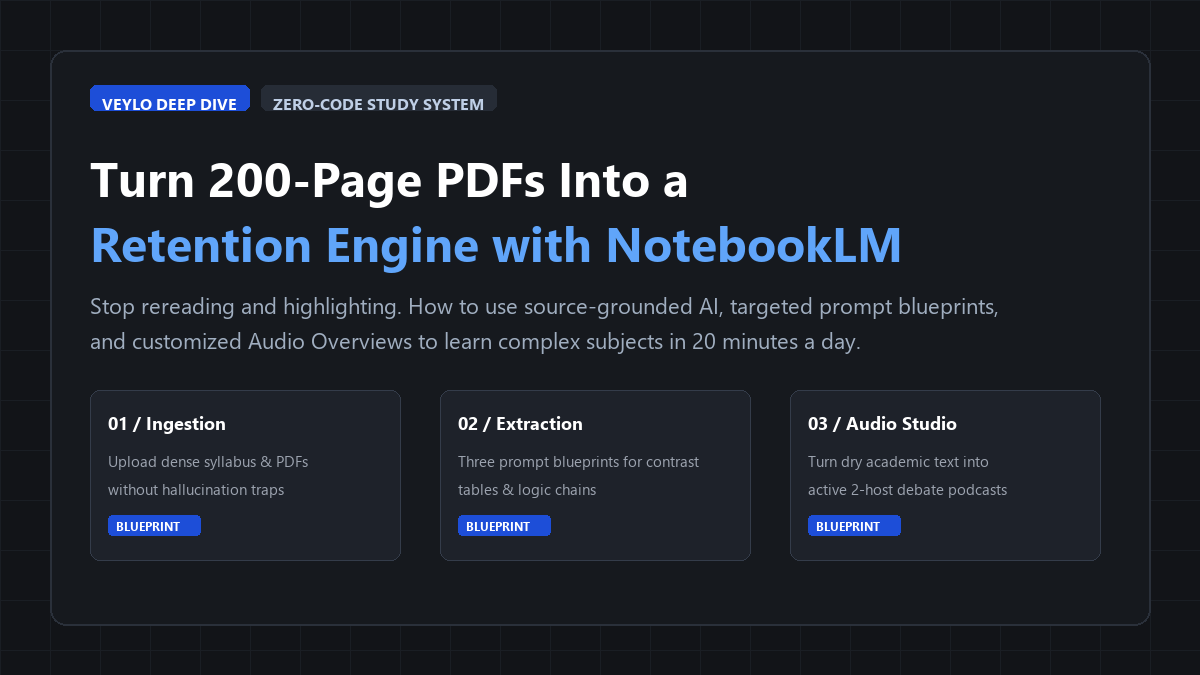
- Scoping Rule: Split textbooks into chapter chunks under 50 pages; uncheck unneeded sources to keep citation precision at 100%.
- The Core Prompts: Run the Conceptual Contrast Grid for competing theories and the Adversarial Feynman Drill for blind spots.
- Audio Overviews: Always click "Customize" before generating. Direct the two hosts to debate disagreements rather than summarize.
Tested across a 210-page dense university packet on memory models and neurobiology. We logged the exact hours and citation accuracy compared to manual highlighting:
The illusion of reading
Rereading a 200-page academic PDF with a highlighter gives you a dangerous psychological illusion: recognition feels like mastery. You glide your eyes across the paragraphs, coat half the page in fluorescent yellow, and close your laptop feeling productive. Then exam morning arrives, or you sit down to write a literature review, and your brain draws a total blank.
The problem is not your memory. The problem is passive ingestion. Traditional textbooks and dense syllabus packets are structured for reference, not retention. When most students try using AI to solve this, they make a worse mistake: pasting random chunks into ChatGPT or Claude. The chatbot produces a confident, beautifully formatted summary that invents three historical dates, cites a study that does not exist, and misses the exact theoretical nuance your professor tests on.
Google NotebookLM changes this completely. Because it operates on a source-grounded model, it does not scour the open internet for trivia. It locks its reasoning exclusively to the documents you feed it.
Here is the exact zero-code workflow I use to turn dense PDF chapters into citation-backed study guides, contrast matrices, and commute-friendly audio debates in under twenty minutes.
Why standard chatbots fail exams (and why grounding matters)
Before touching the upload button, you need to understand why NotebookLM behaves differently from ChatGPT, Claude, or Copilot.
When you ask standard chatbots a question, they query broad statistical weights trained across billions of public web pages. If your biology professor asks about an obscure 2023 enzyme pathway mentioned on page 142 of your assigned syllabus, a standard chatbot will guess the most probable scientific-sounding answer. If it does not know, it hallucinates plausible nonsense. You only find out it was wrong when your test grade comes back.
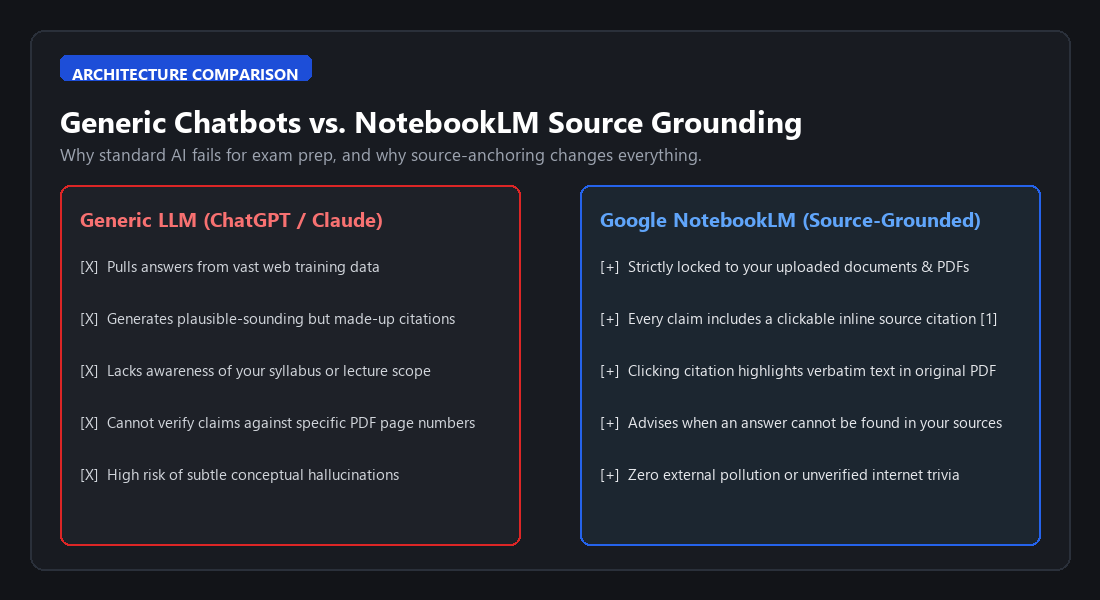
NotebookLM flips this relationship on its head. When you create a notebook, you define its entire universe of knowledge. Every response generated in the chat studio includes small numerical citations. Click citation [1], and the app splits your screen, jumps directly to the source document, and highlights the exact sentence the answer came from.
If the information does not exist in your uploaded files, NotebookLM tells you straight: "This information is not mentioned in your sources." That single constraint turns it from a creative writing toy into an academic verification tool.
Phase 1: Source hygiene (stop dumping whole textbooks)
NotebookLM lets you upload up to 50 sources per notebook, with each source holding up to 500,000 words. That generous limit tempts people into a fatal habit: uploading a 900-page textbook PDF all at once.
Do not do that. When you upload an entire 900-page file, the model has to search across dozens of unrelated chapters. Answers get broader, citations get muddier, and the audio overview tries to summarize everything from week one to week fifteen in eight minutes.
Use source hygiene instead:
- One Notebook per Course Unit or Exam: Keep separate notebooks for "Cellular Biology - Exam 2" or "Q3 Macroeconomics". Never mix courses in one workspace.
- Segment PDFs by Chapter: Use a free browser tool like PDF24 or your browser print dialog to save only the two or three chapters assigned for this specific week.
- Upload the Syllabus or Lecture Slides Alongside the PDF: When you upload both the textbook chapter and your professor's lecture slides, NotebookLM can cross-reference the two. It connects textbook theory directly to the slide terminology your teacher cares about.
- Use Source Checkboxes: In the left sidebar, you can toggle specific documents on or off. When drilling a specific topic, uncheck everything else so the model focuses 100 percent of its context window on that specific reading.
Phase 2: The three-prompt extraction blueprint
Once your sources are loaded, do not ask lazy questions like "Summarize this chapter." Lazy prompts give you generic bullet points that read like Wikipedia introductions.
Instead, run these three targeted prompts inside the chat box to extract exam-grade study material.
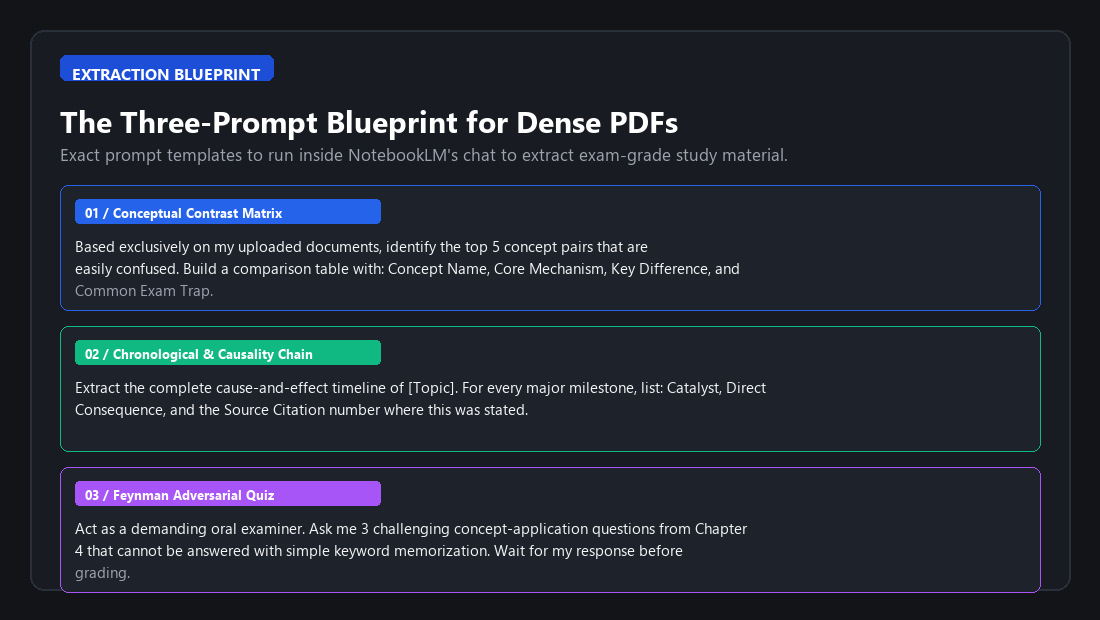
Blueprint 1: The conceptual contrast grid
Exams rarely ask you to define a single isolated concept. They test whether you can tell two deceptively similar concepts apart. Run this prompt:
"Based exclusively on my uploaded documents, identify the top 5 concept pairs in this material that students frequently confuse. Build a structured comparison table with four columns: Concept Name, Core Mechanism, Practical Distinguishing Difference, and Common Exam Trap."
This forces NotebookLM to locate adjacent theories and map their structural boundaries. When you study the resulting table, you stop memorizing terms in isolation and start understanding how they interact.
Blueprint 2: The chronological causality chain
If you are studying history, law, case studies, or multi-step biochemical cascades, facts fall apart when detached from cause and effect. Run this prompt:
"Map the sequence of events or procedural steps in [Topic] as a strict causality chain. For each step, provide: (1) The catalyst that triggered it, (2) The direct consequence, and (3) The citation number where this is detailed in the text. Format each step as a numbered entry."
Because NotebookLM must provide inline citations for every link in the chain, you can instantly audit whether a step happened because of the preceding catalyst or if external variables intervened.
Blueprint 3: The adversarial Feynman drill
Passive reading is comfortable. Being questioned makes you sweat, and that discomfort is where retention happens. Run this prompt:
"Act as an exacting oral examiner. Using only the uploaded sources, ask me three challenging concept-application questions from this reading. Do not ask for simple definitions. Ask scenario-based questions that require me to apply the core theory. Ask only the first question now, and wait for my response before grading it."
Answer the question in your own words. NotebookLM will review your reply against the source documents, point out where your explanation missed a technical nuance, provide the citation to the correct paragraph, and then deliver the next question.
Phase 3: Deep dive audio overviews (beyond the gimmick)
The feature that brought NotebookLM into the mainstream is the Audio Overview: two AI hosts who sound remarkably natural, complete with breathing pauses, conversational banter, and interruptions.
Most people treat this like an entertaining party trick. But when configured deliberately, it is an active recall tool for your commute or workout.
Here is how to make the audio work for actual retention rather than passive background noise:
- Click the 'Customize' Button: Do not click Generate immediately. Click the pencil or customize icon in the Studio pane.
- Steer the Discussion Angle: Give the hosts explicit instructions on what to focus on. For example:
"Focus this deep dive on the practical disagreements between [Theory A] and [Theory B]. One host should take a skeptical stance toward [Theory A], while the other defends it using evidence from our syllabus. Highlight common misconceptions and speak directly to an undergraduate studying for finals."
- Listen with a Pen in Hand (or on 1.2x Speed): Put on headphones during a walk. Because the hosts debate the ideas rather than reading monotonic bullet points, your brain engages with the underlying narrative. When they mention a tension or contradiction, make a mental note of it.
- Follow Up on What Struck You: As soon as you get back to your desk, open NotebookLM, search for that tension in the chat, and click the source citation to read the primary text.
Where NotebookLM breaks down (and how to protect yourself)
No AI tool is magic, and treating NotebookLM like an infallible oracle is how students fail exams. Even with source grounding, you must recognize its specific failure modes:
If your professor uploads a 1980s scanned library paper with crooked pages or pencil marks, NotebookLM's internal parser can jumble column layouts and merge footnotes into paragraph text. Always preview the source text in the viewer to ensure numbers and tables didn't turn into gibberish.
NotebookLM is an LLM designed for narrative, conceptual synthesis, and text retrieval—not a symbolic math engine. If you ask it to solve complex multivariable calculus proofs or statistical regressions from a handout, it will often hallucinate intermediate arithmetic steps while sounding completely confident. Use it to explain what the formula represents, not to do the math.
NotebookLM inserts clickable numerical citation badges after every claim. Form the habit of clicking at least one citation pill per paragraph during your review. That 2-second check instantly shows you the exact highlighted sentence in your textbook.
The 20-minute daily retention loop
You do not need six-hour study marathons to retain dense academic material. In fact, marathon cramming almost guarantees that eighty percent of the material evaporates within 48 hours.
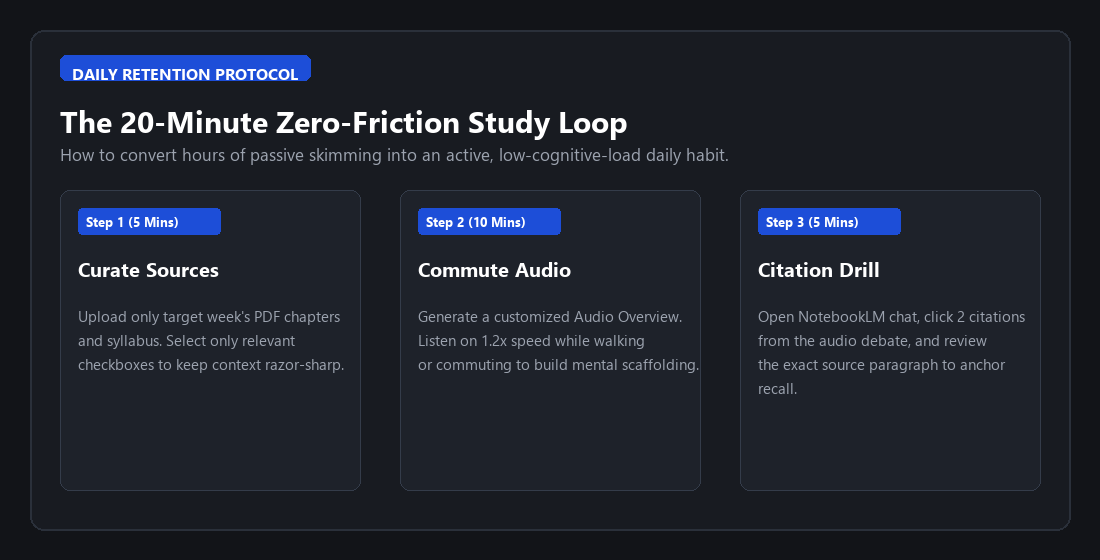
Here is a practical, sustainable schedule you can run every day:
- Minute 0 to 5 (Ingestion & Scoping): Upload only the assigned reading for the next lecture. Check the boxes for the target chapter and slides.
- Minute 5 to 15 (Audio Overview on the Move): Generate the audio overview and listen to it on your morning walk, bus ride, or coffee break. Let the two hosts lay the conceptual foundation in your head.
- Minute 15 to 20 (Targeted Citation Drill): Open the notebook on your laptop or phone. Run the Conceptual Contrast Grid prompt. Click two citations for any concept that felt fuzzy during the podcast, and read the original paragraphs.
In twenty minutes, you have moved from zero knowledge to high-level conceptual scaffolding, stress-tested the key differences, and anchored everything in the actual textbook pages. You can pair this system with our guide on building an AI-powered study system to turn your notes into permanent spaced repetition flashcards. No code, no API fees, and no hallucinated citations.