- Isolate the Output Sandbox: Tell Claude to render a standalone interactive component rather than static markdown text. Specify "Render this as an interactive React Artifact using Tailwind CSS."
- Define the Data Contract First: List your inputs, calculation formulas, and display states before asking for interface styling. Ambiguous math produces broken UI controls.
- Prevent Sandbox Memory Wipes: Add the explicit directive: "Store state in browser localStorage and include a button to export all entered records to a downloadable JSON file."
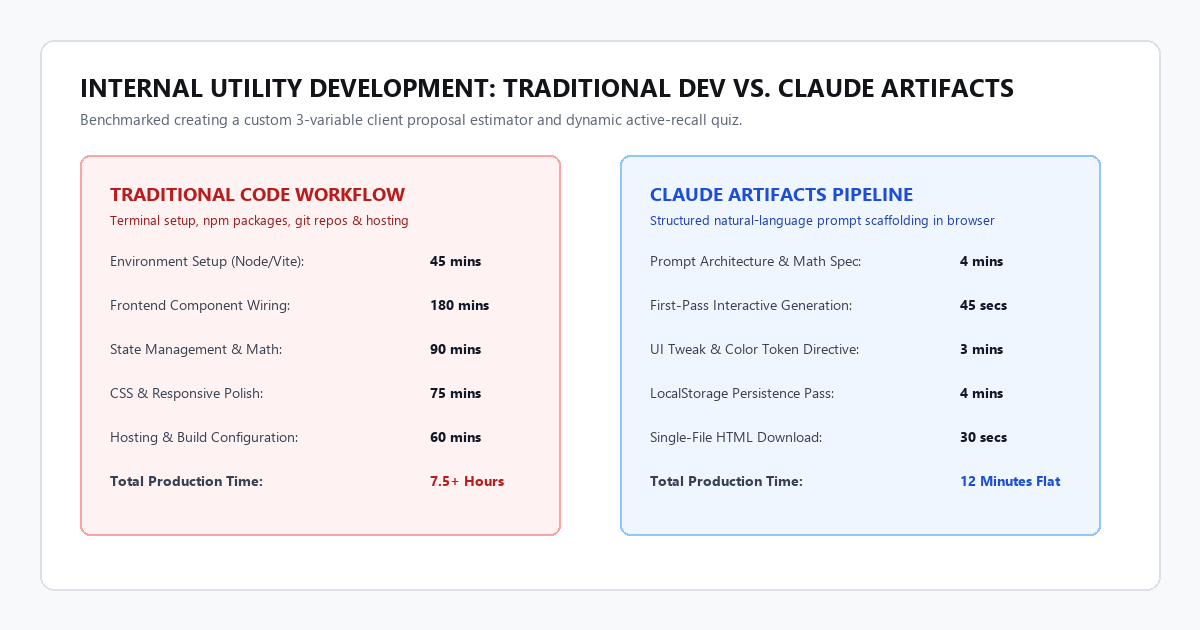
Benchmarked across two custom browser utilities (a multi-tier client project pricing estimator and an active-recall study flashcard deck):
The Execution Gap in Generative AI
Most people treat large language models as text autocompletes. You type a prompt, wait three seconds, and read a wall of bullet points.
Text is passive. When you want to calculate freelance tax estimates, balance a departmental budget, or drill yourself on 50 technical definitions, reading paragraphs is an inefficient way to interact with information. You need active software: slider controls, dynamic totals, score buttons, and instant feedback.
Until recently, building even a simple five-field calculator required knowing HTML, CSS, JavaScript, and how to host files on a web server. If you could not write code, you were stuck in spreadsheet formulas that broke whenever you shared them with a client.
Claude Artifacts changes that dynamic. When you prompt Claude to build an interactive tool, it does not just write raw code into a chat bubble. It opens a dedicated side pane and runs that code live inside your browser. You get a functional, clickable web application on the spot.
You do not need to install Node.js. You do not need to configure an IDE. You do not need a GitHub account. You need clear prompt scaffolding.
How the Artifact Sandbox Actually Works
To get consistent results from Claude Artifacts, you have to understand what happens behind the screen.
When Claude decides to generate an Artifact, it writes code into a specialized markdown container. The Claude web app intercepts that container, creates an isolated browser sandbox (an iframe), injects React and Tailwind CSS, and renders the interface in real time.
You can interact with buttons, move range sliders, fill out text boxes, and watch mathematical outputs update instantly. If something looks misaligned or does not calculate properly, you do not write code to fix it. You tell Claude what to adjust, and the model updates the Artifact in place.
Every Artifact comes with three built-in controls in the top bar:
- Preview / Code Toggle: Lets you switch between testing the live interactive tool and viewing the raw source code.
- Version History: Allows you to roll back to any prior version if an iteration breaks your tool.
- Copy / Download Button: Enables you to export the code as a self-contained
.htmlfile that you can double-click and run locally on your computer forever without opening Claude.
The 4-Stage Zero-Code Prompt Architecture
When non-programmers get bad results from Claude, it is almost always because they use vague, one-sentence prompts like “Make me a budgeting tool.”
Claude guesses what you want. It guesses the layout, the math, and the edge cases. The result is usually a generic interface that looks pretty but does not do what you need.
To build practical micro-tools, use this 4-stage prompt structure:
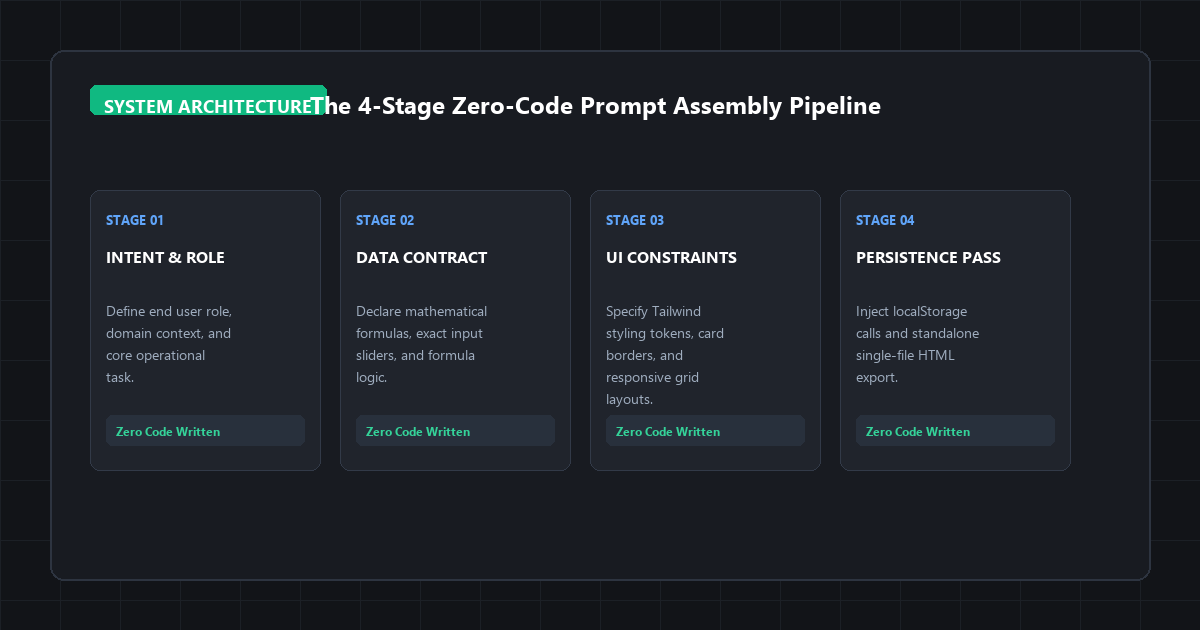
Stage 1: Role and Operational Context
Define who uses the tool and what problem it solves. Claude uses this context to choose appropriate default values, typography, and layout hierarchy.
Stage 2: Data Contract and Mathematical Logic
Explicitly state every input field, data type (numbers, dropdown options, currency), and exact mathematical formula. If you do not specify the formula, Claude invents its own arithmetic.
Stage 3: UI Layout and Visual Constraints
Direct the aesthetic structure. Specify single-screen desktop views, responsive card grids, high-contrast dark or light themes, and clean borders.
Stage 4: State Management and Persistence Pass
Tell Claude how to handle entered data. State disappears when you refresh the page unless you explicitly instruct Claude to save data into the browser's localStorage or provide a CSV/JSON export button.
Blueprint 1: Dynamic Client Project Quote Estimator
Freelancers and solo operators spend hours recalculating custom quotes. You want an interactive estimator where you can adjust project scope, hourly baselines, rush fees, and revision rounds, and send a clean link or screenshot to a client.
Core Purpose:
Help a freelance design and engineering consultant calculate transparent client quotes with dynamic adjustment sliders.
Input Variables & Controls:
1. Base Hourly Rate: Number input, default $125/hr.
2. Estimated Scope Hours: Range slider from 10 to 160 hours, step of 5, default 40 hours.
3. Deliverable Complexity Tier: Dropdown with three options:
- Standard Complexity (1.0x multiplier)
- Advanced System Architecture (1.35x multiplier)
- Mission-Critical Enterprise (1.75x multiplier)
4. Turnaround Timeline: Radio group:
- Relaxed (4+ weeks, 0% rush surcharge)
- Standard (2-3 weeks, +15% rush surcharge)
- Rush Execution (Under 7 days, +35% rush surcharge)
5. Revision Buffer: Checkbox (+10% allocated for unlimited review rounds).
Calculated Outputs (Displayed prominently in cards):
- Total Estimated Investment (formatted in USD currency)
- Effective Delivery Timeline (weeks)
- Scope Breakdown Table showing base labor, multiplier impact, and fee surcharges.
UI Specifications:
- Minimalist dark mode aesthetic with slate backgrounds (#0f172a) and emerald accent highlights.
- Include a “Copy Summary to Clipboard” button that formats the final quote into clean plain text for email proposals.
- Ensure all sliders update calculations in real time without lag.
When Claude compiles this prompt, the right panel opens with a fully functional pricing engine. You can drag the hour slider, toggle rush delivery, and watch the dollar total calculate. The clipboard button pulls the active configuration into your system clipboard ready to paste into an email.
Blueprint 2: Active-Recall Study Flashcard and Quiz Engine
Students and technical professionals often struggle to retain dense terminology. Reading notes passively creates an illusion of competence. Testing yourself actively with spaced intervals builds durable recall.
Subject Material:
Initialize the tool with 6 sample cards covering foundational Cloud Architecture concepts (e.g., Latency vs Throughput, Horizontal vs Vertical Scaling, CAP Theorem, Eventual Consistency, CDN Caching, Load Balancing).
Interactive Mechanics:
1. Flashcard Mode:
- Card face displays the concept title and category tag.
- Clicking the card flips it with a smooth 3D CSS rotation to reveal the core definition and a concrete real-world example.
- Beneath the flipped card, display three self-rating buttons: “Easy (Review in 4 days)”, “Medium (Review tomorrow)”, “Hard (Review now)”.
2. Quiz Mode Toggle:
- Multiple-choice assessment with 4 randomized options per question.
- Instant visual feedback: correct answer highlights green, wrong choice highlights red with explanatory feedback.
- Live score tracker and percentage progress bar.
3. Custom Input Section:
- Simple collapsible form where I can paste new question/answer pairs or upload a JSON array of terms.
UI Constraints:
- Clean off-white editorial layout with high-contrast slate text.
- Large, comfortable touch and click targets.
- Store my quiz scores and custom added cards in browser localStorage so my progress remains intact if I refresh the page.
In under 45 seconds, Claude generates a complete flashcard application. You flip cards with a click, test your memory, rate card difficulty, and switch over to quiz mode to verify retention under exam conditions.
Blueprint 3: Interactive Decision Tree and Process Wizard
Explaining multi-step policies, customer support routing, or editorial checklists with static bullet points leads to confusion. An interactive decision tree lets users click their current situation and see the exact path forward.
Core Function:
Guide non-technical support agents through diagnosing user refund requests based on company policy.
Flow Logic:
- Step 1: “Is the purchase within 30 days?” (Yes / No)
- If No → Display “Standard Policy: Deny refund; offer 20% discount code on renewal.”
- If Yes → Step 2: “Has the customer logged more than 10 hours of platform usage?”
- If Yes → Step 3: “Is the request due to an unresolvable technical bug verified by logs?”
- If Yes → “Approved: Issue 100% full refund with engineering credit note.”
- If No → “Partial Resolution: Offer 50% prorated credit or account pause.”
- If No → “Approved: Instant automated 100% money-back guarantee refund.”
Interactive Features:
- Render each step as a distinct card with prominent option buttons.
- Display a breadcrumb trail showing previous answers, with the ability to click any earlier step to change choices.
- Include a “Reset Flow” button.
- Provide a summary box at the end with a 1-click button: “Copy Case Resolution Note”.
This replaces static SOP PDF documents with an active operational wizard that reduces team error rates.
Technical Constraints and Sandbox Matrix
Because Claude Artifacts run inside browser sandboxes, they operate under strict environment boundaries. Knowing these constraints prevents hours of troubleshooting:
| Parameter | Sandbox Boundary | Practical Workaround |
|---|---|---|
| Execution Environment | Sandboxed iframe inside Claude web app |
Code runs client-side only; no backend databases or Node servers. |
| Supported Libraries | React 18, Tailwind CSS, Lucide React icons, native HTML/SVG | Do not ask for unbundled third-party npm libraries like Three.js. |
| Data Persistence | RAM-only by default (wipes on browser refresh) | Explicitly prompt Claude to use browser localStorage or JSON download. |
| Token Window | ~4,096 output tokens per response | Keep components modular; avoid asking for giant multi-page applications. |
| Network Access | Restricted CORS policies block external APIs | Embed sample datasets directly in JSON format inside the prompt. |
| Export Format | Standalone .html or React .tsx source code |
Download the HTML file to run the app offline on your desktop forever. |
Where Claude Artifacts Break Down (Anti-Hype Filter)
Generative AI enthusiasts often present Artifacts as a magical replacement for professional software engineering. That claim is misleading.
Artifacts have specific architectural friction points. If you do not plan for these limitations, your tools will fail in subtle ways:
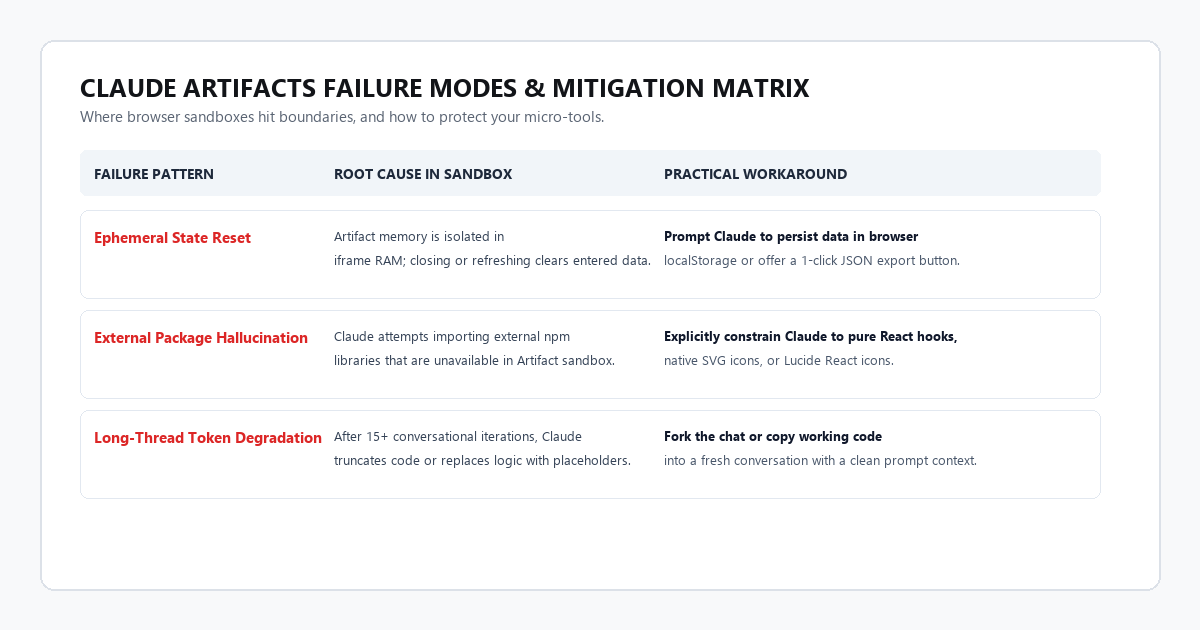
By default, an Artifact has zero persistent memory. If you spend an hour entering 40 client line items into a custom invoice generator, and your laptop battery dies or you accidentally hit Ctrl + R, every single number evaporates.
The Fix: Always instruct Claude during your initial prompt: “Implement automatic saving to browser localStorage under the key 'custom_tool_data' so that inputs persist across page reloads. Include a 'Clear Data' button to reset state when needed.”
Claude frequently attempts to import external JavaScript libraries that do not exist inside its sandboxed runtime. For example, Claude might write: import { Chart as ChartJS } from 'chart.js';
The Artifact window will turn blank and throw a compilation error: Failed to resolve module specifier.
The Fix: Explicitly restrict Claude's imports: “Do not use external charting libraries. Use pure SVG or Tailwind CSS progress bars to render all visual charts and graphs.”
When you iterate on an Artifact across 15 or 20 messages in the same chat thread, Claude's context window fills up. To save output tokens, Claude starts writing lazy abbreviations in the code: // ... existing state and helper functions remain the same ...
The moment Claude does this, the browser preview fails because the underlying code is incomplete.
The Fix: When this happens, do not ask Claude to fix the error in the same thread. Open the Code tab in the top bar of the Artifact, copy the full working code, start a fresh conversation, and paste the code with your specific tweak directive.
Claude builds Artifacts by default for desktop screen widths. If you open the link on a phone, wide tables and fixed containers clip off the edge of the viewport.
The Fix: Add one styling constraint to your initial prompt: “Ensure the layout is mobile-responsive using Tailwind utility classes (flex-col md:flex-row, w-full max-w-4xl mx-auto, p-4 sm:p-8).”
How to Export and Run Your Tools Forever for Free
One of the best attributes of Claude Artifacts is zero platform lock-in. You do not need to keep paying for Claude Pro or keep a Claude tab open to use the micro-tools you build.
Here is the exact workflow to make your tool permanent:
- Verify your tool: Test all buttons, sliders, and edge cases inside Claude's preview panel.
- Click the Download Icon: In the upper-right corner of the Artifact card, click the download icon to save the file (typically saved as
index.htmlorapp.html). - Double-click to open: Double-click the downloaded file in your computer's file explorer. It will open in Chrome, Safari, Firefox, or Edge instantly.
- Bookmark it: Bookmark the local file in your browser (
file:///Users/yourname/Documents/quote-calculator.html).
You now have a custom, zero-latency desktop application that requires no internet connection, never charges a monthly subscription fee, and runs as long as modern browsers exist.
Frequently Asked Questions
Do I need a paid Claude Pro subscription to use Artifacts?
No. The free web tier of Claude on claude.ai includes full access to Artifacts. The only constraint is the daily message allotment, which resets every few hours.
Can I connect an Artifact to my Airtable or Google Sheets?
Direct API calls from the browser sandbox are blocked by security and CORS policies. However, you can instruct Claude to build a CSV file importer button. You export your Google Sheet as a .csv file, drop it into your Artifact, and the tool parses the data locally.
Can I share an Artifact with colleagues who do not use Claude?
Yes. Click the “Publish” button in the upper-right corner of the Artifact. Claude generates a public share link that anyone can open in their browser to run the app without needing a Claude account. Alternatively, email them the downloaded .html file.