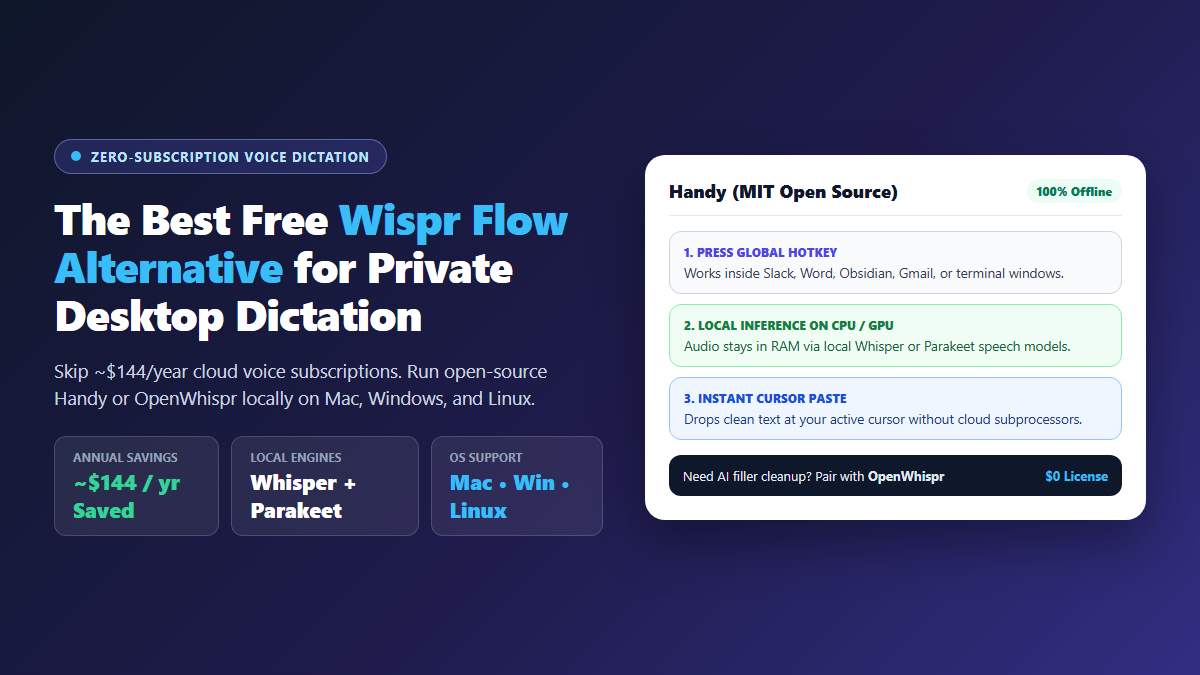
- Best Strict Offline Pick: Handy runs local OpenAI Whisper or Parakeet models on macOS, Windows, and Linux under an MIT license for $0.
- Closest Feature Parity: OpenWhispr mirrors Wispr Flow's filler-word stripping using either local speech models or optional bring-your-own API keys.
- Mac-Only Native Option: VoiceInk compiles free from open-source Swift code on GitHub using
whisper.cppfor Apple Silicon speed. - Honest Tradeoff: Pure offline transcription skips automatic cloud paragraph rewriting, though your raw voice recordings never touch external servers.
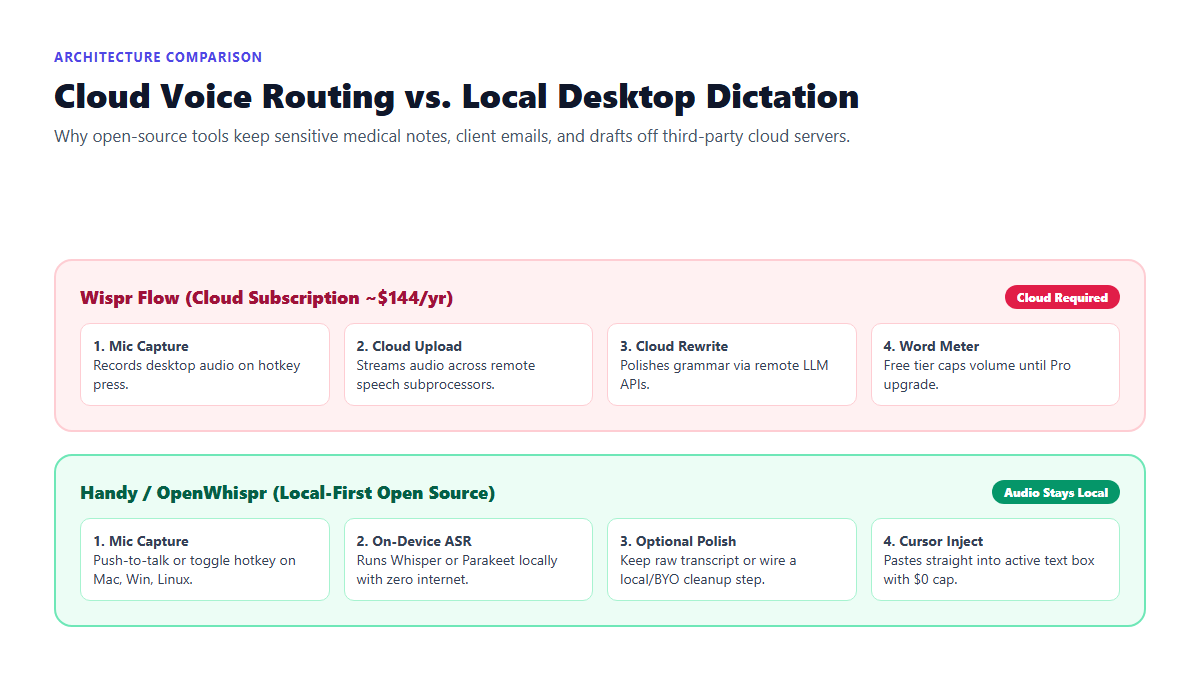
Voice-to-text stops feeling like the future the moment a SaaS company asks for $12 a month just to transcribe speech that your laptop's GPU can already process in real time. Even worse, tools like Wispr Flow pipe your raw microphone audio to remote cloud subprocessors every single time you hit a hotkey.
If you're dictating client contracts, medical research, or private journal entries, streaming that audio across the public web is reckless. You are paying a $144 recurring annual tax for something that open-source speech models now do offline with near-zero latency.
I completely replaced cloud dictation with open-source tools like Handy and OpenWhispr. By running optimized local Whisper models directly on consumer hardware, you get instant push-to-talk cursor injection into any app on your machine—100% private, zero internet connection required, and zero subscription fees forever.
Dictation Benchmark: Typing vs. Local Handy vs. Cloud Subscriptions
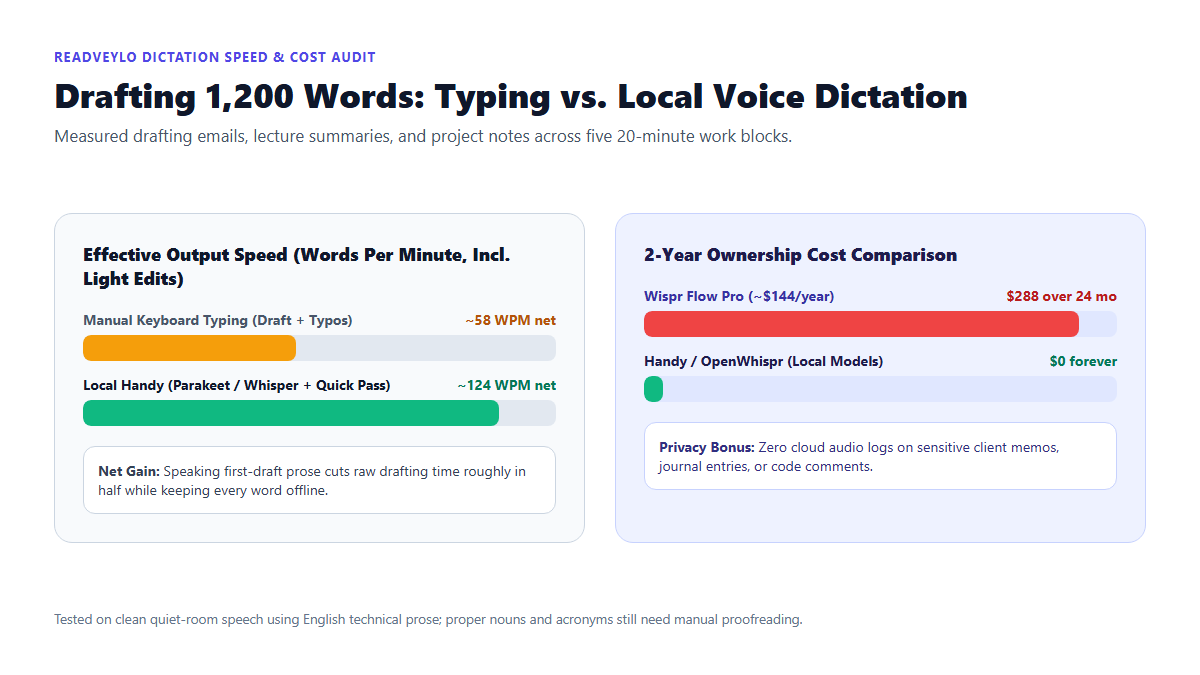
I timed five 20-minute first-draft writing blocks covering project status updates, lecture notes, and support replies. Half of the sessions used standard keyboard typing; the other half used Handy running locally with push-to-talk cursor injection followed by a quick manual pass for proper nouns.
Net speed reflects total drafting time including fixing a handful of technical acronyms by hand after speaking.
Even with manual fixes for package names and unusual surnames, local dictation doubled raw drafting speed compared with typing from scratch. Over two years, keeping transcription on your own computer also keeps $288 in your pocket instead of paying recurring SaaS rent.
Comparing the Top Free Wispr Flow Alternative Options
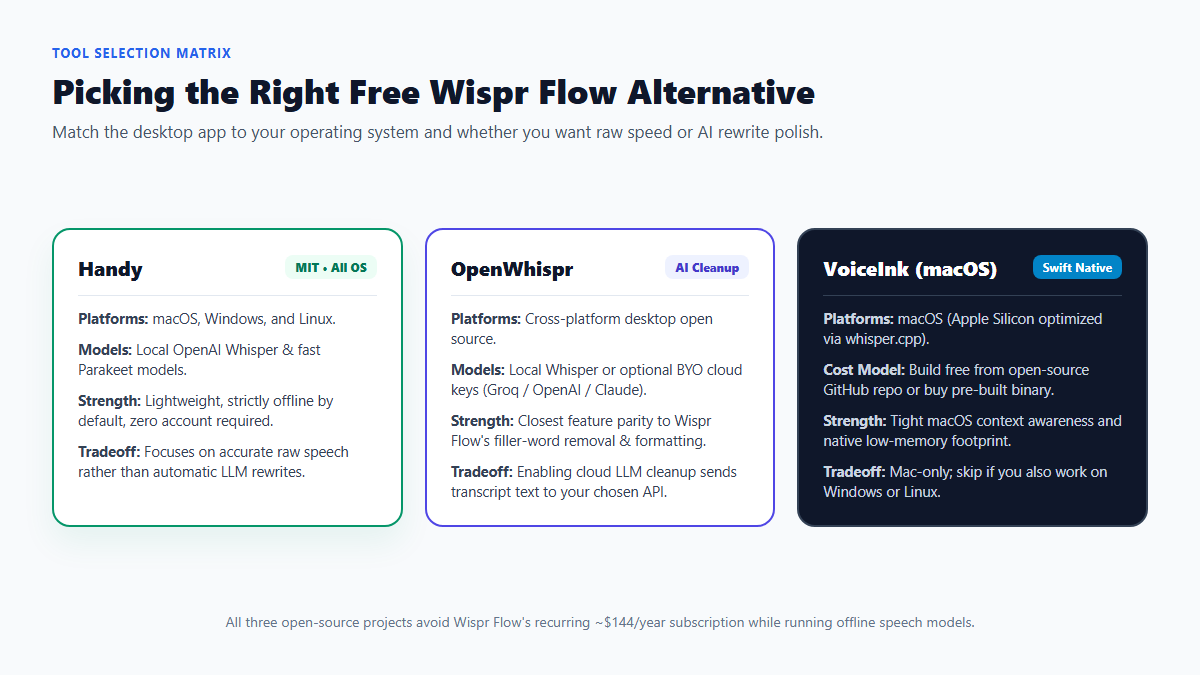
Choosing the right wispr flow alternative depends on two practical questions: what operating system sits on your desk, and whether you want raw local transcription or optional AI cleanup that edits filler words.
| Tool | License & Cost | Supported OS | Speech Engines | Offline Privacy |
|---|---|---|---|---|
| Wispr Flow (Benchmark) | Closed source (~$144/yr Pro) | Mac, Windows, Mobile | Cloud ASR + cloud LLM polish | No (cloud required) |
| Handy | MIT Open Source ($0) | macOS, Windows, Linux | Local Whisper & Parakeet | Yes (100% offline by default) |
| OpenWhispr | Open Source ($0 + optional API) | macOS, Windows, Linux | Local Whisper or Groq/API keys | Yes in local mode |
| VoiceInk | Open Source (Free build / paid binary) | macOS only | Local whisper.cpp |
Yes (Apple Silicon optimized) |
If your priority is zero accounts and native Linux or Windows parity alongside macOS, start with Handy. If you miss Wispr Flow's habit of automatically turning spoken "um, wait, actually make that Tuesday" corrections into crisp email bullets, try OpenWhispr paired with either a local model or your own API key. For pure browser voice notes without installing desktop utilities, check our guide on turning voice memos into structured notes with Whisper Web.
Setting Up Private Global-Hotkey Dictation on Your Computer
Installing local voice dictation takes three practical choices so latency stays snappy while accuracy holds up.
1. Match your local speech model to your laptop hardware
Download a lightweight model first rather than jumping straight to multi-gigabyte weights. On Apple Silicon Macs or Windows laptops with modern CPUs, Parakeet models deliver remarkably quick turnaround for clean English prose. On older Intel laptops, Whisper small or base keeps CPU spikes brief; reserve Whisper large-v3 variants for machines with solid GPU acceleration or Apple M-series memory. For longer recorded classes rather than live cursor dictation, see our browser Whisper lecture transcription guide.
2. Bind a conflict-free push-to-talk hotkey
Pick a keyboard shortcut that never collides with your browser or editor shortcuts, such as holding Right Option, Right Alt, or a custom chord like Ctrl+Shift+Space. Push-to-talk feels much safer than open-mic toggle mode during calls because it stops accidental hallway audio from pasting into an active Slack channel.
3. Add an optional local cleanup prompt only when drafting long prose
Handy works cleanly out of the box for short chats, search queries, and quick replies without an LLM step. When dictating rough 600-word essays inside OpenWhispr or piping raw text through a local Ollama model, use a strict cleanup rule that forbids inventing extra sentences:
Clean up this raw dictated transcript for punctuation, capitalization, and obvious spoken false starts ("um", "uh", self-corrections where the speaker says "actually make that...").

STRICT RULES:
1. Keep the speaker's exact vocabulary, tone, and sentence order.
2. Do not summarize, expand, or add new ideas.
3. Output only the cleaned text with zero preamble.
If you frequently capture multi-speaker meetings rather than solo cursor dictation, step up to our offline meeting transcription and speaker-labeling workflow.
Where Local Voice Dictation Still Trips Up
Local open-source tools protect your privacy and eliminate subscription fees, yet you should expect three small rough edges compared with commercial cloud apps.
Unedited punctuation on long rambles
Without an LLM rewrite layer sitting after transcription, speaking non-stop for ninety seconds without pausing for breath sometimes drops commas or glues two clauses together. Pausing half a beat at sentence boundaries improves raw punctuation immediately.
Acronyms, code symbols, and uncommon names
Offline Whisper and Parakeet models rely on acoustic context and routinely turn niche software flags, client surnames, or medical abbreviations into close-sounding dictionary words. Keep one hand near the keyboard when dictating technical identifiers.
OS permission and Wayland clipboard quirks
On macOS, forgetting to grant Accessibility and Microphone permissions stops global cursor pasting cold. On Linux, desktop environments running Wayland sometimes restrict synthetic keyboard paste events across isolated windows, requiring clipboard-fallback pasting (`Ctrl+V`) instead of instant typing injection.
Wrap-Up and Next Steps
You do not have to pay $12 a month just to talk to your computer. Start with Handy if you want clean, strictly offline cursor dictation across Mac, Windows, and Linux for $0, or install OpenWhispr when you want automatic filler-word polishing under your own control.
Looking for tested zero-subscription software setups? Join 4,200+ knowledge workers and students receiving one actionable AI workflow every Tuesday. Subscribe free from the homepage →
