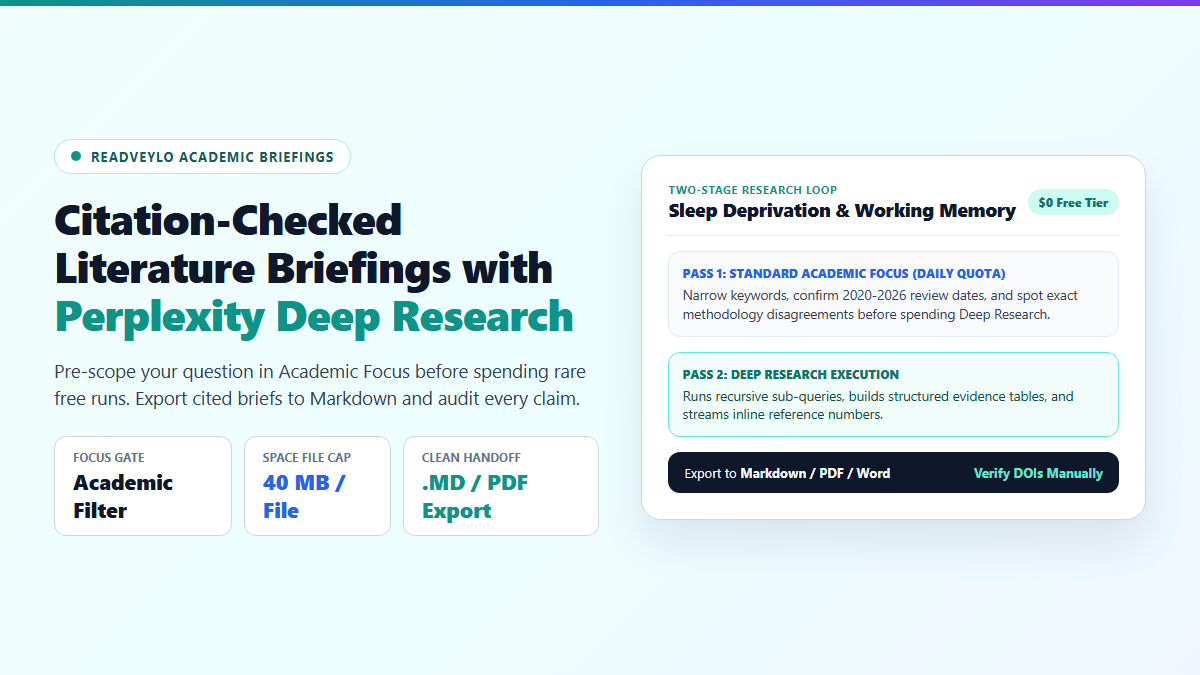
- Scope First for $0: Run two fast queries in standard Academic Focus to nail down date ranges and exact terminology before clicking Deep Research.
- Respect the Quota Wall: Free accounts get very few Deep Research runs (often roughly one preview per month) compared with daily Pro Searches (~3/day).
- Attach Anchor Context: Upload syllabi or core papers up to 40 MB per file inside a Space so your report mirrors your assignment rubric.
- Audit Every Export: Download as Markdown or Word and open every cited journal landing page manually before dropping references into Zotero.
The first time I triggered Perplexity Deep Research, I burned my only free quota run on a generic six-word prompt. Three minutes later, I had a 30-page dossier that looked impressive on the surface but cited corporate marketing blogs, SEO listicles, and secondary summaries that misquoted the original author's sample size.
Deep Research is powerful, but treating it like a standard search engine is the fastest way to waste your account's limited monthly allowances. When an AI model crawls dozens of sources autonomously, poor query constraints guarantee poor signal-to-noise ratios.
To pull actual publication-grade literature reviews, you have to reverse the sequence. Pre-scope your domain in Academic Focus first, lock your date boundaries, and force the crawler to anchor to primary peer-reviewed findings before you ever hit export. If you are weighing platforms before running a briefing, compare models in our head-to-head benchmark on Perplexity vs ChatGPT for research.
Budget Audit: Blind Prompting vs. Pre-Scoped Perplexity Deep Research
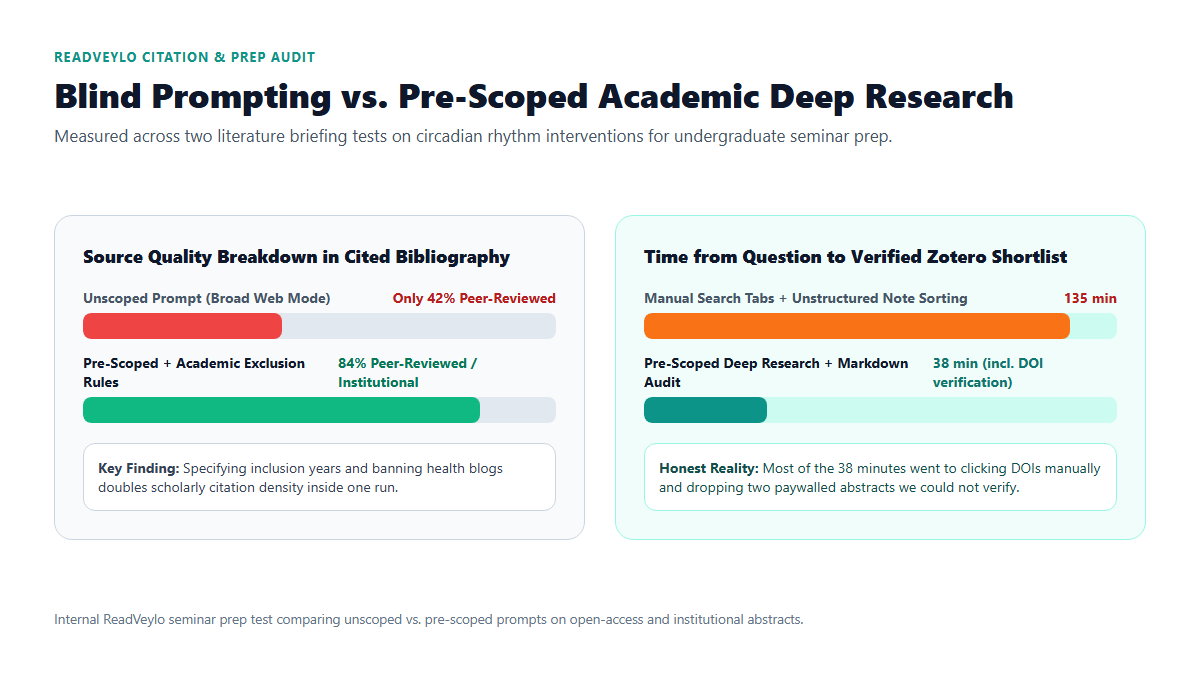
To measure how much prompt framing changes bibliography quality, I ran two seminar prep briefings on circadian rhythm interventions in university students. Test A sent a plain topic sentence cold into Deep Research. Test B spent five minutes running two standard Academic Focus queries first to extract exact Medical Subject Headings and consensus splits, then passed a tightly constrained prompt.
Half of that 38-minute window went to clicking DOIs by hand and cutting two paywalled papers whose abstracts did not confirm the sample figures.
The difference showed up immediately in the reference list. Test A pulled helpful review studies, yet more than half of its inline footnotes pointed to lifestyle wellness blogs and summary aggregators I could never cite in a literature review. Test B pushed scholarly and institutional links up to 84% of the bibliography in a single pass, cutting manual triage down from over two hours of open browser tabs to 38 minutes.
Free Tier Limits vs. Paid Tiers in Perplexity Deep Research
People frequently confuse Perplexity's daily Pro Search button with Perplexity Deep Research, so it helps to separate the two before planning a thesis sprint. Standard Pro Search asks clarifying steps and finishes in 5 to 15 seconds, refreshing on a daily rolling window (typically three free Pro searches per day). Deep Research operates autonomously over several minutes, reading scores of pages and synthesizing a multi-page report.
Because Deep Research runs heavy multi-step reasoning, free accounts receive tightly capped occasional access, commonly cited around one preview run per month, whereas Pro ($20/month) and Max subscribers unlock daily high-volume reports and manual model selection. File uploads inside Spaces or prompts allow up to 40 MB per file across supported document formats.
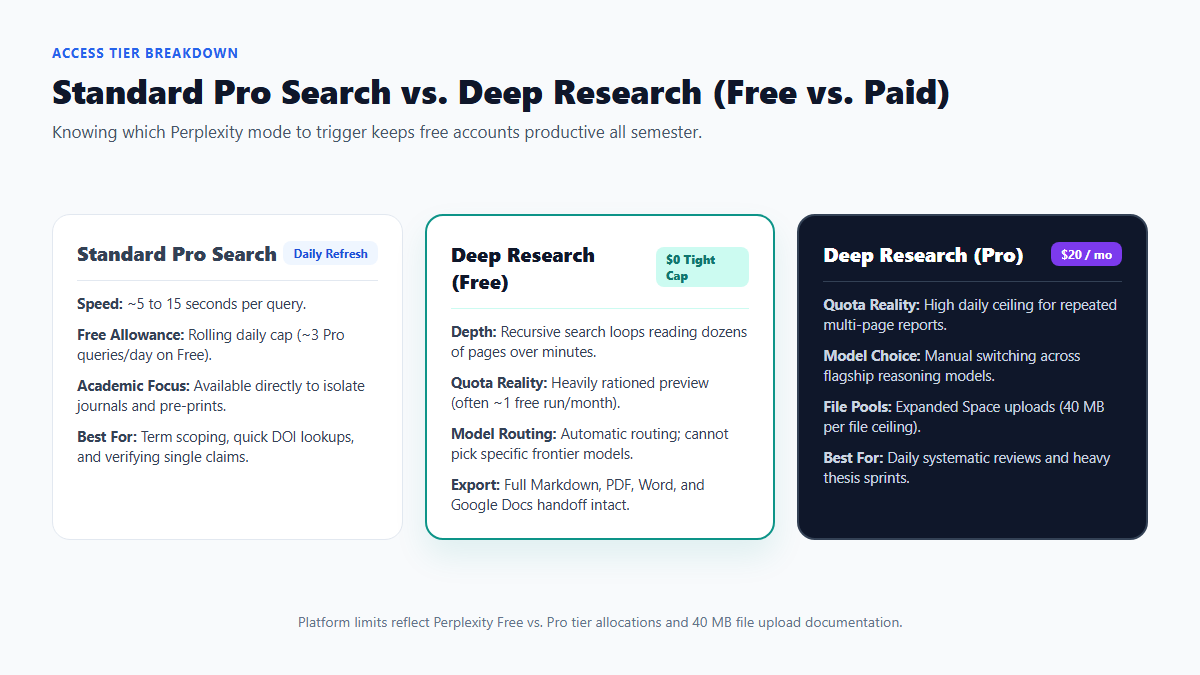
| Capability | Standard Pro Search (Free) | Perplexity Deep Research (Free) | Perplexity Deep Research (Pro / Max) |
|---|---|---|---|
| Execution Style | 5 to 15 second multi-step search | Autonomous multi-minute recursive research | Autonomous multi-minute recursive research |
| Usage Allowance | Rolling daily cap (~3 Pro queries/day) | Tight periodic preview (~1 run/month) | Daily high-volume allowance |
| Model Routing | Automatic default routing | Automatic default routing | Manual selection across flagship models |
| Source Upload Limit | 40 MB per file | 40 MB per file | 40 MB per file with expanded pool |
| Export Options | Copy / Markdown / PDF | Markdown, PDF, Word (.docx), Docs | Markdown, PDF, Word (.docx), Docs |
Four Steps to Run a Clean Academic Literature Briefing
If you only get one or two free Deep Research passes per month, treat each launch like submitting a formal database query rather than chatting.
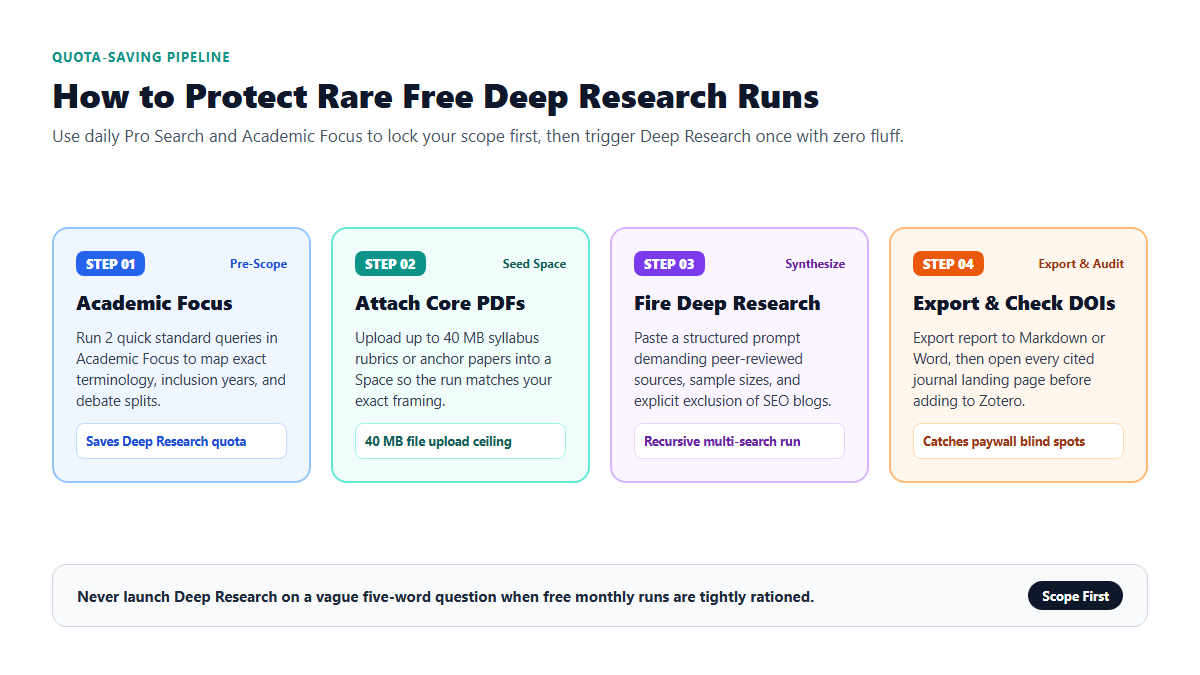
1. Pre-scope terms with standard Academic Focus
Before switching modes, set the search focus to Academic and run one or two ordinary questions. Ask for the three main competing hypotheses, the exact terminology used in recent reviews (2020 to 2026), and which seminal papers both sides keep citing. That takes under two minutes and costs zero Deep Research quota. For broader search habits on the platform, pair this with our Perplexity student literature review workflow.
2. Anchor your prompt inside a Space with a syllabus or rubric
Open a Perplexity Space and drop in your assignment rubric or up to two anchor PDFs (staying under the 40 MB file ceiling). Anchoring your Space stops the agent from drifting into introductory textbook definitions you already know. If your primary job is screening hundreds of raw abstracts by title, pair discovery with offline active-learning abstract screening rather than forcing a web agent to read everything.
3. Trigger Deep Research with strict exclusion rules
Switch to Deep Research once your parameters are settled. Paste a prompt that sets explicit date bounds, forces a methodology comparison table, and bans consumer wellness sites or marketing explainers:
RESEARCH SCOPE: Synthesize peer-reviewed empirical studies and systematic reviews (2020-2026) on [INSERT SPECIFIC HYPOTHESIS].

CONSTRAINTS:
1. Prioritize peer-reviewed journals, PubMed/PMC, arXiv, institutional repositories, and DOI-indexed papers. Exclude lifestyle blogs, vendor whitepapers, and SEO summary articles.
2. Build a comparison matrix with columns: Author & Year | Study Design | Sample Size (n) | Primary Outcome | Stated Limitations.
3. Separate areas of strong consensus from studies reporting null or conflicting results.
4. For any figure or claim taken only from an abstract (because the full paper is paywalled), label it [ABSTRACT ONLY].
4. Export to Markdown and run a manual DOI check
Once the report finishes streaming inside Perplexity's editable view, export it directly to Markdown (`.md`) for Obsidian or Word (`.docx`) for collaborators. Before moving any paper into your bibliography, click every inline footnote link. Verify that the sample size and p-value reported in the table actually appear in the original paper, and check whether later studies challenged the finding using our free citation-audit checklist or the Consensus academic search guide.
Where Perplexity Deep Research Still Slips Up
Even a multi-minute autonomous search pass leaves blind spots that can embarrass you in front of a thesis advisor if you copy paragraphs verbatim.
Zero access behind publisher paywalls
Deep Research reads publicly accessible web pages, open-access PDFs, and publisher abstract pages. When a flagship study sits behind an Elsevier or Wiley paywall, the model reads only the 200-word abstract plus whatever secondary commentary exists on the open web. Never assume a table row reflects the full Methods section unless you opened the PDF through your university library proxy.
Secondary blog summaries still sneak in
Unless your prompt explicitly bans consumer sites and news explainers, broad Deep Research runs pull popular summaries because they rank cleanly for plain-English questions. Reviewing the trailing source list and stripping non-journal URLs takes three minutes and saves major credibility later.
Cross-study number blending
When two papers appear in the same paragraph of a review article, autonomous summarizers occasionally attach Study A's sample size to Study B's effect size. Keep your exported Markdown inside a scratch folder, or cross-check uploaded full texts inside a free Claude Project workspace before drafting final paragraphs.
Wrap-Up and Next Steps
You do not need a $20 monthly plan just to benefit from Perplexity Deep Research on an occasional literature review. Use daily Academic Focus queries to sharpen your question, keep your Space uploads under 40 MB, reserve your Deep Research pass for structured comparison matrices, and verify every DOI against the real PDF before citing.
Want practical study and workflow blueprints tested against real limits? Join 4,200+ knowledge workers and students receiving one actionable AI workflow every Tuesday. Subscribe free from the homepage →
