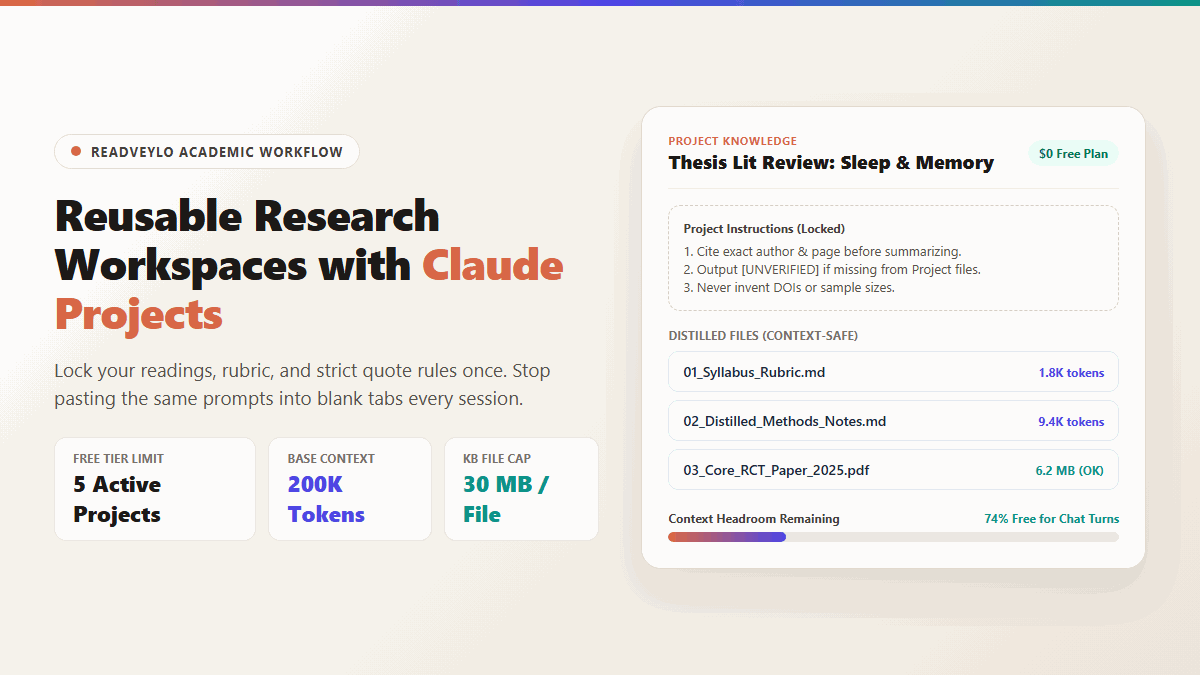
- Zero Re-Setup: Pin course readings, rubrics, and citation instructions once so every new chat inside that Project loads the same workspace automatically.
- $0 Access Tier: Anthropic includes up to 5 active Projects on free accounts with a 200,000-token context window and 30 MB per Knowledge Base file.
- Strict Citation Guardrails: System-level rules force inline filenames, section tags, and explicit abstention markers rather than smooth guessing.
- Best Pair: Filter bulky PDF libraries inside Google NotebookLM first, then move anchor sources into Claude for tight synthesis.
Every new research sprint used to start with the same tedious setup routine. I would open a clean AI tab, drag in three reference papers, paste my custom citation rules for the fifth time, and watch the conversation crawl to a halt an hour later as context limits kicked in.
Doing that repetitive prep work every single morning burns your focus before you read a single paragraph. You end up spending more time managing your chat window than actually synthesizing your research materials.
Moving those files into Claude Projects eliminates that repetitive setup on Anthropic's free plan (or explore our 60-second guide on ChatGPT Projects for coursework). But you have to manage one hidden limit upfront: dumping twelve raw PDFs inside on day one will drain your rolling message cap before lunch.
Session Audit: Fresh Chat Tabs vs. Structured Claude Projects
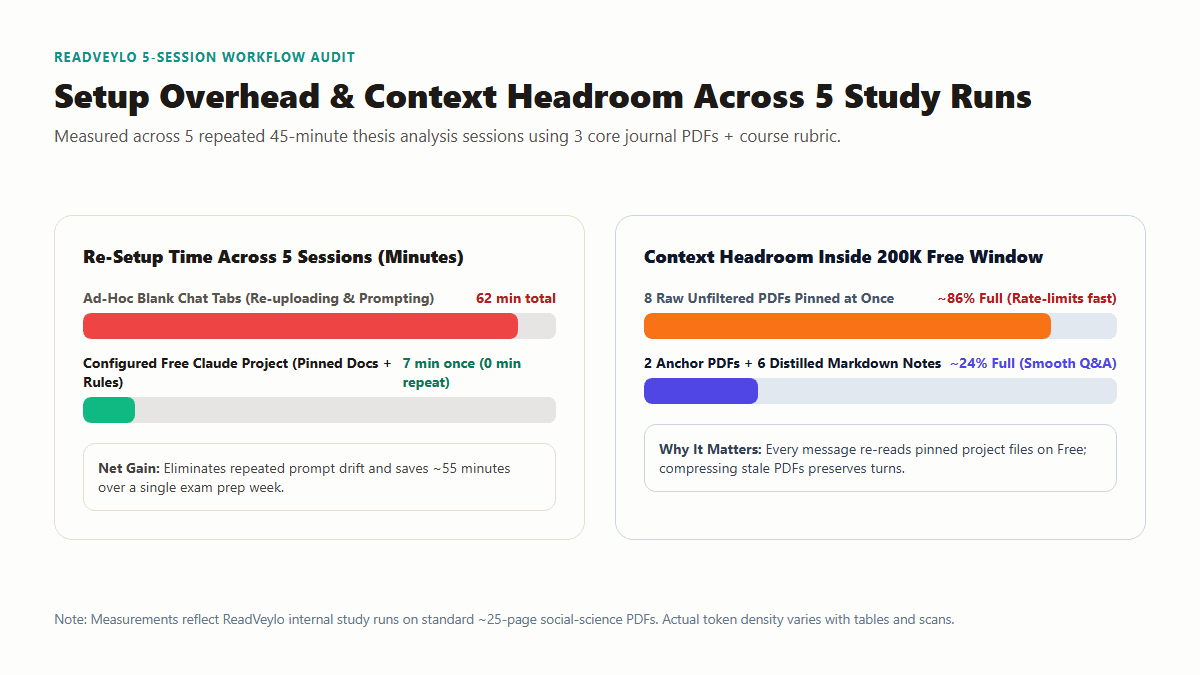
I tested two ways of prepping a week-long literature review across five repeated 45-minute study sessions using three 25-page social-science PDFs, a grading rubric, and an annotated outline. One workflow used standard standalone chat threads; the other used a configured free Claude Project mixing two primary PDFs with trimmed Markdown notes.
Replacing completed PDFs with condensed Markdown study notes preserved enough context headroom for long multi-turn Q&A instead of hitting early rate cool-downs.
Opening fresh chat tabs took roughly 12 minutes per sitting just to re-upload documents, clarify formatting rules, and repeat basic section extractions. Over five sittings, that burned 62 minutes before any actual drafting happened, and two threads drifted away from the grading rubric halfway through.
Setting up a single Claude Project took 7 minutes on Sunday night and dropped repeat prep to zero seconds across the remaining four sessions. Even better, keeping only two anchor PDFs alongside compressed Markdown notes held baseline context fill near 24%, whereas pinning eight unfiltered PDFs chewed ~86% of the free window and tripped rolling usage cooldowns in four turns.
Free Plan Guardrails and Context Limits You Need to Know
Free and paid Claude accounts look identical on the Project dashboard, yet they process large document folders differently under the hood. Reading Anthropic's help documentation makes the architectural split clear.
In a standard one-off chat window, direct file attachments reach up to 500 MB per file. Inside persistent Project Knowledge, however, each uploaded file is capped at 30 MB, and total unread volume hits a hard wall once your text crosses 200,000 tokens on Free. Paid plans automatically turn on Retrieval-Augmented Generation (RAG) chunk search as projects pass that threshold, multiplying effective project capacity roughly tenfold while granting at least 5x more message volume.
On the free plan, pinned project documents sit directly inside active conversation memory on every reply. Treat Project Knowledge like active desk space rather than a long-term hard drive: keep only what you need for today's paper on the table.
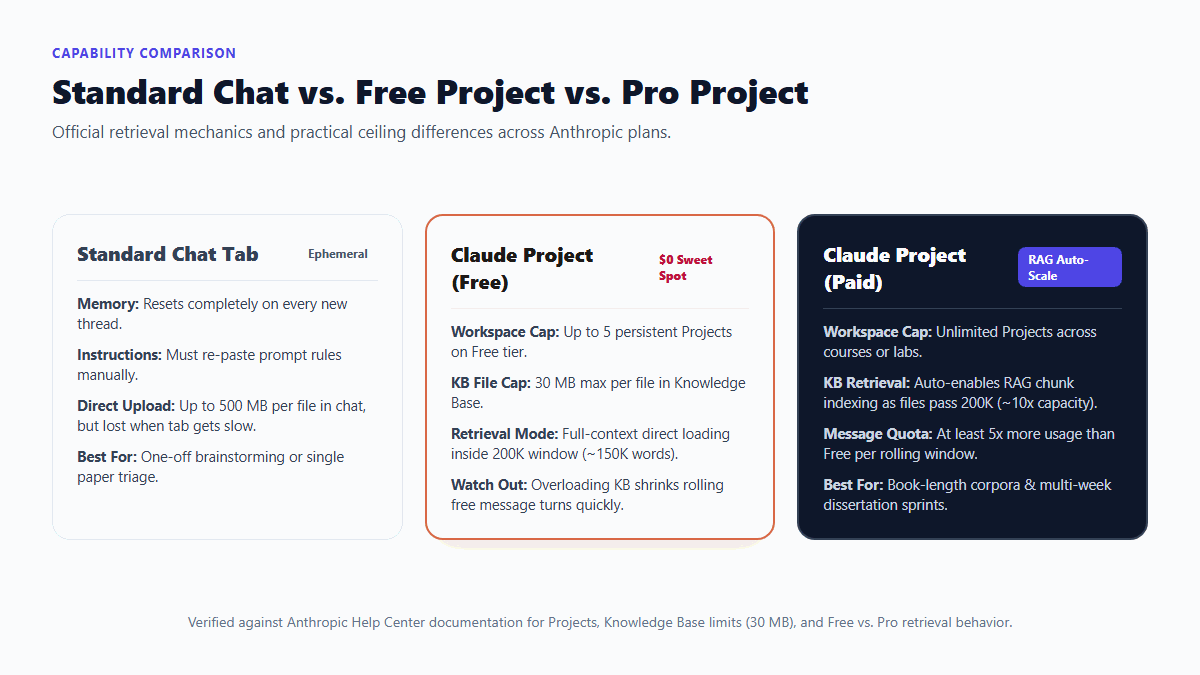
| Workspace Feature | Standard Free Chat | Claude Project (Free Tier) | Claude Project (Paid Tier) |
|---|---|---|---|
| Persistent Instructions | None (re-paste each tab) | Locked across every project chat | Locked across every project chat |
| Active Project Cap | N/A | Up to 5 active projects | Unlimited projects |
| KB File Size Limit | 500 MB per chat attachment | 30 MB per Knowledge Base file | 30 MB per Knowledge Base file |
| Retrieval Engine | Linear thread history | Direct 200K full-context loading | Auto-RAG indexing (~10x capacity) |
| Message Headroom | Standard rolling window | Tightens quickly if KB exceeds ~45% | At least 5x Free tier allowance |
Step-by-Step: Configuring Your First Academic Project
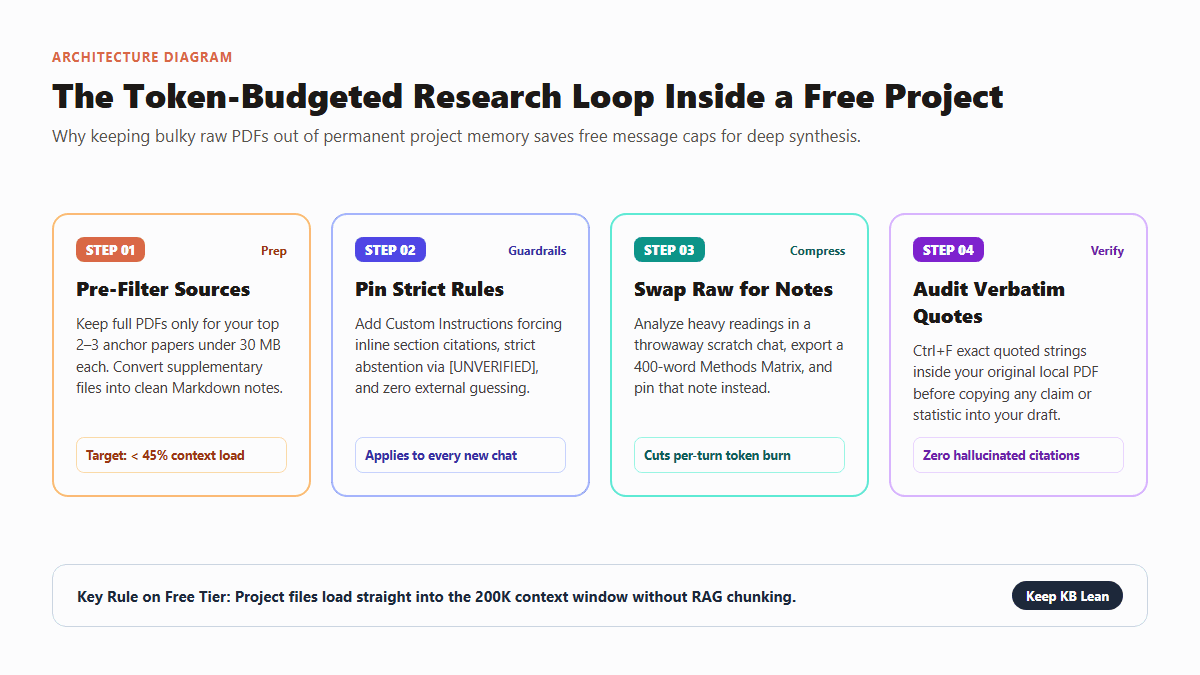
To keep a free workspace responsive from week one through finals, organize each Project as a lean two-stage funnel rather than a giant syllabus folder.
1. Build a Lean Knowledge Folder Before Uploading
Create one focused project per seminar paper or unit, such as SOC402_Midterm_Synthesis, instead of mixing four unrelated classes together. At the start, upload only two items permanently: your assignment rubric as plain text or Markdown, and two core anchor papers under 30 MB each.
Whenever a reading packs 40 pages of reference lists or survey appendices, trim trailing bibliography pages first or triage candidate sources inside our Perplexity Academic workflow. Keeping clean core sections rather than bloated anthologies stretches every rolling message turn.
2. Lock Citation and Abstention Custom Instructions
Open Project Instructions in the workspace sidebar and paste constraints that block guesswork. Asking AI simply to "cite sources clearly" leaves room for polished guesses when a detail is absent. Force rigid grounding instead:
ROLE: Graduate research assistant anchored strictly to uploaded Project Knowledge files.

HARD RULES:
1. Quote before you claim. Every empirical statement must include the source filename, section heading, and a short verbatim phrase in quotation marks from that file.
2. When uploaded Project Knowledge does not directly support an answer, write [NOT IN PROJECT FILES] on its own line and stop guessing. Never pull sample sizes, p-values, publication years, or DOIs from memory.
3. Separate observation from interpretation. Place direct file facts under "Documented Evidence" and unresolved points under "Open Gaps."
4. Keep replies concise unless a structured comparison table is explicitly requested.
Once your workspace follows strict citation formatting, you can also generate interactive quiz matrices in the side pane using the templates in our guide on Claude Artifacts for non-programmers.
3. Compress Stale PDFs into Distilled Source Notes
After pulling sample details and study limits from Paper A inside a scratch chat, ask Claude to compress that reading into a 350-to-500-word Markdown note keeping exact anchor quotes. Upload that lightweight `.md` file into Project Knowledge and remove the raw 40-page PDF from the folder.
Convert the active paper in this thread into a compact Knowledge Note (under 450 words) in Markdown:
- Citation header (Author, Year, Journal from uploaded text only)
- Research Question & Sample Cohort
- Core Methodological Design
- Top 3 Verbatim Anchor Quotes (exact wording + section/page label)
- Stated Author Limitations
Do not include bibliography entries or introductory commentary.
That simple swap drops recurring token weight across future prompts while leaving six or eight synthesized papers pinned cleanly beside your outline. You can also cross-check candidate claims across broader corpora using our free SciSpace reading workflow or our student literature review pipeline.
Where Claude Projects Still Slip Up (And How to Verify Citations)
Persistent context solves cross-tab amnesia, yet an organized interface can trick students into skipping primary verification. Keep three failure modes in front of you before trusting any paragraph inside a graded draft.
Hitting the free-tier quota cliff under heavy uploads
Because Free Projects keep uploaded files sitting directly in active context rather than chunk-searching them on demand, pinning four dense textbooks forces Claude to re-read tens of thousands of tokens even when you ask a tiny copyediting question. Keep pinned files comfortably below 45% of the bar indicator and convert finished readings to short Markdown briefs.
Silent OCR garbage inside older journal scans
Feed Claude a 1990s PDF scan with a corrupted hidden text layer and it rarely pauses to announce that page 14 came through scrambled. It reads clean phrases around damaged glyphs and quietly fills broken numbers with plausible guesses. Run murky archival PDFs through clean offline OCR first before pinning them.
Confident page-number drift
Even with strict quote prompts, LLMs routinely offset printed journal page numbers by one or two digits when publisher download cover sheets shift the internal PDF page count. Treat every extracted quote strictly as a search pointer: press Ctrl+F inside your local PDF viewer for five distinctive words from the snippet and inspect the surrounding paragraph yourself before citing it.
Wrap-Up and Next Steps
A free Claude Project won't replace a full bibliography database like Zotero, and overloading its Knowledge Base burns through free message limits quickly. Used selectively with strict `[NOT IN PROJECT FILES]` instructions and distilled Markdown notes, though, it eliminates annoying prompt re-entry and gives you a disciplined research assistant for $0.
Want battle-tested study and workflow guides without AI hype? Get one practical AI workflow every Tuesday. Subscribe free from the homepage →
