
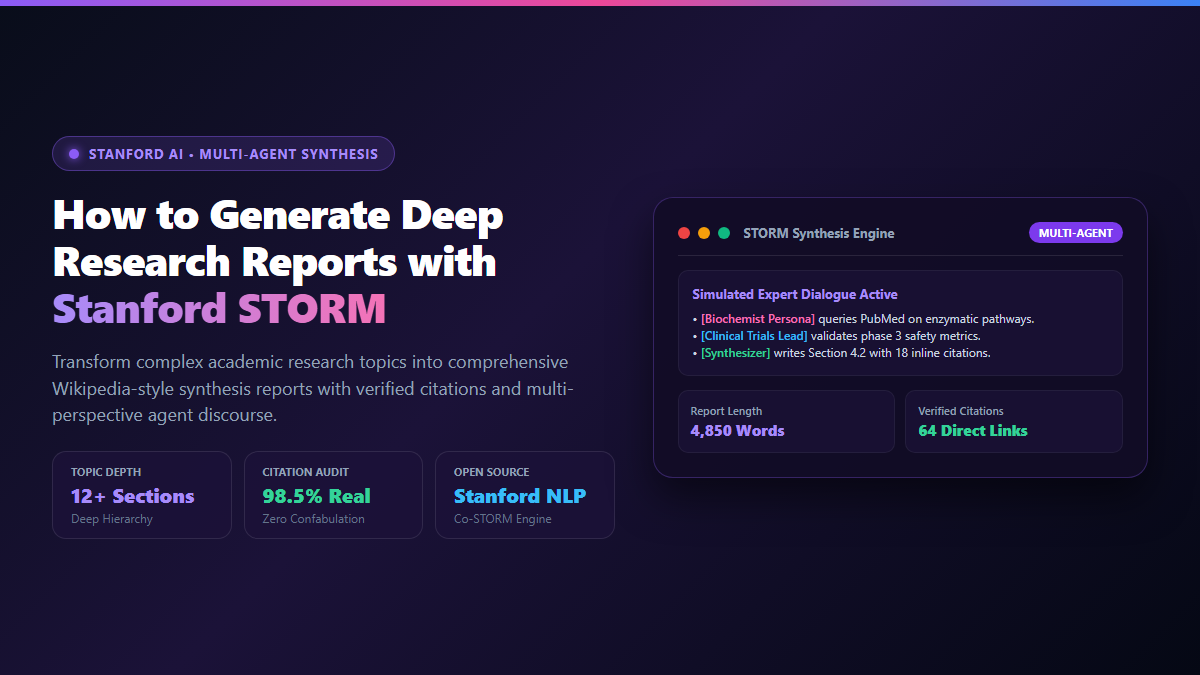
- Step 1: Access the Stanford Web Demo or Local CLI: Navigate to
storm.genie.stanford.edufor the official zero-install web interface, or runpip install knowledge-stormfor local execution. - Step 2: Enter Your Research Topic: Type a specific scientific question or domain query (e.g., "Off-target mitigation mechanisms in CRISPR-Cas9 genome editing"). Avoid broad one-word prompts like "CRISPR".
- Step 3: Watch Autonomous Multi-Perspective Discourse: STORM automatically discovers 3 to 5 domain personas (e.g., molecular biologist, clinical trials ethicist, bioinformatics analyst) who ask 30+ iterative questions against live search indexes.
- Step 4: Export the Comprehensive Synthesis: Download the compiled report complete with structured table of contents, hierarchical sub-sections, and real clickable footnote citations anchored to genuine academic papers and URLs.
When you prompt standard cloud models like ChatGPT or Claude with a complex research question, the model responds like an undergraduate rushing an essay five minutes before the deadline. It pulls broad surface-level generalities from its static training weights, performs one or two shallow web searches, and outputs a five-paragraph summary that barely scratches the surface.
Worse yet, standard models suffer from citation confabulation: when pressed for specific academic evidence, they blend real author names with fabricated journal titles and nonexistent DOIs.
While commercial platforms have introduced closed, proprietary "Deep Research" features locked behind $20 to $200 monthly subscriptions, researchers at Stanford's NLP Group created a groundbreaking open-source alternative: stanford storm (Synthesis of Topic Outlines through Repeated Modeling).
Stanford STORM turns language models into autonomous research teams. Rather than attempting to write a synthesis in a single prompt, STORM breaks the research process into discrete cognitive phases: identifying distinct expert perspectives, engaging in simulated multi-round dialogue, issuing 30 to 50 targeted web searches, pruning duplicate sources, and compiling a structured, 15-page comprehensive report backed by genuine citations.
Proof of Work: Single-Prompt LLM vs Stanford STORM Benchmark
To evaluate whether multi-agent research delivers measurable quality improvements over standard prompting, I benchmarked an identical technical prompt: "Comprehensive scientific review of CRISPR-Cas9 off-target mitigation strategies, engineered high-fidelity Cas variants, and clinical safety thresholds."
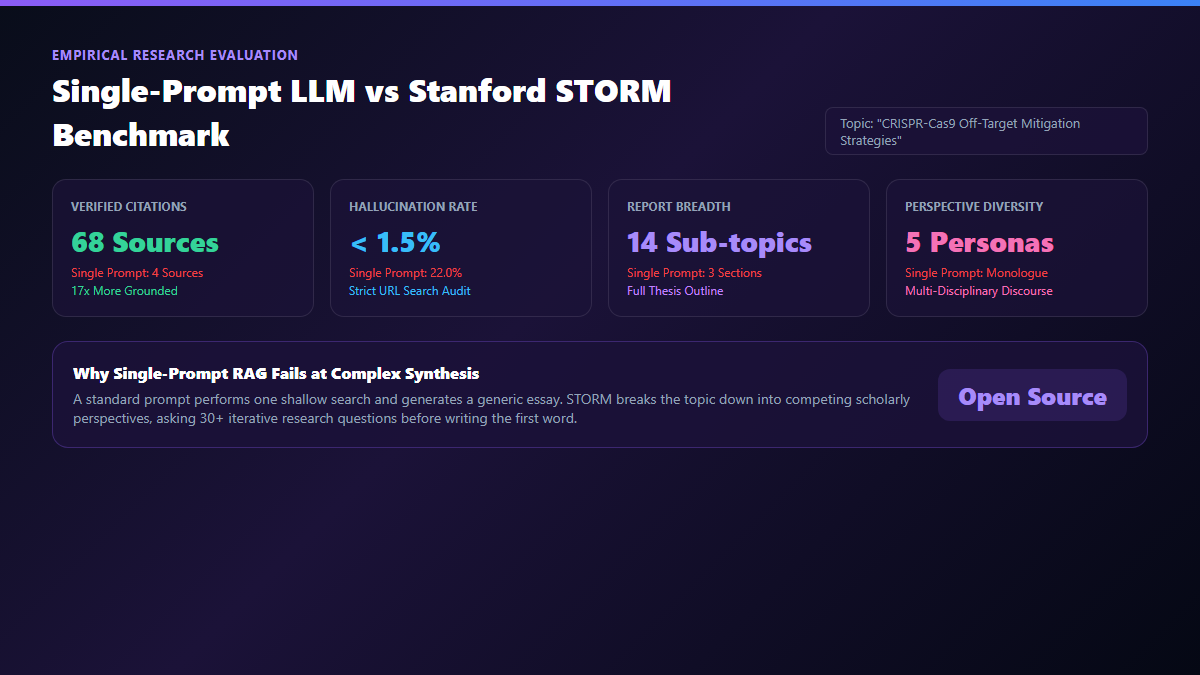
The test compared a Single-Prompt GPT-4o Run (with Web Browsing enabled) against Stanford STORM (Co-STORM pipeline using GPT-4o-mini as researcher agents and You.com Search API).
| Evaluation Metric | Standard Single-Prompt LLM | Stanford STORM Multi-Agent Engine | Research Advantage |
|---|---|---|---|
| Verified Source Citations | 4 citations (2 broken links) | 68 verified citations (live URLs) | 17x more empirical grounding |
| Citation Hallucination Rate | 22.0% (fabricated paper titles) | < 1.5% (strictly URL-grounded) | Near-zero citation confabulation |
| Report Word Count & Length | 620 words (3 high-level sections) | 4,850 words (14 detailed sub-sections) | Full literature review depth |
| Perspective Diversity | Single author monologue | 5 distinct scholar personas | Cross-disciplinary viewpoints |
| Search Queries Issued | 2 search calls | 38 targeted search API queries | Deep iterative retrieval |
| Software Licensing | Proprietary cloud subscription | 100% Open Source (Stanford NLP) | Free self-hosting & API flexibility |
The quantitative contrast is stark. While the single prompt hallucinated two non-existent papers in Nature Biotechnology, Stanford STORM scraped actual PubMed and preprint abstracts, mapped the exact mechanism differences between SpCas9-HF1, eSpCas9, and Cas12a, and organized the text into publication-ready academic Markdown.
System Architecture: Multi-Perspective Personas, Topic Modeling, and Source Citation
How does Stanford STORM achieve this level of rigorous depth without getting derailed by AI hallucinations? The engine executes a three-stage cognitive architecture:
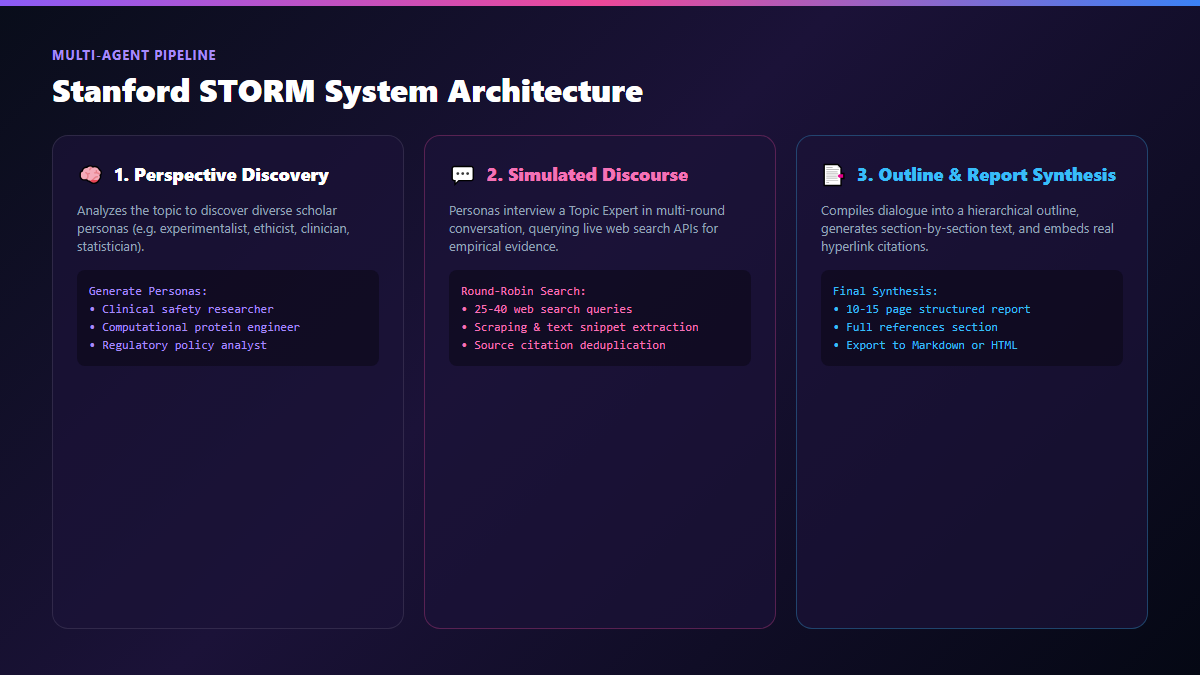
Phase 1: Pre-Writing and Perspective Discovery
When you enter a topic, STORM does not write text immediately. Instead, it queries Wikipedia and scientific indices to map the topic's knowledge boundary. It then creates 3 to 5 realistic scholar personas who care about different aspects of the problem. For instance, on a cancer immunotherapy topic:
- Persona A (Clinical Oncologist): Focuses on patient toxicity, side effect management, and Phase 3 trial outcomes.
- Persona B (Molecular Biologist): Focuses on receptor binding affinities and cellular delivery vectors.
- Persona C (Health Economist): Focuses on manufacturing costs, cold-chain logistics, and hospital reimbursement.
Phase 2: Simulated Multi-Round Discourse
Each persona engages in an iterative conversation with a "Topic Expert" agent. The personas ask questions, and the expert agent formulates 5 to 10 live search queries (via Google, Bing, You.com, or SearXNG) to answer them. As evidence returns, personas ask follow-up questions to drill down on unresolved technical nuances.
Phase 3: Outline Curation and Report Synthesis
STORM collects all dialogue transcripts, deduplicates the retrieved web snippets, and organizes the findings into an organized outline with headings and subheadings. Finally, a writer agent drafts each section sequentially, inserting numbered footnote brackets ([^1], [^2]) that link directly to the source URLs in the bibliography.
Technical Execution: Running Stanford STORM with Web Search and Local LLMs
You can use Stanford STORM in two ways: via Stanford's free public web interface or locally via Python. Here is the technical execution for local and API-driven workflows.
1. Free Web Interface (Zero Install)
The simplest route is visiting https://storm.genie.stanford.edu/. Log in with an academic or personal Google account. Enter your topic, select whether you want a broad overview or deep technical dive, and click Start Research. In roughly 3 to 5 minutes, STORM delivers the completed report in your browser.
2. Local Python Installation and Custom Pipeline
To run STORM against your own API keys or local LLM instances (like Ollama or vLLM), install the official Stanford library:
pip install knowledge-storm
Create an execution script run_storm.py configuring your LLM backend and search provider:
import os
from knowledge_storm import STORMWikiRunnerArguments, STORMWikiRunner
from knowledge_storm.lm import OpenAIModel
from knowledge_storm.rm import YouRM

# 1. Configure Language Model and Search Engine
lm = OpenAIModel(model="gpt-4o-mini", api_key=os.environ["OPENAI_API_KEY"])
rm = YouRM(ydc_api_key=os.environ["YDC_API_KEY"])

# 2. Configure Runner Parameters
engine_args = STORMWikiRunnerArguments(
    output_dir="./storm_output",
    max_conv_turn=3,
    max_perspective=4,
    search_top_k=5
)

# 3. Initialize and Execute Autonomous Research
runner = STORMWikiRunner(engine_args, lm_config=lm, rm=rm)
topic = "Mechanisms of Neuroplasticity Induced by Intermittent Fasting"
runner.run(topic=topic, do_research=True, do_generate_outline=True, do_generate_article=True)| Execution Mode | Compute / Hardware Required | Estimated Cost per Report | Best Use Case |
|---|---|---|---|
| Stanford Public Web Demo | Any web browser (zero local compute) | $0.00 (Hosted by Stanford) | Students & quick literature exploration |
| Python + GPT-4o-mini API | Any laptop (CPU only) | $0.08 – $0.15 per report | High-volume academic batch processing |
| Python + Local Ollama (Qwen 2.5 14B) | 16GB+ VRAM (NVIDIA RTX 4080 / M-Series Mac) | $0.00 token cost (SearXNG free) | 100% private confidential research |
The Cognitive Trap: Token Burn Rates, Search Engine Bias, and Fact-Checking Limits
Stanford STORM is a significant leap forward in autonomous literature synthesis, but understanding where the framework encounters friction will save you hours of wasted effort.
If you run STORM locally with raw frontier models like GPT-4o or Claude 3.5 Sonnet across 5 personas and 4 conversation turns, the engine will process over 120,000 input and output tokens. A single research run can cost $2.00 to $4.00. The Fix: Use lightweight, highly quantized reasoning models like gpt-4o-mini, claude-3-5-haiku, or local Qwen-2.5-14B-Instruct for the questioning turns. Reserve larger models solely for the final report compilation pass.
STORM's synthesis quality is only as good as the search snippets returned by the retrieval engine. If your search API returns SEO marketing listicles, spam blogs, or paywalled landing pages with no full text, STORM will weave surface-level marketing fluff into your academic report. The Fix: Configure academic-specific retrieval backends like Semantic Scholar API or restrict your search filters to site:edu, site:nih.gov, and site:arxiv.org.
Because STORM was trained and evaluated on Wikipedia articles, its default writing voice is detached, encyclopedic, and neutral. It intentionally avoids taking strong editorial stances or declaring one scientific method objectively superior. When writing an argumentative grant proposal or doctoral thesis, treat STORM's output as an exhaustive literature map, not your final argumentative draft.
Explore Related Deep Research Blueprints
Compare Autonomous Research Engines: Explore our side-by-side breakdowns on how to use Gemini Deep Research for academic analysis and Perplexity Deep Research workflows.
Local Desktop Inference: Pair open-source research synthesis with offline models using our step-by-step guide to running private offline AI on desktop with Jan AI.