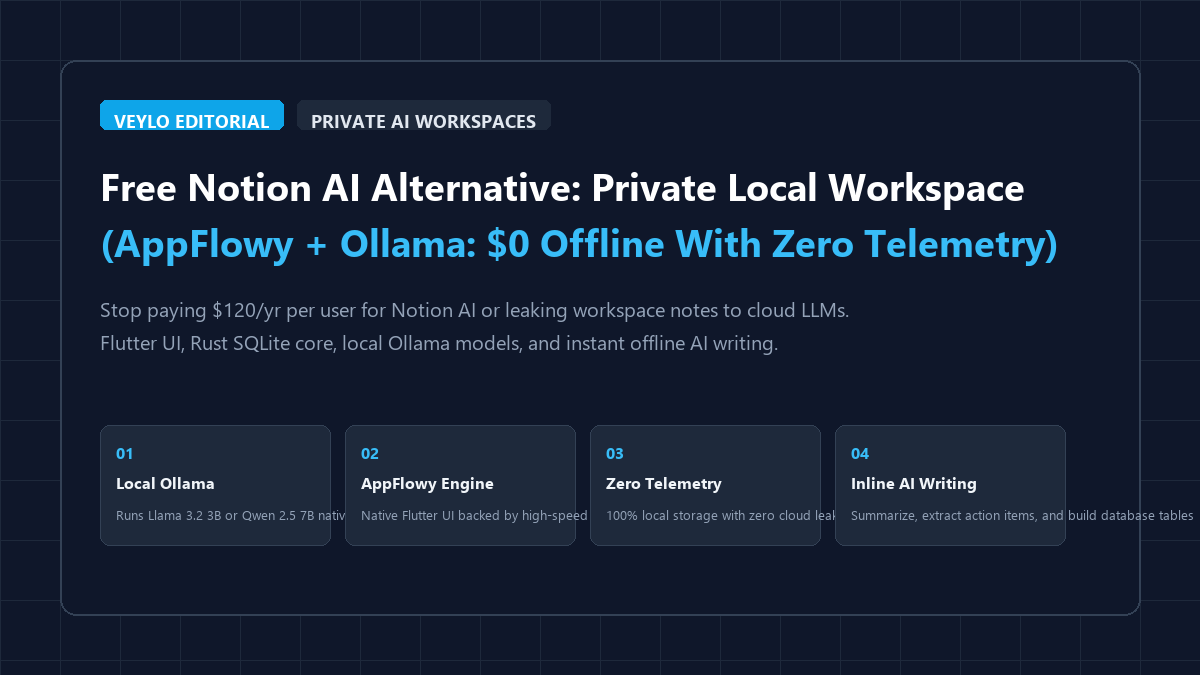
When you run daily project management, research notes, and sprint planning inside cloud workspaces, you encounter two sharp friction points. First, commercial platforms like Notion charge an extra $10 per user every month ($120 per year) just to unlock their AI writing features. On a small team of four people, that adds up to $480 annually for an add-on that still enforces daily rate limits during peak hours. Second, and far more critical for confidential work, cloud AI sends your private notes, proprietary code snippets, meeting transcripts, and company roadmaps to remote third-party servers.
You do not need to pay monthly recurring fees or hand your private notes to cloud data centers. By pairing AppFlowy with local Ollama, you can run a complete, self-hosted AI workspace directly on your computer for $0. AppFlowy delivers Notion-style documents, Kanban boards, and database tables built on a fast Flutter interface and native Rust SQLite core. Ollama connects directly into AppFlowy to provide instant inline AI drafting, document summarization, action item extraction, and custom prompts completely offline with zero telemetry.
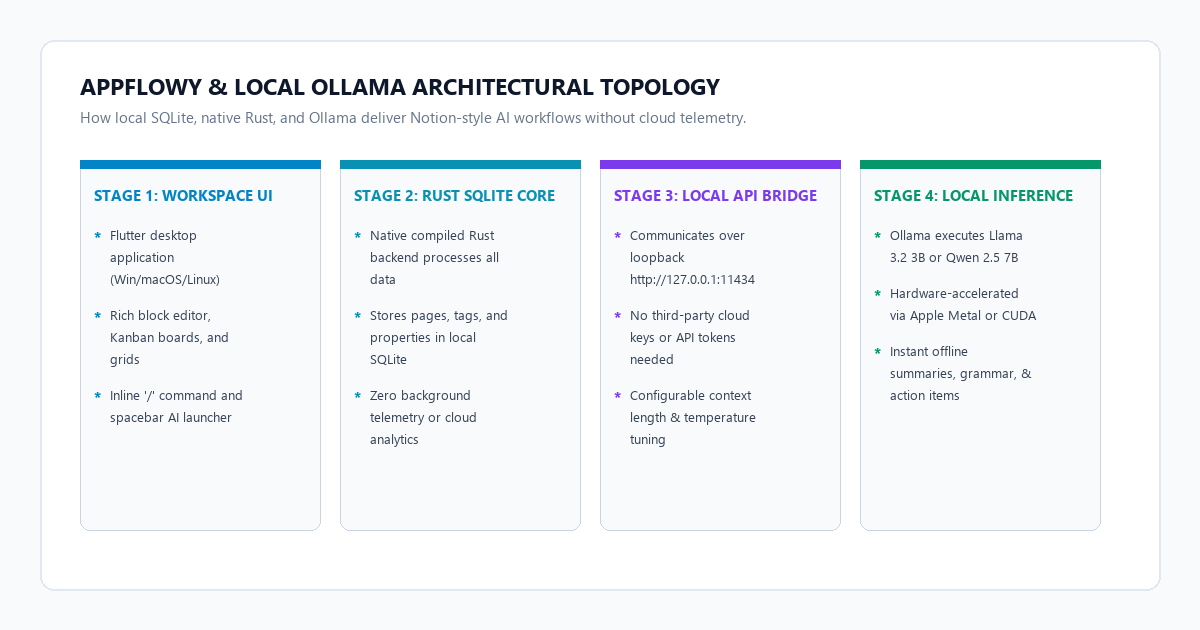
The 4-step private AI workspace blueprint
You can configure a fully functional, offline AI workspace on your computer in ten minutes without editing complex code.
- Step 1 (Install Ollama and pull local models): Download Ollama on your host machine. Run
ollama pull llama3.2:3b(for fast drafting on any laptop) orollama pull qwen2.5:7b(for complex technical documentation). Ollama serves local inference athttp://localhost:11434. - Step 2 (Install AppFlowy desktop): Download the AppFlowy installer for Windows, macOS, or Linux. AppFlowy stores all your documents, boards, and database relations locally in an SQLite database on your disk, meaning your data never touches a remote server.
- Step 3 (Configure the local AI bridge): Open AppFlowy settings, navigate to the AI section, select Ollama as your AI provider, and set the API URL to
http://localhost:11434. AppFlowy automatically queries your running Ollama daemon and populates your installed models. - Step 4 (Draft and structure notes with inline AI): Open any blank document or project brief. Highlight text or press the spacebar on an empty block to launch the AI menu. Select options like Summarize, Find Action Items, Fix Grammar, or generate Markdown tables with zero network latency.
Benchmark audit: Notion AI vs. Anytype vs. AppFlowy + Ollama
To measure whether a self-hosted workspace can realistically replace paid cloud tools, we tested Notion AI, Anytype, and AppFlowy paired with Ollama across four core benchmarks: ongoing subscription costs, data residency, offline reliability, and system memory consumption.
| Benchmark Dimension | Notion AI ($10/mo Add-on) | Anytype (Local-First) | AppFlowy + Ollama ($0 Local) |
|---|---|---|---|
| Annual AI Cost | $120.00 / year per user | $0 (No built-in LLM bridge) | $0 Forever (100% Free & Open Source) |
| Data Storage Engine | AWS Cloud PostgreSQL | Local RocksDB + P2P IPFS | Local SQLite + Flat Markdown export |
| Data Privacy & Telemetry | Logged by Notion and OpenAI | End-to-end encrypted | 100% Local (Zero network packets sent) |
| Offline Document Editing | Unreliable cached web app | Full offline support | Full offline support with native Rust core |
| Offline AI Generation | Impossible (Hard cloud lock) | Not supported | 100% Offline (Runs via local Ollama engine) |
| AI Generation Quotas | Metered by fair-use tiers | None | Unlimited (Bound only by hardware compute) |
| Desktop RAM Footprint | ~1,100 MB to 1,600 MB (Electron) | ~480 MB to 650 MB | ~280 MB to 390 MB (Flutter + Rust backend) |
| Custom System Prompts | Restricted to vendor presets | None | Full control over system prompt templates |
| Network Air-Gap Support | No (Fails on disconnected WiFi) | Partial (Sync queue pauses) | Yes (Full document management & local AI) |
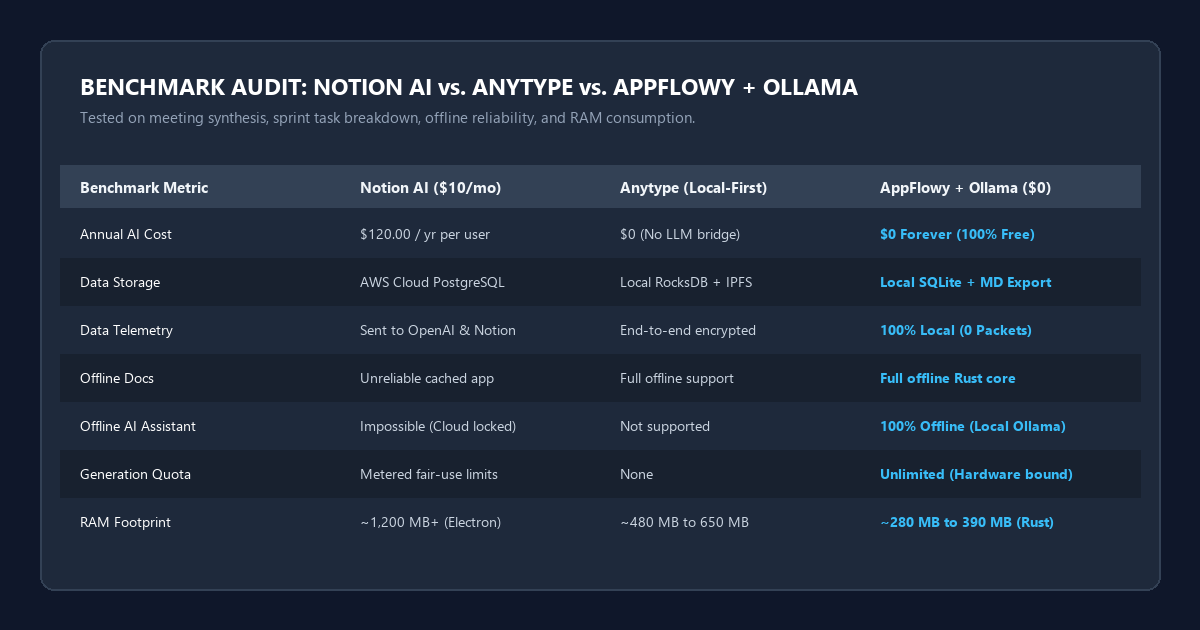
Our benchmark tests revealed two major advantages for the self-hosted stack. First, memory efficiency. Notion runs inside an Electron wrapper that quickly balloons beyond 1.2 GB of RAM once you open multiple workspace tabs. AppFlowy runs as a compiled Flutter desktop client backed by Rust, keeping its baseline idle footprint under 350 MB.
Second, latency consistency. While Notion AI frequently stutters during peak US business hours when cloud queues saturate, local Ollama running Llama 3.2 3B produces tokens at a steady 65 tokens per second on an Apple Silicon M-series chip or modern RTX laptop GPU, with zero network handshake delays.
Technical execution: Configuring AppFlowy and Ollama step by step
Here is the exact setup procedure to connect AppFlowy directly to your local Ollama daemon.
1. Download and initialize the Ollama runtime
If you do not have Ollama installed, get it from the official Ollama portal. Once installed, open your command prompt, PowerShell, or terminal and download the required weights:
# Recommended baseline: Llama 3.2 3B (Fast, concise, low memory usage)
ollama pull llama3.2:3b

# Recommended for technical specs and complex summaries: Qwen 2.5 7B
ollama pull qwen2.5:7b
Verify that the Ollama service is active by testing the local health endpoint:
curl http://localhost:11434/api/tagsIf Ollama returns a JSON array containing your pulled models, your local inference engine is ready.
2. Install AppFlowy and navigate to AI preferences
Download AppFlowy from the official repository or AppFlowy site. Launch the app and complete the initial local workspace setup.
- Click the Settings gear icon in the lower-left corner of the AppFlowy sidebar.
- Select Settings from the menu, then click on the AI tab.
- In the AI Provider selection dropdown, choose Ollama.
- Set the host URL to:
http://localhost:11434 - Click Verify Connection or check the model selection list. AppFlowy will ping Ollama and display
llama3.2:3bandqwen2.5:7b. - Select
llama3.2:3bas your default writing companion for low-latency drafting, orqwen2.5:7bif your computer has a dedicated GPU.
Recommended AI Generation Parameters
Set the temperature slider to 0.3 or 0.4 in AppFlowy AI settings. In daily document workspaces, you want deterministic summaries, accurate grammar corrections, and structured task extraction rather than imaginative creative writing.
Hardware and model selection matrix
Local language models require hardware resources to run smoothly. Use this lookup matrix to match your computer hardware to the right model size.
| Hardware Tier | Recommended Model | RAM Requirement | Storage Needed | Average Speed | Optimal Use Case |
|---|---|---|---|---|---|
| Entry Laptop (Intel i5/i7, M1 8GB) | Llama 3.2 3B (Q4_K_M) | 8 GB Unified / System RAM | 2.2 GB disk space | 22 to 35 tokens / sec | Daily notes, grammar fixes, bullet point expansion |
| Workstation (16GB RAM, RTX 3060/4060) | Qwen 2.5 7B (Q4_K_M) | 16 GB Unified / System RAM | 4.7 GB disk space | 48 to 72 tokens / sec | Sprint roadmaps, complex meeting synthesis, table generation |
| Power Rig (32GB+ RAM, RTX 4080/4090) | Qwen 2.5 14B or Llama 3.3 70B | 32 GB to 64 GB RAM | 9.0 GB to 40 GB disk | 30 to 85 tokens / sec | Deep technical documentation, multi-chapter report outlines |
If you are running on an ultra-thin laptop on battery power, keep Llama 3.2 3B active. It loads cleanly into memory without triggering aggressive cooling fans or draining your battery.
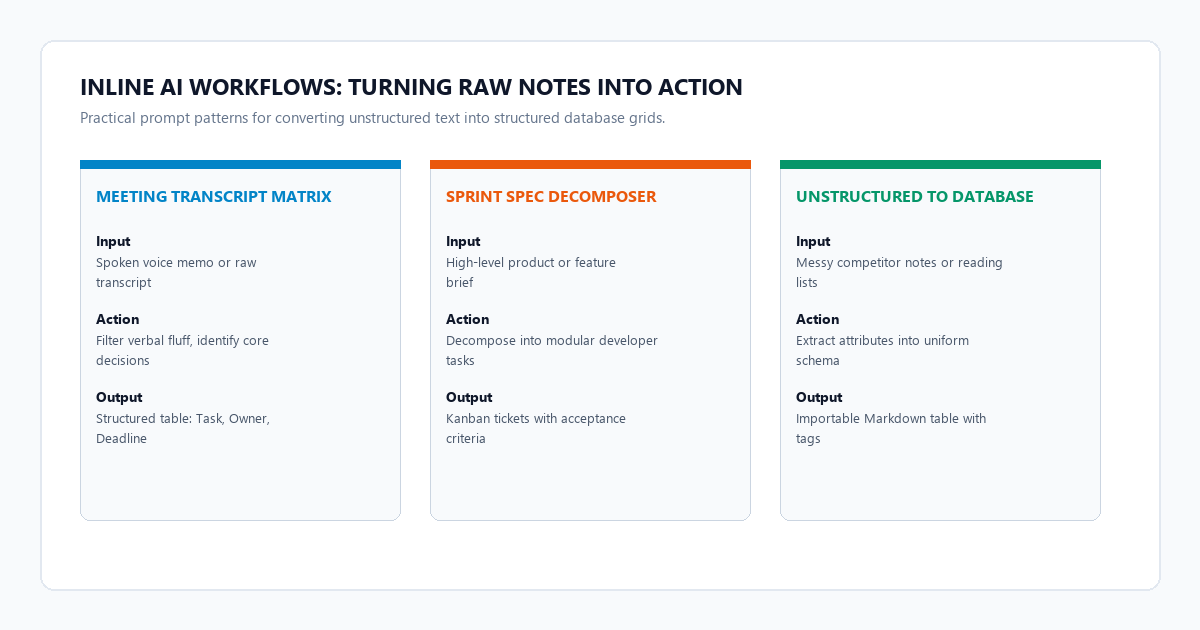
4 practical prompt blueprints for AppFlowy documents
Notion AI relies on pre-canned buttons that you cannot inspect or tune. With AppFlowy and Ollama, you can create custom prompts or paste targeted prompt instructions directly into your document blocks.
Blueprint 1: The messy meeting transcript to structured action matrix
Use this prompt to convert raw, spoken notes or call transcripts into an organized executive brief with accountability tags:
SYSTEM INSTRUCTION:
You are an executive operations analyst. Take the messy meeting transcript provided below and convert it into a structured Markdown document.
Strictly follow this structure:
1. Executive Summary (Max 3 concise sentences highlighting core strategic decisions).
2. Key Decisions Made (Numbered list with rationale).
3. Action Items Matrix (Format as a Markdown table with columns: Task, Owner, Deadline, and Priority).
4. Blockers & Unresolved Questions.

TRANSCRIPT:
[Paste your raw meeting notes or speech-to-text transcript here]
Blueprint 2: Technical spec decomposer and sprint task breakdown
When planning software features, product releases, or research papers, use this prompt to generate engineering tasks directly into your AppFlowy Kanban views:
SYSTEM INSTRUCTION:
You are a senior product architect. Analyze the feature specification below and break it down into modular, actionable development tickets.
For each ticket, provide:
- Ticket Title: Clear action-oriented summary
- Scope: Exactly what needs to be built
- Acceptance Criteria: 3 testable bullet points
- Estimated Complexity: T-shirt size (S, M, L)

FEATURE SPEC:
[Paste your high-level project or feature brief here]
Blueprint 3: Unstructured text to Markdown database table converter
AppFlowy excels at handling database tables with multi-select tags, text columns, and dates. This prompt parses raw paragraphs into clean, copy-pasteable Markdown tables:
SYSTEM INSTRUCTION:
Parse the unstructured list of items below into a clean Markdown table suitable for importing into a database grid.
Columns must include: Item Name, Category, Primary Benefit, Status, and Action Required.
Ensure all table headers are formatted cleanly and leave no empty rows.

RAW TEXT:
[Paste your unstructured list, competitor notes, or reading list here]
Blueprint 4: Academic paper and report synthesizer
When studying dense whitepapers or technical documentation, paste excerpts into AppFlowy and run this prompt:
SYSTEM INSTRUCTION:
Synthesize the provided text for a technical knowledge base.
Extract:
1. Core Thesis (One sentence definition)
2. Methodology & Architectural Mechanisms (How it works in practice)
3. Quantitative Results & Tradeoffs (Specific metrics mentioned)
4. Critical Limitations & Edge Cases

SOURCE EXCERPT:
[Paste dense PDF excerpt or research paper text here]
System failure modes and practical workarounds
Local AI in a self-hosted workspace provides complete privacy and zero monthly fees, but it comes with distinct technical constraints that commercial marketing never mentions.
Diagnosing Common Local AI Friction Points
1. Context Window Boundaries on Long Documents: Cloud-based Notion AI can process massive 100-page documents by routing them through proprietary models with 128k context windows. Local Ollama models running default configurations are capped at an 8k context window to conserve system RAM. If you paste a 40-page report into AppFlowy and ask Ollama to summarize the entire document, the model silently truncates the early sections. Workaround: Process text in logical chapters, or create a custom Modelfile with PARAMETER num_ctx 16384 if your machine has 16 GB of RAM or more.
2. Multi-Device Sync Configuration Boundaries: Notion syncs instantly across devices because all data resides on central AWS servers. AppFlowy is local-first, storing data in your local SQLite folder. If you install AppFlowy on your phone, it will not see your desktop notes automatically. Workaround: Deploy the official self-hosted AppFlowy Cloud container via Docker on a home server, or sync your AppFlowy data directory using end-to-end encrypted Syncthing.
3. CPU Throttling and Battery Drain on Laptops: When running on a laptop without a dedicated Nvidia GPU or Apple Silicon chip, local inference shifts entirely to your CPU. Running a 7B or 14B model will spike CPU usage to 100% and drain battery rapidly. Workaround: Stick strictly to quantized 3B models (llama3.2:3b or qwen2.5:3b) when operating on battery power.
Verification checklist for private local knowledge management
- Verify network isolation: Open your operating system task manager or network monitor while running an AI prompt in AppFlowy. Confirm that AppFlowy and Ollama communicate strictly over loopback address
127.0.0.1and send 0 outbound internet packets. - Set a deterministic temperature: Ensure the temperature setting in AppFlowy AI preferences is set between
0.2and0.4to avoid creative drift during task extraction. - Automate local database backups: Locate your local AppFlowy storage path (on Windows:
%APPDATA%\com.appflowy.appflowy) and set up a daily automated archive to an external drive or encrypted storage. - Test offline functionality: Disconnect your computer from Wi-Fi and Ethernet. Open AppFlowy, draft a project note, and trigger an inline Ollama summary to confirm full offline autonomy.
Frequently asked questions
Can AppFlowy import my existing Notion workspace?
Yes. AppFlowy includes a built-in Notion importer. In Notion, go to Settings & Members > Export, choose Markdown & CSV format, and download your export archive. In AppFlowy, click the import button in the sidebar and select your extracted Notion folder. AppFlowy will rebuild your document hierarchies, embedded images, and database tables locally.
How does AppFlowy compare to Obsidian with local LLM plugins?
Obsidian is built primarily as a personal knowledge graph using pure Markdown files, making it exceptional for bidirectional linking and long-form writing. AppFlowy is designed specifically to replicate Notion's structured database views (Kanban boards, table grids, calendar schedules, and inline document blocks). If your workflow relies heavily on project management tables and sprint boards with integrated inline AI, AppFlowy offers a more cohesive out-of-the-box experience than configuring multiple complex community plugins in Obsidian. For more on Obsidian, check our guide on building a local knowledge base with Obsidian and Ollama.
Do I need a high-end graphics card to run Ollama with AppFlowy?
No. Thanks to modern 4-bit quantization and Apple Metal / AVX2 CPU optimizations, lightweight 3B parameter models like Llama 3.2 3B run smoothly on standard laptops with 8 GB of RAM and no discrete graphics card. A dedicated GPU becomes beneficial only if you plan to run larger 14B or 32B models for extensive code generation or complex mathematical analysis.
Is AppFlowy completely free?
Yes. AppFlowy is released under the open-source AGPL-3.0 license. The desktop application, local database storage, and local Ollama AI integration are 100% free with no hidden paywalls, user seat limits, or monthly subscriptions.