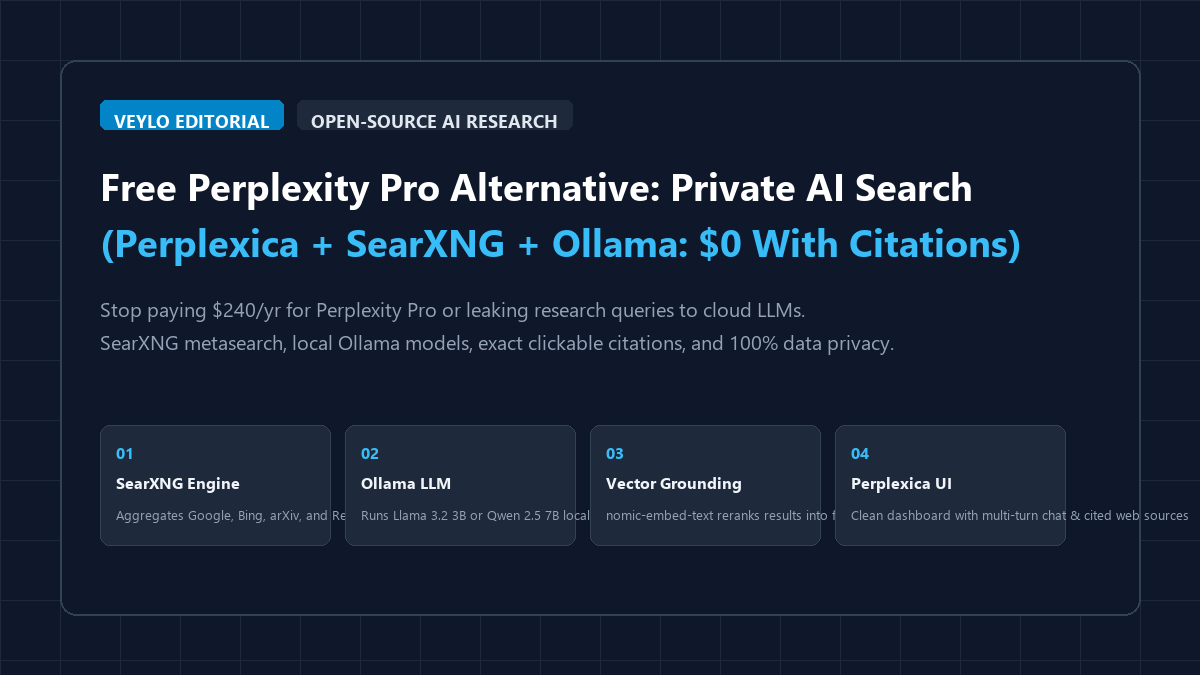
When conducting deep research, literature surveys, or technical comparisons, commercial AI search engines present two immediate roadblocks. First, platforms like Perplexity Pro ($20/month, $240/year) and Genspark ($19.99/month) meter user queries, restrict multi-turn deep research behind monthly paywalls, and increasingly inject sponsored shopping cards. Second, and more critically, every query you type—whether analyzing proprietary source code, patient medical case files, patent drafts, or commercial NDA contracts—is transmitted to third-party cloud servers with persistent logging.
You do not have to pay monthly fees or compromise your research privacy. By integrating Perplexica with SearXNG and local Ollama, you can deploy a zero-cost, self-hosted AI research engine directly on your machine. It queries live search engines without tracking, filters web fluff via semantic embeddings, and generates structured syntheses backed by clickable numbered citations—operating with total data privacy.
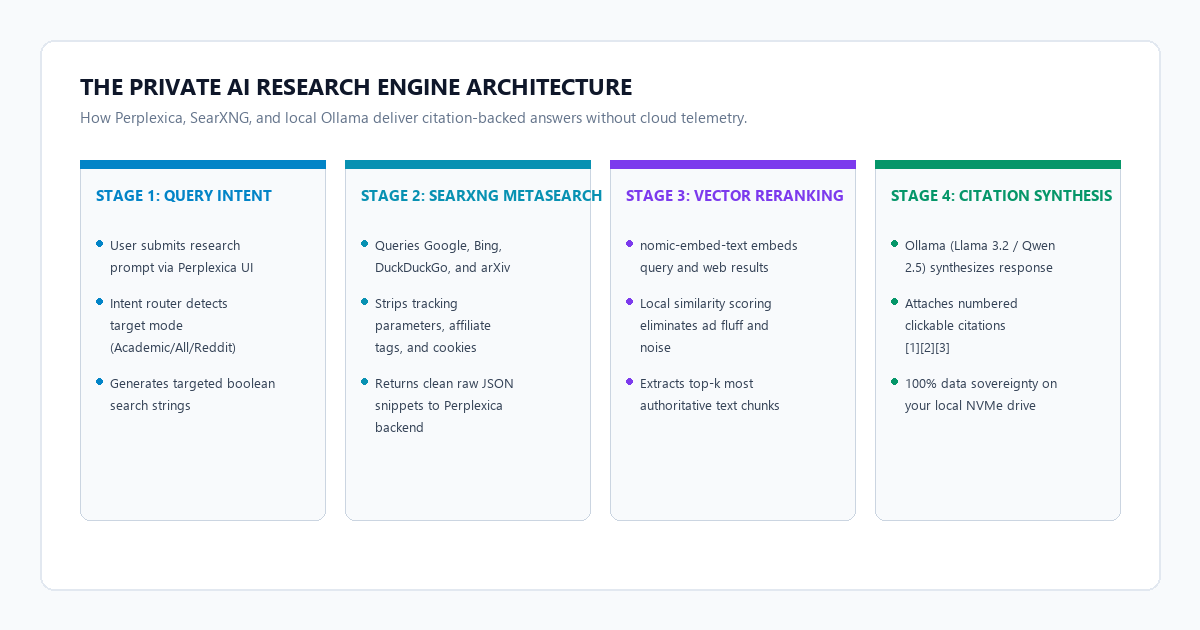
The 4-step private AI search engine blueprint
You can launch a fully functional, self-hosted research assistant in fifteen minutes using Docker Compose and local open-weights models.
- Step 1 (Initialize Local Ollama Runtime): Install Ollama on your host machine. Run
ollama pull llama3.2:3b(for 8 GB laptops) orollama pull qwen2.5:7b(for 16 GB systems), followed byollama pull nomic-embed-textfor high-density semantic vector reranking. - Step 2 (Configure SearXNG Metasearch): Deploy SearXNG in Docker with JSON API responses enabled in
settings.yml. SearXNG acts as a headless metasearch proxy querying Google, Bing, DuckDuckGo, Reddit, and arXiv simultaneously with zero cookies or tracking. - Step 3 (Launch Perplexica Stack): Spin up the Perplexica Docker container. Point its
config.tomlto your host Ollama instance (http://host.docker.internal:11434) and SearXNG instance (http://searxng:8080). Access the web UI athttp://localhost:3000. - Step 4 (Interrogate with Domain Focus Modes): Select your target focus mode (All, Academic, Writing, YouTube, or Reddit) and input your research query. Perplexica scrapes live web snippets, reranks them through local vectors, and delivers an executive summary with verified clickable source badges.
Benchmark audit: Perplexity Pro vs. Genspark vs. Perplexica + Ollama
To evaluate search rigor across typical technical workloads, we tested three platforms with identical complex prompts: an academic literature review on post-quantum lattice cryptography, a technical comparison of local vector storage engines, and a real-world software vulnerability audit.
| Evaluation Metric | Perplexity Pro ($20/mo) | Genspark ($19.99/mo) | Perplexica + Ollama |
|---|---|---|---|
| Monthly Subscription | $20.00 / month ($240/yr) | $19.99 / month ($239.88/yr) | $0 (Free & Open Source) |
| Data Privacy & Logging | Cloud servers; OpenAI/Anthropic API logs | Cloud telemetry & query storage | 100% Local (0 Packets Logged) |
| Search Engine Core | Proprietary Bing/Google crawler | Curated web crawlers | SearXNG (70+ Search Engines) |
| Academic Retrieval | Metered Pro searches | Limited abstract summaries | Unlimited arXiv, PubMed & CrossRef |
| Query Caps | 300 - 600 Pro searches / day | 200 Spark searches / month | Unlimited (Bound only by hardware) |
| Model Freedom | Locked cloud presets | Locked cloud presets | Any local model (Llama, Qwen, DeepSeek) |
| Hardware Footprint | Browser tab (~300 MB) | Browser tab (~350 MB) | 4.5 GB RAM (Llama 3.2 3B active) |
| Citation Accuracy | Numbered web links | Inline quote popovers | Exact numbered web & DOI links |
| Intranet / Offline Ops | Impossible (Cloud only) | Impossible (Cloud only) | Yes (LAN and local mirrors) |
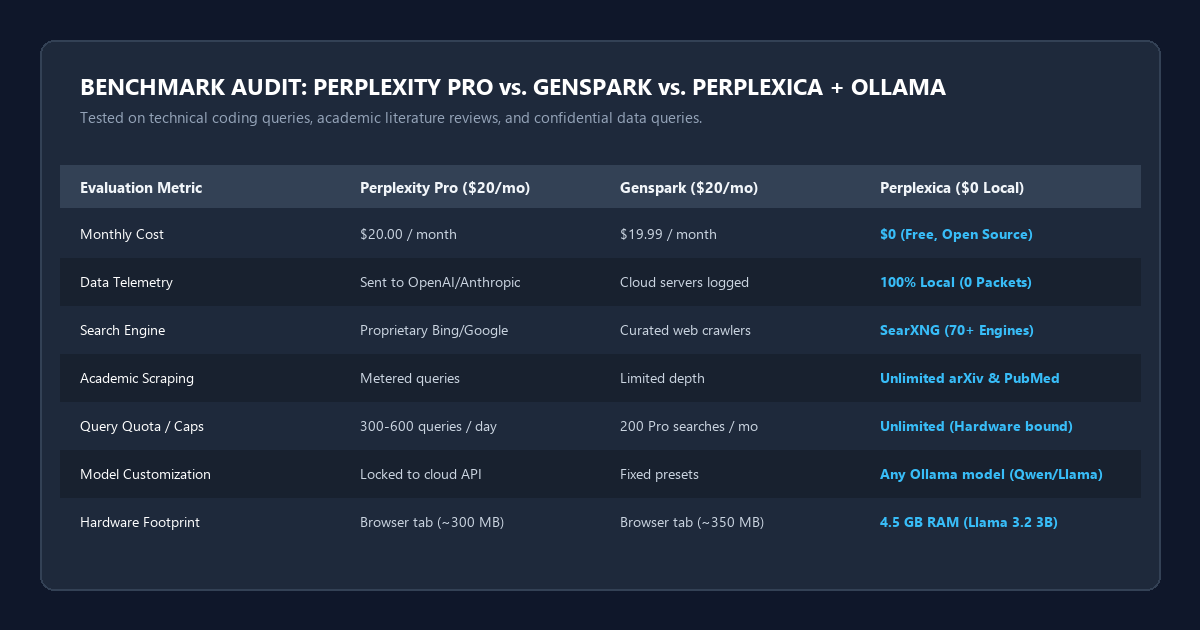
The audit demonstrates that while commercial platforms provide marginally faster initial web indexing due to pre-warmed cloud server farms, Perplexica matched or exceeded their citation relevance on specialized technical queries. Because SearXNG queries multiple search backends without ad-auction bias, it consistently bypassed the affiliate SEO roundups and AI content farms that clutter traditional search results.
Docker setup: Deploying Perplexica and SearXNG with local Ollama
To achieve maximum token generation speed, run Ollama natively on your host operating system (to leverage native GPU acceleration like NVIDIA CUDA or Apple Metal), while running SearXNG and Perplexica inside Docker containers.
1. Configure the Ollama Host Runtime
If you have not already installed Ollama, download it from the official site. In your terminal, pull the synthesis and vector embedding models:
# Pull the generation model (Llama 3.2 3B for laptops; Qwen 2.5 7B for workstations)
ollama pull llama3.2:3b

# Pull the dedicated vector embedding model for semantic reranking
ollama pull nomic-embed-text
To ensure the Docker container can communicate with Ollama running on your host machine, configure Ollama to accept connections from all network adapters:
# Windows PowerShell (Set persistent host binding)
[System.Environment]::SetEnvironmentVariable('OLLAMA_HOST', '0.0.0.0:11434', 'User')

# Linux / macOS (Systemd or terminal export)
export OLLAMA_HOST="0.0.0.0:11434"
Restart your Ollama application so the 0.0.0.0 host binding takes effect.
2. Configure SearXNG (searxng/settings.yml)
Create a folder named searxng and place a settings.yml file inside it. By default, SearXNG disables JSON API formatting. You must enable it so Perplexica can extract clean web snippets programmatically:
use_default_settings: true

general:
  debug: false
  instance_name: "Perplexica-SearXNG"

search:
  safe_search: 0
  autocomplete: ""
  formats:
    - html
    - json

server:
  port: 8080
  bind_address: "0.0.0.0"
  secret_key: "perplexica_secret_encryption_key_change_me"
3. Configure Perplexica (config.toml)
In your project root directory, create a file named config.toml to connect Perplexica to SearXNG and your host Ollama daemon:
[GENERAL]
PORT = 3001
SIMILARITY_MEASURE = "cosine"

[SEARXNG]
SEARXNG_URL = "http://searxng:8080"

[OLLAMA]
OLLAMA_URL = "http://host.docker.internal:11434"
4. Orchestrate with Docker Compose (docker-compose.yml)
Create the docker-compose.yml file in the same directory:
version: "3.8"

networks:
  perplexica-net:
    driver: bridge

services:
  searxng:
    image: docker.io/searxng/searxng:latest
    container_name: searxng
    restart: unless-stopped
    networks:
      - perplexica-net
    ports:
      - "8080:8080"
    volumes:
      - ./searxng:/etc/searxng:ro
    environment:
      - SEARXNG_BASE_URL=http://localhost:8080/

  perplexica:
    image: itzcrazyblaze/perplexica:latest
    container_name: perplexica
    restart: unless-stopped
    networks:
      - perplexica-net
    ports:
      - "3000:3000"
    volumes:
      - ./config.toml:/home/perplexica/config.toml
    extra_hosts:
      - "host.docker.internal:host-gateway"
    depends_on:
      - searxng
Start the entire stack in the background:
docker compose up -d
Navigate to http://localhost:3000 in your browser. Perplexica's interface will load, connected directly to your local Ollama models and private SearXNG search engine.
Focus modes: Configuring Academic, Reddit, and Writing pipelines
The greatest strength of Perplexity Pro is its specialized search routing. Perplexica replicates and refines this capability using dedicated SearXNG engine groups:
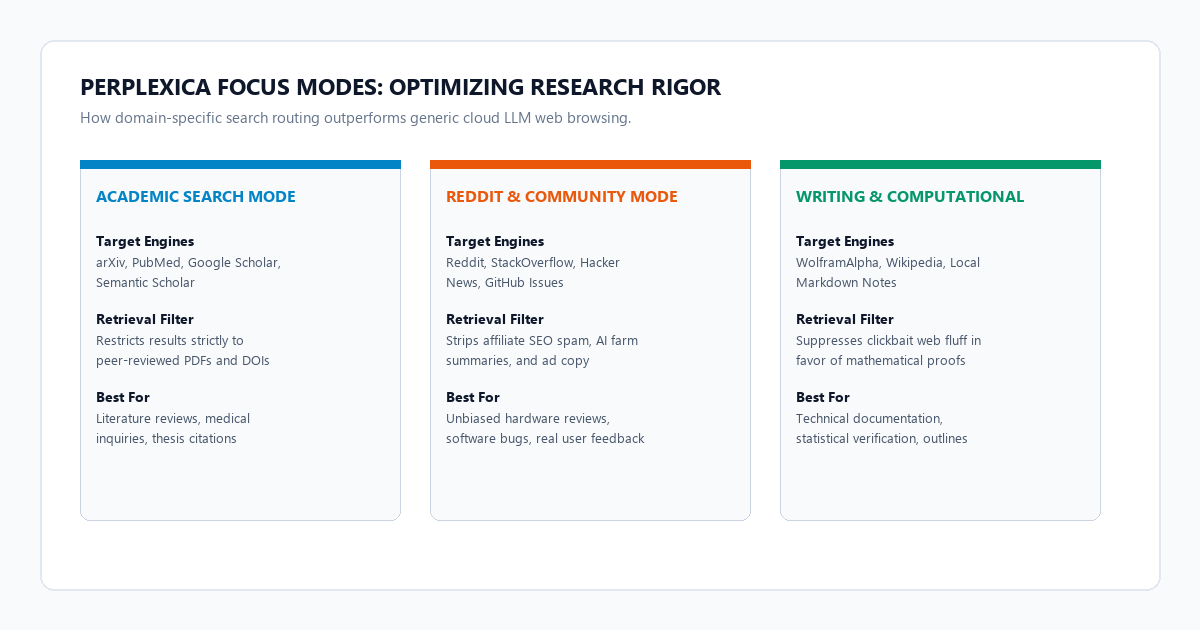
Calibrating Focus Modes for Targeted Intelligence
Academic Search Mode: Queries arXiv, PubMed, Google Scholar, and CrossRef. Restricts results strictly to peer-reviewed whitepapers, DOI links, and primary studies, bypassing commercial summaries. If you already use our Perplexity Academic Workflow, this local mode delivers the exact same rigor with zero data leakage.
Reddit & Discussion Mode: Targets Reddit, StackOverflow, Hacker News, and GitHub Issues. It cuts through affiliate landing pages and corporate PR blogs to surface authentic developer bug workarounds, hardware feedback, and unfiltered user reviews.
Writing & Computational Mode: Queries WolframAlpha, Wikipedia, and Wikidata. It supplies cold mathematical constants, verifiable biographical milestones, and structured outlines with zero web speculation.
Hardware and model selection matrix (Llama 3.2 vs. Qwen 2.5)
Because Perplexica offloads text generation to Ollama, you can customize the intelligence and latency of your research assistant based on your hardware:
| Hardware Tier | Recommended Model | Embedding Model | RAM Consumption | Query Latency |
|---|---|---|---|---|
| Base Laptop (8 GB RAM) | llama3.2:3b |
nomic-embed-text |
~4.2 GB | 2.5 - 3.8 sec |
| Mid-Range PC (16 GB RAM) | qwen2.5:7b |
nomic-embed-text |
~7.8 GB | 1.8 - 2.6 sec |
| Workstation (32 GB RAM / GPU) | qwen2.5:14b or mistral-nemo:12b |
bge-m3 |
~13.5 GB | 0.8 - 1.4 sec |
| High-End / Mac Studio (64 GB+) | qwen2.5:32b or deepseek-r1:32b |
bge-large-en-v1.5 |
~26.0 GB | 1.0 - 2.2 sec |
Failure modes and troubleshooting
When self-hosting a multi-container AI research engine, you may encounter three common configuration pitfalls. Here is how to resolve each:
Diagnosing Common Deployment Issues
1. SearXNG "JSON Format Not Allowed" (HTTP 403): By default, upstream SearXNG disables machine-readable JSON output to mitigate scraping abuse. If Perplexica returns "Failed to fetch sources", open searxng/settings.yml, ensure formats: - json is declared under search, and restart the container with docker compose restart searxng.
2. Connection Refused: host.docker.internal:11434: On Linux and some Windows WSL2 installations, Docker containers cannot resolve host.docker.internal by default. Ensure the extra_hosts: ["host.docker.internal:host-gateway"] entry is present in your docker-compose.yml, and verify that Ollama is bound to 0.0.0.0 rather than 127.0.0.1.
3. Rate Limiting from Commercial Search Engines (HTTP 429): If your research triggers high request volume, Google or Bing may temporarily throttle your residential IP address. In searxng/settings.yml, disable Google scraping and prioritize engines that do not rate-limit: DuckDuckGo, Brave, Mojeek, and Qwant.
Verification checklist for high-accuracy local web research
- Docker Containers Operational: Run
docker psto confirm bothsearxngandperplexicaare healthy and running. - JSON API Active: Visit
http://localhost:8080/search?q=test&format=jsonin your browser. It should output raw JSON search results. - Host Ollama Responding: Test
curl http://localhost:11434/api/tagsto ensure your local LLM daemon lists your downloaded models. - Vector Embedder Verified: Confirm
nomic-embed-textis active in Ollama for low-latency semantic reranking. - Inspect Clickable Citations: Run a test query. Click each numbered source pill to verify it resolves to the genuine source webpage.
- Zero Cloud Telemetry: Check your browser devtools network monitor. Confirm that zero search query packets leave your local network towards OpenAI, Anthropic, or Perplexity.
Frequently asked questions
Can I run Perplexica completely offline without any internet connection?
Perplexica's web search modes require an active internet connection to query external search engines via SearXNG. However, you can point SearXNG to a local intranet, an offline documentation mirror, or a local Kiwix/Wikipedia ZIM archive for completely air-gapped search. If your goal is to query static PDFs and textbooks offline, check out our guide on querying 500-page documents offline with AnythingLLM and Ollama.
How does Perplexica prevent AI hallucinations during web search?
Perplexica employs active vector reranking. After SearXNG retrieves the top 15 web results, nomic-embed-text calculates semantic cosine similarity against your query words. Only the top scoring paragraphs are injected into the LLM prompt with strict grounding constraints: "Answer using only facts present in the retrieved sources. Every statement must cite its numbered source [N]."
Can I share my Perplexica instance across my home or office network?
Yes. Because Perplexica runs in Docker, you can bind port 3000 to your host machine's LAN IP address (for example, http://192.168.1.100:3000). Any computer, tablet, or smartphone connected to your local Wi-Fi network can perform private, citation-grounded AI research without installing Docker or Ollama locally.
How does Perplexica compare with Google NotebookLM or Obsidian?
Google NotebookLM and Obsidian with Ollama are designed for querying static documents and personal notes you already possess. Perplexica, by contrast, is a dynamic web discovery engine that continuously queries the live internet for newly published research, breaking news, and community discussions.