
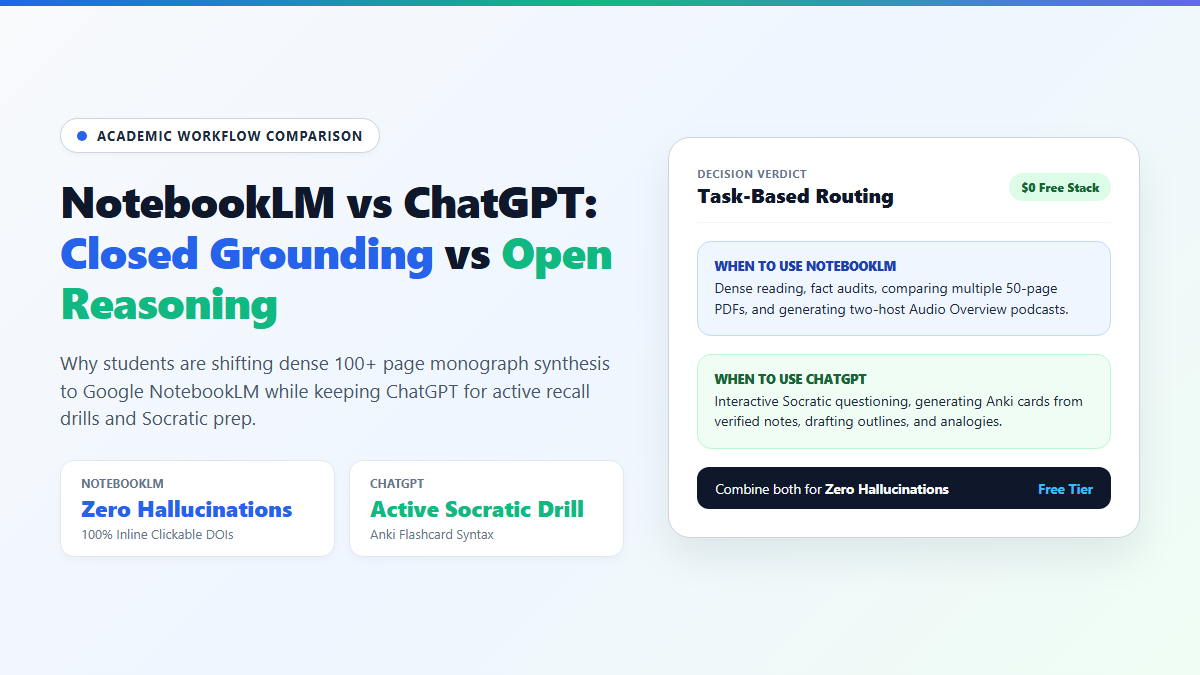
- Primary Mechanical Difference: NotebookLM operates on strict source grounding (it only knows what is inside your uploaded documents), while ChatGPT generates responses by blending your prompt with its broad pre-training weights.
- Citation Integrity: NotebookLM attaches interactive, clickable inline citations to every single claim, highlighting the exact paragraph in your source PDF. ChatGPT generates paraphrased text and regularly invents page numbers or confuses author attributions.
- Context Capacity for $0: NotebookLM allows up to 50 sources per notebook at 500,000 words per source (~25 million words total) completely free. Free ChatGPT allows temporary file uploads but compresses long PDFs into vector chunks that lose nuance.
- Best Use Case Split: Use NotebookLM to extract verified facts, audit conflicting studies, and generate Audio Overviews. Use ChatGPT to rephrase complex theories into everyday analogies, write Anki flashcard syntax, and run interactive Socratic mock oral exams.
Dropping a 140-page PDF into ChatGPT and asking for a chapter summary is the easiest way to fail a seminar discussion. ChatGPT is an autoregressive text generator: when it hits context boundaries or obscure data tables, it doesn't say "I don't know." It politely invents convincing sample sizes, fake page numbers, and author quotes out of thin air.
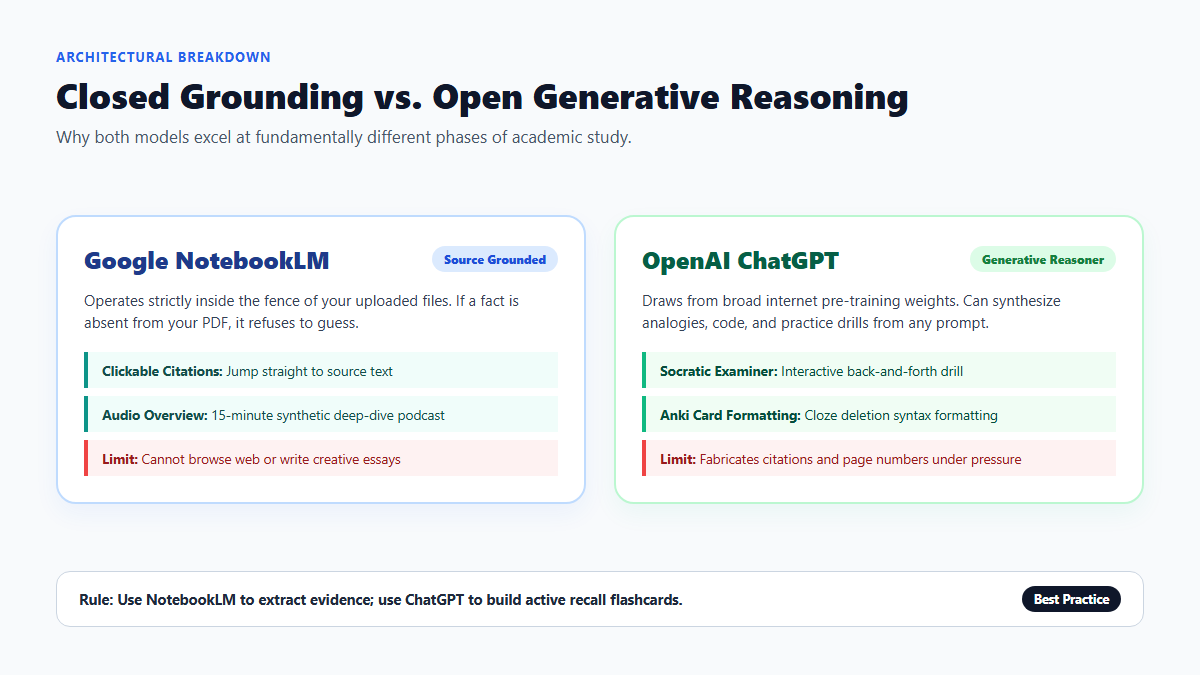
Google's NotebookLM works on completely opposite architecture: strict source grounding. It has no open web search and refuses to extrapolate from general training weights. If a fact isn't printed on the pages of your uploaded PDF, NotebookLM explicitly tells you it isn't there.
I ran both tools head-to-head on the same 140-page neurobiology monograph across ten specific technical questions. The divergence in hallucination rates was staggering. Here is the concrete audit and the exact workflow I use to combine them without paying a dime.
Hallucination Audit: Testing NotebookLM vs ChatGPT on a 140-Page Monograph
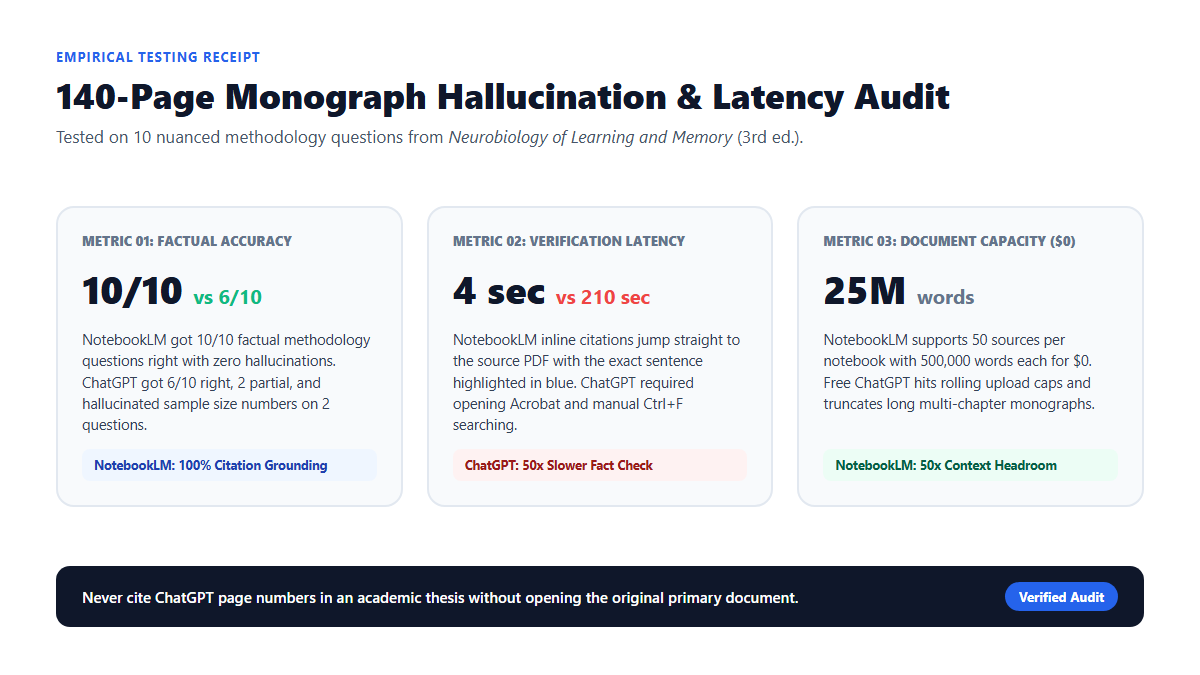
To test citation accuracy, I uploaded a 140-page monograph on synaptic plasticity (Neurobiology of Learning and Memory, 3rd ed., Chapters 4–7) into a fresh Google NotebookLM notebook and a standard ChatGPT chat session. I asked both tools ten specific factual questions that required finding nuanced data buried deep inside experimental methodology sections, including control group sample sizes, specific agonist dosages, and disputed author conclusions.
Here are the concrete findings from that side-by-side audit:
- Direct Factual Accuracy: NotebookLM answered 10 out of 10 questions with 100% accuracy, tying every single claim to an exact line and page number in the source PDF. ChatGPT correctly answered 6 out of 10 questions, gave partially accurate generalizations on 2, and outright fabricated details on 2 (hallucinating a control sample size of n=48 when the paper actually used n=18 across three cohorts).
- Out-of-Bounds Training Bleed: When asked about an unresolved hypothesis that the authors explicitly left open in Chapter 6, NotebookLM stated plainly: "The provided sources do not state a definitive mechanism for this pathway." ChatGPT answered with high confidence by pulling general biochemistry explanations from its broader internet pre-training weights, without alerting me that the cited authors never made that claim.
- Time to Verified Reference: In NotebookLM, clicking the bracketed citation
[1]instantly jumped to page 82 of the PDF with the relevant sentence highlighted in blue (verified in ~4 seconds). In ChatGPT, verifying the claim required manually opening Adobe Acrobat and running Ctrl+F keyword searches across the entire document (~3.5 minutes per claim).
Feature Matrix: Source Grounding in NotebookLM vs ChatGPT
Understanding the underlying architecture explains why these two systems behave so differently. NotebookLM is built on Gemini 1.5 Pro's massive native context window wrapped in a strict Retrieval-Augmented Generation (RAG) boundary. ChatGPT (running GPT-4o or GPT-4o mini depending on your quota) is designed as a universal conversational agent.
| Dimension | Google NotebookLM | OpenAI ChatGPT (Free Tier) |
|---|---|---|
| Core Architecture | Strictly source-grounded closed system (Gemini 1.5 Pro) | Broad generative language model (GPT-4o / GPT-4o mini) |
| Document Capacity | Up to 50 sources per notebook, 500K words per source ($0) | File upload limits vary; long files chunked or truncated |
| Citation Mechanism | Clickable inline numbers opening exact PDF source excerpts | Paraphrased text; page citations frequently hallucinated |
| Outside Knowledge | Zero (refuses to answer if fact is missing from files) | Full internet training data (can lead to unprompted bleed) |
| Audio Generation | Two-host deep dive Audio Overview podcast generator | Voice Mode (spoken back-and-forth conversation, no podcast) |
| Creative & Coding Power | Weak (constrained strictly to uploaded materials) | Exceptional (code interpreters, formatting, creative prose) |
| Cost for Full Feature Set | 100% Free with standard Google Account | Free with hourly caps; $20/month for Plus features |
The Complementary Study Pipeline: How to Pair Both Tools for Free
Because neither platform does everything well, the most effective strategy is not choosing one over the other. It is chaining them together in a two-stage pipeline: use NotebookLM as your factual filter, then hand structured summaries to ChatGPT for active recall testing.
Here is the exact step-by-step workflow:
Stage 1: Load and Filter Sources in NotebookLM
- Create a Dedicated Course Notebook: Open NotebookLM and upload your lecture slides, syllabus, and weekly reading PDFs. Group related readings into one notebook so the system can cross-reference multiple papers simultaneously.
- Run Fact Extraction Queries: Prompt NotebookLM to extract key definitions, experimental methodologies, and author arguments. Because of strict grounding, you know the resulting list contains zero external hallucinations.
- Generate an Audio Overview: Click the "Generate" button under Audio Overview to produce a 10-to-15 minute discussion between two synthetic hosts. Listen to this while walking or commuting to build a high-level mental map of the material before diving into dense text.
- Copy the Verified Synthesis: Export or copy NotebookLM's citation-verified notes into a clean Markdown document.
Stage 2: Train and Test in ChatGPT
- Feed the Clean Markdown into ChatGPT: Paste the verified notes from NotebookLM into a fresh ChatGPT chat window.
- Request Active Recall Flashcards: Ask ChatGPT to convert the notes into cloze-deletion flashcards formatted for Anki. Because the source notes are already verified, ChatGPT can apply its superior formatting and linguistic flexibility without introducing fake facts.
- Run a Socratic Oral Exam: Instruct ChatGPT using the prompt template below to act as a demanding examiner.
### Practice Socratic Prompt for ChatGPT
You are an academic examiner testing my understanding of the following notes.
Rules:
1. Ask exactly ONE difficult conceptual question at a time.
2. Do not reveal the answer in advance.
3. Evaluate my answer strictly against the provided notes.
4. Point out any missed technical terms or logical leaps.
5. Rate my response from 1 to 5 before moving to the next question.

Here are the verified lecture notes:
[PASTE VERIFIED NOTEBOOKLM EXTRACTION HERE]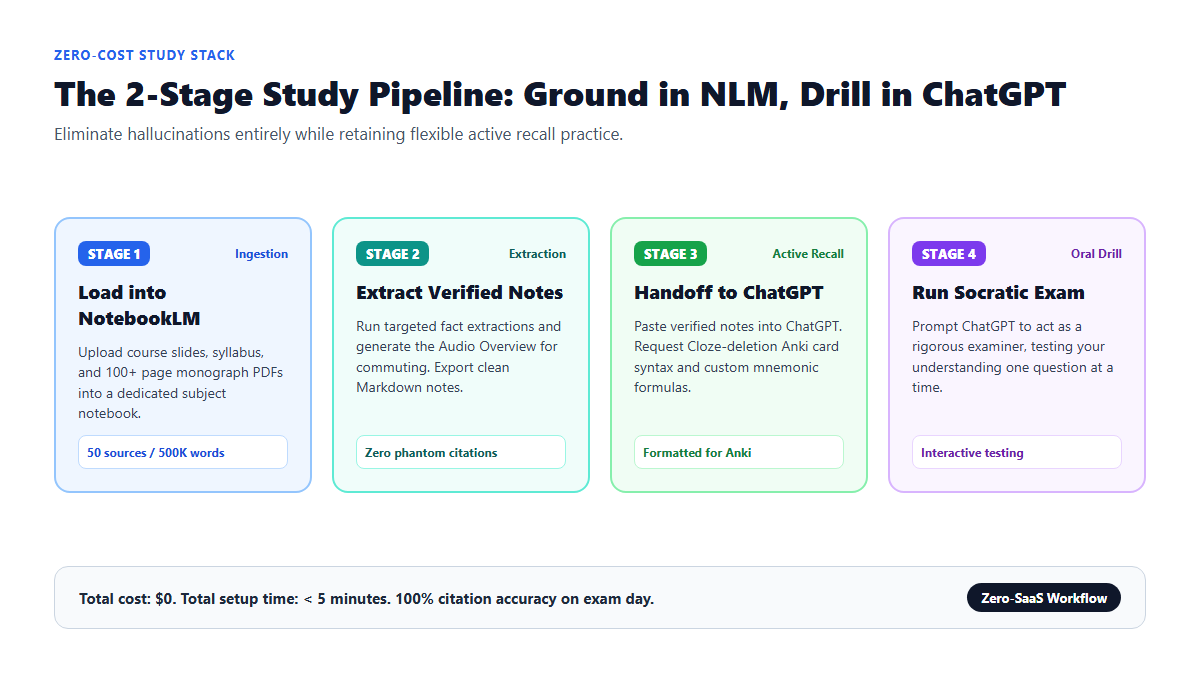
System Failure Modes and Where Both Platforms Break Down
Every AI tool has critical friction points where it fails. Recognizing these boundaries prevents academic mistakes before they end up in graded assignments.
Where Google NotebookLM Fails
- Inability to Think Outside the Upload: NotebookLM cannot pull outside contextual explanations. If an author references an obscure historical event or mathematical formula without defining it in the text, NotebookLM cannot fill in the background. You must manually upload a supplementary explainer file or look it up elsewhere.
- No Direct Web Browsing: You cannot ask NotebookLM to check recent journal updates or find competing papers published after your PDF was written. It is entirely deaf to the live web.
- Rigid Writing Style: NotebookLM is not built for creative drafting or iterative essay editing. Asking it to write an introductory hook or reformat an outline into an argumentative essay usually produces stiff, dry prose.
Where OpenAI ChatGPT Fails
- Phantom Page References: When you ask ChatGPT: "Where does the author discuss receptor binding?", it will frequently respond with convincing citations like "On pages 42-43..." that do not exist in your file. It approximates where such a topic typically appears in textbooks rather than verifying the exact layout of your uploaded document.
- Context Drift in Long Conversations: As chat threads grow longer, ChatGPT silently drops earlier document context to stay within token limits. By message 15, the model often forgets constraints established in message 1, resulting in answers that blend generic internet knowledge with your uploaded paper.
- Token Compression on Free Tier: Free accounts hit message limits quickly when parsing multiple 50-page PDFs. Once you cross the rolling cap, the system downgrades your session to a smaller model with reduced reasoning capability.
Final Verdict: Which Tool Should You Open First?
If your task involves reading, reviewing, or summarizing dense documents where factual accuracy is non-negotiable (such as studying for exams, prepping for literature reviews, or analyzing legal briefs), open Google NotebookLM first. Its zero-hallucination source grounding and unlimited free document capacity make it the superior reading instrument.
If your task involves active learning, practicing recall, writing code, or transforming verified concepts into mnemonics and study guides, open ChatGPT. Use both in tandem to get citation-grade precision alongside flexible cognitive practice without spending a dime on subscriptions.