Commercial AI platforms like ChatGPT Plus and Claude Pro charge $20 every single month ($240 per year) per person. When you run technical research, coding iterations, or document synthesis on those cloud platforms, you run into three concrete problems. First, you hit arbitrary rate caps during peak hours, often locking you out of the frontier model just when you are in the middle of a complex project. Second, every prompt, private code file, and uploaded PDF passes through remote servers where telemetry logs are stored and potentially used for downstream model retraining. Third, the moment your internet drops or the service experiences a global outage, your entire conversational workspace disappears.
You do not need to pay monthly recurring fees or route sensitive work through remote data centers. By pairing Open WebUI with local Ollama, you can run a full-featured, private conversational interface directly on your computer for $0. Open WebUI replicates the exact user experience of ChatGPT and Claude, including multi-model chat switching, local document uploads for Retrieval-Augmented Generation (RAG), web search grounding, voice input, and custom system prompt personas. Because the inference runs locally through Ollama, your prompts never leave your local drive, and you enjoy unlimited generation with zero subscription costs.
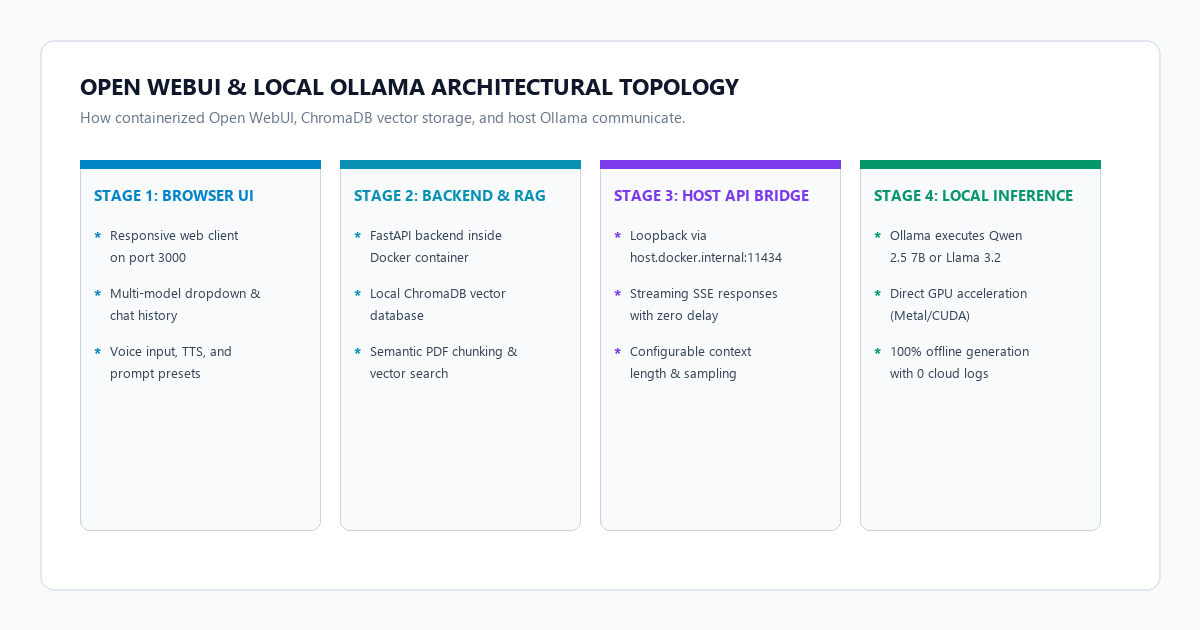
The 4-step private AI chatbot blueprint
You can deploy Open WebUI connected to Ollama on your machine in under ten minutes using Docker or a direct Python virtual environment.
- Step 1 (Start Ollama with local models): Install Ollama on your host machine. Download your daily driver models using
ollama pull llama3.2:3b(for lightweight laptops) orollama pull qwen2.5:7b(for deep coding and technical synthesis). Ollama exposes an HTTP endpoint on port 11434. - Step 2 (Deploy Open WebUI via Docker): Launch the Open WebUI container with host network access:
docker run -d -p 3000:8080 --add-host=host.docker.internal:host-gateway -v open-webui:/app/backend/data --name open-webui --restart always ghcr.io/open-webui/open-webui:main. - Step 3 (Connect the local Ollama API bridge): Open your browser to
http://localhost:3000. Create your local admin account. In Settings > Connections > Ollama API, verify the endpoint is set tohttp://host.docker.internal:11434. Open WebUI automatically detects and lists all installed Ollama models in its top dropdown menu. - Step 4 (Configure offline RAG and custom personas): In Admin Settings > Documents, select a local embedding model like
nomic-embed-textorbge-m3so uploaded PDFs are chunked and vectorized locally. Create custom system prompt personas with tailored instructions for rapid coding reviews or academic analysis.
Benchmark audit: ChatGPT Plus ($20/mo) vs. LM Studio vs. Open WebUI + Ollama ($0)
To measure whether a self-hosted stack can replace commercial subscriptions for daily work, we benchmarked three common setups across monthly subscription cost, offline availability, multi-user access, document RAG privacy, and resource efficiency.
| Evaluation Metric | OpenAI ChatGPT Plus ($20/mo) | LM Studio (Desktop Client) | Open WebUI + Ollama ($0 Stack) |
|---|---|---|---|
| Annual Subscription Cost | $240.00 / year per user | $0.00 (Free desktop software) | $0.00 Forever (100% Open-Source) |
| Cloud Data Logging | Prompts stored on OpenAI servers | Local inference on host GPU/CPU | 100% Local data residency (0 packets) |
| Offline Reliability | Impossible (Cloud outage lockout) | Fully offline on local machine | Fully offline on local machine |
| Document RAG Privacy | Uploads sent to OpenAI file storage | Rudimentary local retrieval | Native vector store with local embedding models |
| Multi-User / Network Access | Requires individual paid seats | Single-user desktop app only | Web interface accessible across local LAN / Tailscale |
| Hourly Message Throttling | 40 to 80 messages per 3 hours | None (Hardware constrained) | None (Unlimited local generation) |
| Model Selection Flexibility | Locked to OpenAI models | Any GGUF model file | Any Ollama model, HuggingFace GGUF, or API bridge |
| RAM / VRAM Overhead | Browser tab only (~150 MB) | Heavy electron app (~650 MB idle) | Lightweight Docker daemon (~250 MB idle) |
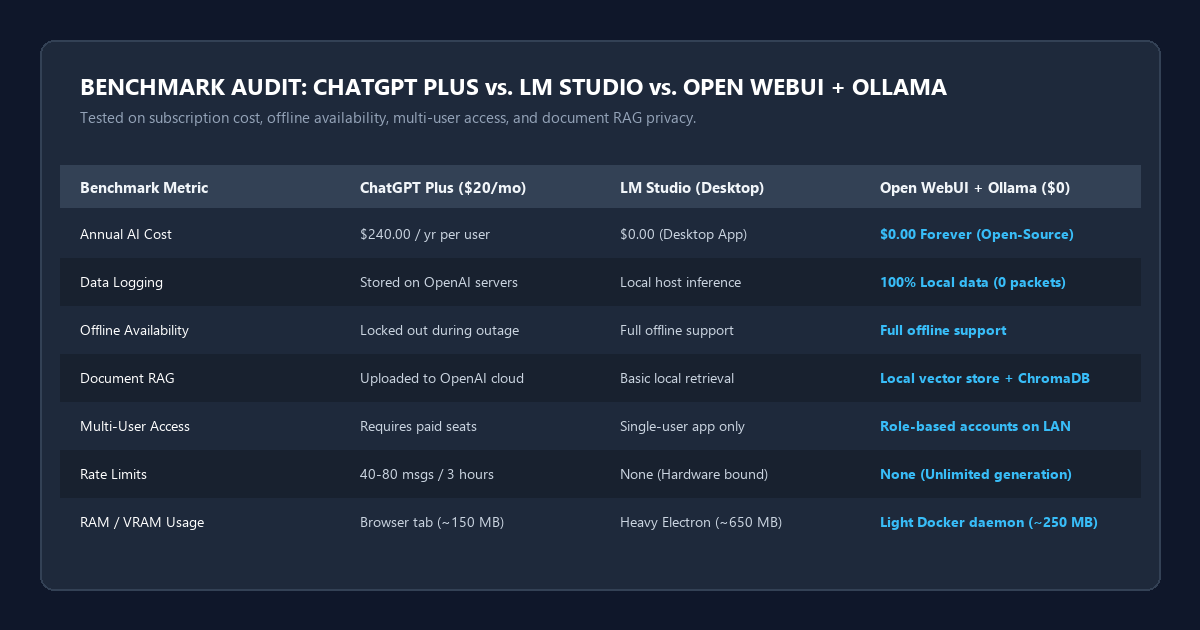
The audit reveals a clear dividing line. If your primary requirement is zero maintenance and you are comfortable paying $240 annually while transmitting project notes to remote servers, ChatGPT Plus remains convenient. However, if you handle proprietary client code, sensitive academic research, or internal financial data, Open WebUI combined with Ollama eliminates ongoing software fees while matching the visual layout and feature depth of commercial web interfaces.
Hardware requirements matrix and local model selection
Running local models requires matching model parameter size and quantization levels to your physical RAM and GPU VRAM capacity.
| Hardware Tier | Recommended Model | Quantization | RAM / VRAM Needed | Practical Use Case |
|---|---|---|---|---|
| Entry Level (8 GB RAM, Integrated GPU) | Llama 3.2 3B or Qwen 2.5 3B | Q4_K_M | 3.5 GB to 4.5 GB | Fast document summaries, email rewrites, quick drafting |
| Mid-Range (16 GB RAM or 8 GB VRAM) | Qwen 2.5 7B or Mistral 7B | Q4_K_M / Q5_K_M | 6.5 GB to 8.5 GB | Complex code debugging, structured JSON, academic reviews |
| Performance (32 GB RAM or 12 GB+ VRAM) | DeepSeek-R1 8B or Qwen 2.5 14B | Q4_K_M | 10.5 GB to 14 GB | Multi-step reasoning, dense document analysis, architectural design |
| Workstation (64 GB+ RAM or 24 GB VRAM) | Qwen 2.5 32B or Llama 3.3 70B | Q4_K_M | 22 GB to 42 GB | Production-grade reasoning comparable to GPT-4o and Claude Sonnet |
For most modern laptops equipped with Apple Silicon (M1/M2/M3/M4) or an Nvidia RTX graphics card, qwen2.5:7b provides the ideal equilibrium between generation speed (40 to 60 tokens per second) and instruction-following precision.
Step-by-step setup: Deploying Open WebUI and bridging the local Ollama API
Setting up Open WebUI with Ollama takes under five minutes. You can run Open WebUI either through Docker (recommended for clean updates) or directly via Python pip.
1. Install Ollama and pull your primary models
First, verify that Ollama is installed and functioning on your operating system. Open your terminal or PowerShell console and download your chosen models:
# Pull a fast 3B parameter model for quick queries
ollama pull llama3.2:3b

# Pull a powerful 7B parameter model for coding and deep writing
ollama pull qwen2.5:7b

# Pull an embedding model for offline document RAG
ollama pull nomic-embed-text
Verify that the Ollama daemon is running by visiting http://localhost:11434 in your browser. You should see the message: Ollama is running.
2. Launch Open WebUI with Docker
Run the official Open WebUI container. Notice the --add-host=host.docker.internal:host-gateway flag. This flag is critical because it allows the Docker container to communicate directly with the Ollama service running on your host machine:
docker run -d \
  -p 3000:8080 \
  --add-host=host.docker.internal:host-gateway \
  -v open-webui:/app/backend/data \
  --name open-webui \
  --restart always \
  ghcr.io/open-webui/open-webui:main
If you prefer to run Open WebUI without Docker, you can install it using Python in an isolated virtual environment:
# Create and activate a clean virtual environment
python -m venv openwebui-env
source openwebui-env/bin/activate  # On Windows: .\openwebui-env\Scripts\activate

# Install Open WebUI and launch
pip install open-webui
open-webui serve
3. Configure the initial admin profile and API connection
Open your browser and navigate to http://localhost:3000.
- On your first visit, Open WebUI prompts you to create an account. The first account created automatically receives administrative privileges. Because all account records remain in your local SQLite container volume, your credentials stay on your machine.
- Click the profile icon in the bottom left corner, select Admin Panel, and open the Settings tab.
- Click Connections.
- Under the Ollama API section, verify that the connection URL is configured as:
- For Docker on Windows or macOS:
http://host.docker.internal:11434 - For Docker on Linux:
http://172.17.0.1:11434or use--net=host - For direct Python installation:
http://127.0.0.1:11434
- For Docker on Windows or macOS:
- Click the circular refresh icon next to the URL input. Open WebUI tests the connection and displays a green confirmation status.
Now, return to the main chat screen. Click the model dropdown at the top of the interface. All the models you pulled in Ollama appear instantly.
Configuring offline document RAG and web search grounding
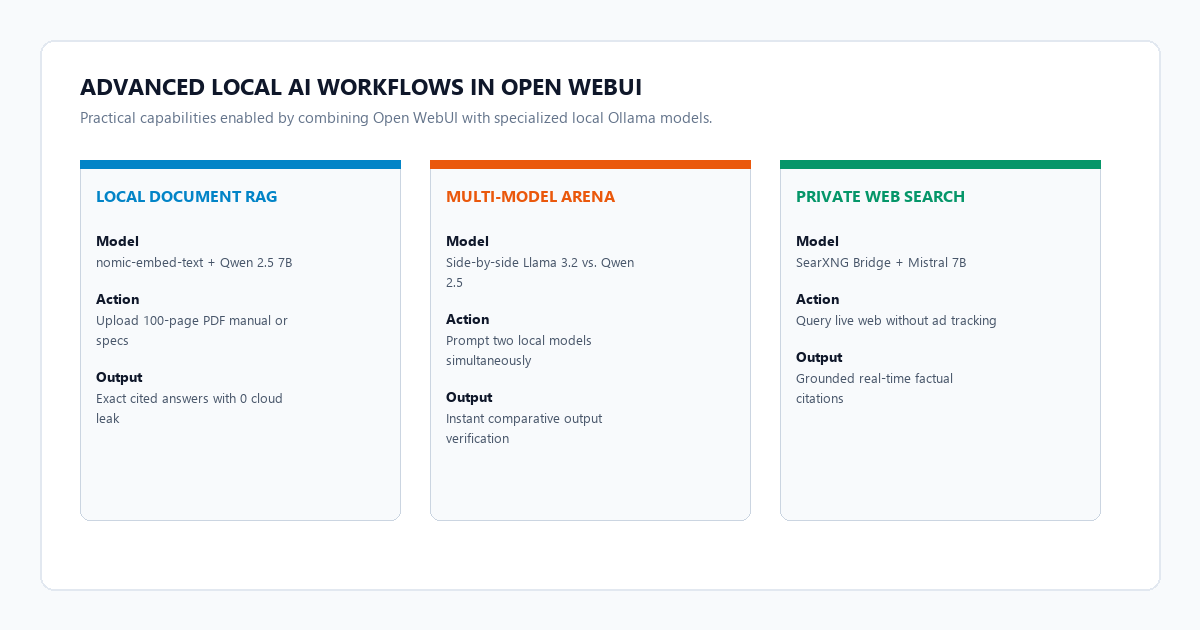
One of the standout reasons people pay for ChatGPT Plus is the ability to attach PDFs, spreadsheets, and Word documents to chat conversations. Open WebUI includes built-in Retrieval-Augmented Generation that runs completely offline on your own machine.
Enabling offline document embeddings
- In Open WebUI, navigate to Admin Panel > Settings > Documents.
- Under Embedding Model Engine, select
Ollama. - Set the embedding model name to
nomic-embed-text(which we pulled earlier). - Set the chunk size to
1000tokens with an overlap of100tokens. This preserves conceptual continuity across paragraph breaks. - Click Save.
Now, when you click the + icon in any chat window and upload a 50-page technical manual or meeting transcript, Open WebUI reads the file, splits it into semantic chunks, generates vector embeddings using nomic-embed-text locally, and stores them in ChromaDB inside your local data volume. When you ask a question about your document, Open WebUI performs a similarity search, retrieves the exact relevant excerpts, and passes them to your local LLM with citation references.
Optional: Connecting Free Private Web Search via SearXNG
If you want live search capabilities similar to Perplexity or ChatGPT Web Search without commercial tracking, you can link Open WebUI to a SearXNG instance. In Admin Panel > Settings > Web Search, enable the toggle, select SearXNG, and enter your instance URL (such as http://localhost:8080). Open WebUI will query search results in real time and ground responses with live citations.
4 high-utility system persona prompt templates
Open WebUI lets you create custom system personas with fixed temperature settings, system instructions, and knowledge bases. Here are four battle-tested templates you can copy directly into your persona manager.
Persona 1: Senior Code Architect & Refactoring Auditor
You are a Staff Systems Architect and Security Engineer. Analyze the provided code for runtime bottlenecks, memory leaks, security flaws, and architectural anti-patterns.

Rules:
1. Skip generic praise or conversational pleasantries.
2. Highlight problematic lines directly with concrete explanations.
3. Provide the corrected, production-ready implementation inside clean code blocks.
4. If testing logic is missing, provide targeted unit tests using the standard framework for the target language.
Persona 2: Academic Paper Deconstructer & Evidence Synthesizer
You are a rigorous Academic Peer Reviewer and Research Methodologist. Your objective is to extract verifiable claims from complex academic papers and technical whitepapers.

Rules:
1. Identify the core hypothesis, methodology, sample size, and primary findings.
2. List all experimental limitations, confounders, and unproven assumptions explicitly.
3. Contrast the author's conclusions with actual statistical data presented in the text.
4. Output your synthesis in a clean, high-density structured summary.
Persona 3: Executive Meeting Transcript to Action Matrix
You are an Operations Director. Take this raw, unstructured meeting transcript and convert it into an operational execution briefing.

Output format:
1. Executive Decision Summary: 3 bullet points summarizing what was agreed upon.
2. Action Item Matrix (Markdown Table): Columns for Task Description, Responsible Owner, Deadline, and Dependencies.
3. Unresolved Questions: Open discussion items that require executive clarification.
Persona 4: Zero-Fluff Technical Writing Editor
You are an uncompromising Editorial Director. Rewrite the provided text to maximize factual density and clarity while eliminating conversational filler and AI clichés.

Elimination checklist:
- Strip out all participial phrases ending in '-ing' used as rhetorical tags.
- Remove marketing buzzwords, empty adjectives, and false ranges.
- Use active voice and short, direct sentences.
- Maintain all underlying technical metrics, configuration flags, and source citations exactly.
Failure modes, memory bottlenecks, and token throttling mitigation
While running Open WebUI and Ollama locally provides unmatched privacy and zero recurring expenses, local inference operates under strict physical hardware constraints. Here is how to diagnose and bypass common bottlenecks.
Diagnosing Common Local Chatbot Bottlenecks
1. Docker Networking Connection Failure (Ollama API Unreachable): The most common friction point occurs when Open WebUI running inside Docker cannot reach Ollama on the host OS. On Windows and macOS, ensure you started the container with --add-host=host.docker.internal:host-gateway and set the connection URL to http://host.docker.internal:11434. If Ollama binds only to 127.0.0.1, set the system environment variable OLLAMA_HOST=0.0.0.0:11434 and restart Ollama.
2. VRAM Paging Overflow and Extreme Token Slowdown: If generation speed suddenly drops from 45 tokens per second to 2 tokens per second, your model parameter size has exceeded your graphics card's physical VRAM. The OS begins swapping memory pages into system RAM across the PCIe bus. Monitor memory usage with nvidia-smi or Activity Monitor, and avoid 14B models on 8 GB cards. Stick to qwen2.5:7b-instruct-q4_K_M or llama3.2:3b.
3. Context Window Truncation on Large Document Uploads: By default, Ollama configures an input context window of 2,048 tokens to conserve system memory. If you upload a long report, Ollama silently truncates the early sections. In Open WebUI, navigate to Workspace > Models, open Advanced Parameters, and increase num_ctx to 16384 or 32768. Ensure your computer has sufficient RAM to accommodate the larger KV cache.
Verification checklist for private local AI management
- Verify network isolation: Open your operating system task manager or network monitor while sending prompts in Open WebUI. Confirm that Ollama communicates strictly over loopback address
127.0.0.1and transmits 0 outbound packets to cloud servers. - Benchmark token generation speed: Check the generation metrics displayed at the bottom of Open WebUI responses. Aim for at least 30 tokens per second for comfortable conversational reading.
- Verify persistent volume mounts: Confirm that the Docker volume
open-webuiis actively mapped so that your chat histories, uploaded documents, and custom personas persist across container restarts. - Test offline functionality: Disconnect your computer from Wi-Fi and Ethernet. Open
http://localhost:3000, prompt your local model, and upload a test PDF to confirm full offline autonomy.
Frequently asked questions
Can I access Open WebUI from my phone or another laptop on my home network?
Yes. Because Open WebUI runs as a web server on port 3000, any device on the same local network can access it by navigating to your host computer's local IP address (for example, http://192.168.1.150:3000). If you want secure remote access when traveling without exposing open ports to the public internet, install Tailscale on your host machine and mobile devices. You can then access Open WebUI securely through your private Tailscale mesh network.
Does Open WebUI support external cloud models if I need GPT-4o or Claude 3.5 Sonnet?
Yes. Open WebUI provides a unified interface. In Admin Panel > Settings > Connections, you can add OpenAI, Anthropic, or OpenRouter API keys alongside your local Ollama connection. This allows you to use local models for confidential daily work and switch to frontier cloud models only when you need massive reasoning power, paying only pennies per million tokens rather than a flat $20 monthly subscription.
How do I update Open WebUI when new features are released?
If you deployed using Docker, updating takes three commands: docker pull ghcr.io/open-webui/open-webui:main, then docker stop open-webui && docker rm open-webui, followed by rerunning your initial docker run command. Your chats, uploaded documents, and settings are preserved in the persistent volume.
Can multiple people in my office use the same Open WebUI instance?
Yes. Open WebUI features full multi-user role-based access control. You can create user accounts for team members, assign admin or user roles, and even set per-user model permissions. Each user has their own private chat history and personal document store.